Storm-3168 used two compromised Azure application identities to turn cloud access into destruction. Microsoft’s September 25 investigation describes a June intrusion with hours of reconnaissance followed by a seven-minute destructive burst. Storage accounts disappeared; SQL deletion attempts failed because the attacker chose an unsupported API version. Some storage protections held. [1]
After deletion, the attacker collected keys
One identity conducted reconnaissance; the second added destruction and credential collection.
Roughly 30 minutes after destruction ended, the second identity successfully requested storage keys over 30 times, including for recovery-related storage. One surviving account alongside the deleted application resources also yielded keys. This establishes credential access, not confirmed data theft. [1]
Group-granted Storage Account Contributor enabled storage destruction. Direct Contributor covered the application deletions and that surviving account’s key retrieval; SQL DB Contributor authorized the failed database deletion attempts. The operations followed existing role assignments. [1]
The permission belonged to an application
A service principal is an application’s identity within an organization’s Microsoft Entra tenant. It lets software authenticate and use resources without pretending to be an employee. Deployment scripts and integrations need such access; their permissions therefore deserve the same scrutiny as a person’s privileged account. [2]
That distinction explains the risk: a legitimate automation credential can authorize an illegitimate operation. An administrator investigating cloud destruction needs to ask which application identity acted, which permissions it held, and which resources those permissions covered—not just which employee signed in.
Microsoft also found a secret still visible in a GitHub issue’s edit history, but could not establish the entry route. No ransom note or successful exfiltration was confirmed. [1]
Why a surviving resource is not a clean bill of health
The failed SQL requests are a useful investigative distinction: an unsuccessful destructive request still reveals intent. Treating every failed operation as harmless would hide the difference between a typo in ordinary maintenance and an attack that worked elsewhere.
Service availability also needs context. In the separate Kiteworks precautionary shutdown advisory, the vendor requested downtime without reporting a confirmed compromise. That is a different evidence state from the destructive operations documented here.
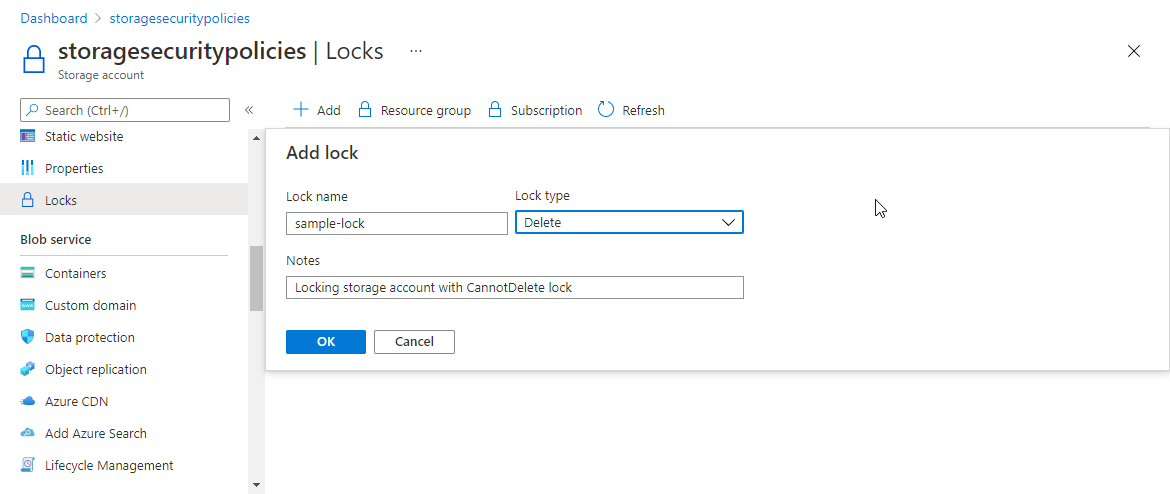
Azure’s CannotDelete lock can block deletion of a storage account while allowing configuration changes. It does not stop deletion or overwriting of the blobs and containers inside it. A ReadOnly lock also blocks the List Keys operation, but keys obtained earlier can remain usable. These controls protect different boundaries; “the account still exists” does not establish that its contents are safe. [3]
Deleting the disclosure does not revoke access
GitHub’s remediation guidance puts credential revocation at the center of a leak response. Removing a secret from a repository does not invalidate it. Identify its owner and dependent applications, replace or revoke it through its provider, and examine evidence of use. Coordinate replacement where immediate revocation could disrupt production. [4]
Then review the identity’s role and scope. Azure’s access-control guidance recommends granting only required operations on the narrowest appropriate resources. Broad subscription permissions turn one leaked credential into a much larger recovery problem. [5]
Our earlier investigation summary about stolen cloud keys explains a related persistence problem. The lesson here is concrete: preserve failed requests as evidence, revoke exposed credentials, and verify data protection separately from resource survival.
References
- Microsoft Security Research. Storm-3168 investigation. September 25, 2026.
- Microsoft Learn. What are workload identities? Accessed September 27, 2026.
- Microsoft Learn. Apply a resource lock to a storage account. Accessed September 27, 2026.
- GitHub Docs. Remediating a leaked secret. Accessed September 27, 2026.
- Microsoft Learn. Best practices for Azure RBAC. Accessed September 27, 2026.