A convincing AI client can hide the dangerous part of an npm package somewhere a developer may never look: the installation script. In research published on October 8, CloudSEK linked seven fake “NebulaAI” SDK packages across four publisher accounts to a Windows remote-access trojan. Its NEBULA investigation places the attack at installation time, before the developer imports the apparent library.
The campaign began in late September. CloudSEK identified api-nebula and llm-nebula among the packages still available when it published; our October 8 check of registry metadata also returned version 1.0.0 for both. Availability is not a safety verdict. Amazon Inspector’s OSV entry independently flags api-nebula 1.0.0 as malicious. [2] The report documents malicious delivery and a recovered implant, but does not identify a successfully compromised victim.
The believable SDK is the distraction
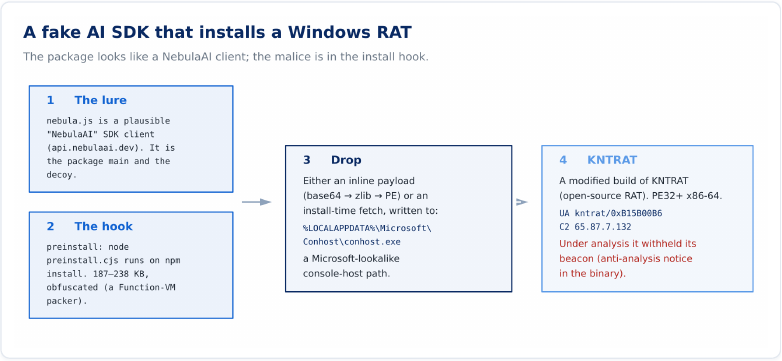
The package’s main entry points to nebula.js. CloudSEK found a plausible client class, streaming and session handling, and an AI model name. Someone reviewing only that module could see the sort of code they expected to install. The client’s default API domain did not resolve during the investigation, however.
The consequential line sits in package.json: a preinstall hook runs preinstall.cjs. The script is heavily obfuscated. Researchers recovered two delivery routes: one carries an encoded, compressed Windows executable inside the package; the other retrieves the payload during installation. Both write it to %LOCALAPPDATA%\Microsoft\Conhost\conhost.exe and launch it separately from the apparent client. [1]
That ordering explains the trap. Reviewing application imports after installation misses code the package manager has already been allowed to run. Install hooks also have legitimate uses; the revealing combination here is an opaque dropper, an executable written into a Microsoft-looking user-profile directory, and its detached launch.
Changing accounts did not change the underlying files
CloudSEK connected the packages using matching installation scripts and decoy code, rather than the “Nebula” name alone. Earlier packages had been removed or replaced with security placeholders. The operator then used further accounts. A seventh, unusually named test package appeared on October 2 and disappeared 41 minutes later; it changed the script’s packing while retaining the same decoy client.
These are seven recovered package names, not seven victims or a complete census of the operation. CloudSEK’s broader fingerprint sweep covered 162,464 retrievable npm archives from September 25–27 and found only known members. Seven archives were already unavailable, and the scan did not cover every day of the campaign. Unrelated legitimate packages containing “nebula” are not implicated by their names.
A quiet sandbox did not erase the recovered RAT
The decoded executable contained KNTRAT identifiers, the configured command host 65.87.7.132, and user-agent kntrat/0xB15B00B6. CloudSEK says the sample produced no beacon during more than twelve minutes in an isolated Windows lab with no route to the real command host. The address therefore comes from recovered code, not an observed connection in that test.
CloudSEK separately inspected KNTRAT source made public on October 6. It describes hidden-desktop remote control, a remote shell, camera and microphone access, and persistence through the per-user Winlogon Shell value. Those are source-confirmed capabilities, not proof that an operator watched a particular victim.
The report’s “no DLL” description concerns direct system calls and an empty import table. It does not mean Windows is uninvolved or that every security product is defeated. File creation, process launch, persistence changes and network behavior still matter when judging the chain.
Check the installation, not just the package name
- Before installing: block the exact reported packages and review dependency lifecycle scripts in a controlled environment. npm’s
ignore-scriptssetting can suppress package scripts during installation; it does not certify a package as safe, and explicitly requested script commands still need review. Some legitimate dependencies need approved build steps. [3] - If installation already ran on Windows: preserve the package/version and installation evidence, isolate a suspected host, and check the reported AppData drop path. A process named
conhost.exealone is not a verdict; its location and execution chain matter. Our Console Window Host guide explains that distinction. - For an exposed developer machine: involve incident response and review credentials accessible to that host. Replace affected secrets from a clean device after containment; deleting the dependency alone does not revoke stolen credentials or remove separately installed persistence.
Removing a visible payload may leave a loader or startup change behind. If one of these packages ran on your Windows machine, download Gridinsoft Anti-Malware, update its database, run a Full Scan, review and remove detections, then restart. A scan can help find malware and persistence; it cannot recover exposed secrets or prove no compromise occurred.
If the process path is wrong, the name imitates a Windows component, or high CPU started after an unknown installer, scan for hidden miners, services, startup entries, and bundled components.
Check this Windows machineThe useful distinction is when code executes. In the earlier RedC2 npm case, import triggered the malicious path on Linux. NEBULA puts the Windows payload in an installation hook. A normal-looking library entry point does not settle either question.
References
- CloudSEK Global Threat Intelligence. NEBULA: Seven Fake AI SDK Packages on npm Install a Windows RAT That Needs No DLL. Published October 8, 2026; accessed October 8, 2026.
- Amazon Inspector, via OSV. MAL-2026-17531: Malicious code in api-nebula. Published October 5, 2026; accessed October 8, 2026.
- npm documentation. Configuration: ignore-scripts. Living documentation; accessed October 8, 2026.