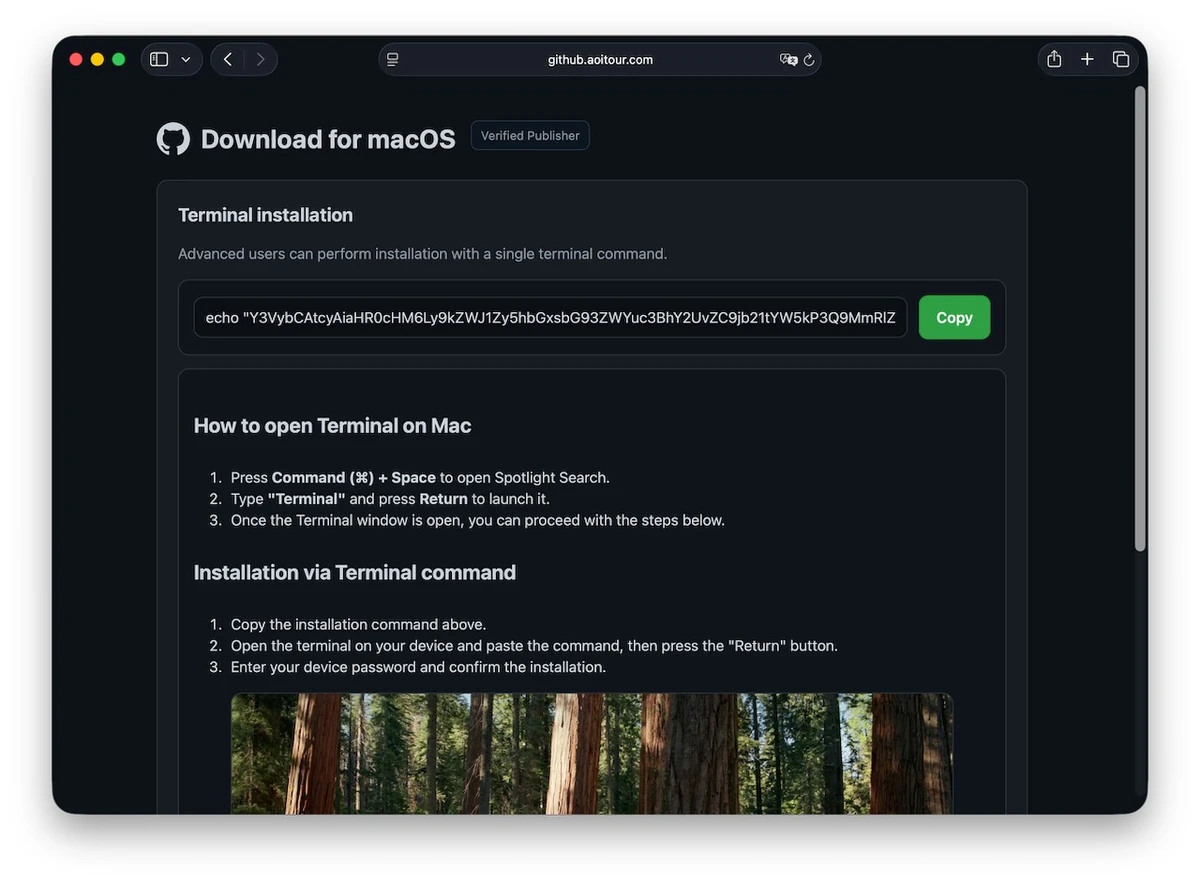
Jamf Threat Labs has documented AmnesiaStealer, a multi-stage macOS infostealer that can move beyond password and cookie theft into hidden control of a victim’s live Chromium browser. The observed campaign starts on github.aoitour[.]com, a counterfeit GitHub-themed page with a “Download for macOS” button and a copied Terminal command.
The key exposure boundary is execution. Merely seeing the page or copying its command does not run the observed chain. Pasting and running it can download the first stage; entering the Mac login password into the later native-looking prompt raises the risk further. Jamf published the analysis on August 13, 2026.
Who is at risk
| What happened | What it means |
|---|---|
| You only viewed the page | No code execution was observed from page viewing alone. Close it and do not use its command. |
| You copied but did not run the command | The observed loader did not execute. Delete the copied text and review how you reached the page. |
| You pasted and ran the command | Treat the Mac as compromised even if you did not enter a password; the command can retrieve and launch the next stage. |
| You entered the Mac password or granted broader access | Assume keychain, browser, Notes, document, Telegram, and persistence exposure until proven otherwise. |
| You kept using Chromium browsers afterward | Active sessions, future cookies, and a hidden live browser-control module may be at risk. |
How AmnesiaStealer takes control
The copied shell command retrieves a first-stage script. Jamf says the following Rust collector targets the macOS keychain, Apple Notes, documents, Telegram data, and 16 Chromium-family browsers, including Chrome, Brave, Arc, and Edge. It can display a native-looking password prompt and install a LaunchDaemon for persistence.
A separate component named stream_module responds to the operator command remote_stream. It uses the Chromium DevTools Protocol to mirror browser tabs, stream the screen at roughly three frames per second, send mouse and keyboard input, navigate, open tabs, and export cookies. This means the operator may act inside a session the victim already authenticated, without showing an ordinary remote-desktop window.
If browser Safe Storage key recovery fails, the malware can overwrite that key with one known to the operator. Jamf describes this as a destructive fallback: previously saved passwords and cookies can become unrecoverable, while data the browser stores afterward may be decryptable by the attacker. It is a conditional behavior, not proof that every infected Mac suffered the overwrite.
What macOS protections did and did not stop
Jamf observed the malware trying an older Transparency, Consent, and Control bypass on macOS 26. That bypass failed in the researchers’ tests. The failure matters, but it is not an all-clear: keychain collection, the deceptive password prompt, browser data access, and other parts of the chain still worked.
Do not interpret a missing Full Disk Access grant as proof the system is clean. The practical question is whether the ClickFix command ran and what credentials or sessions were used afterward.
What to do now
- Disconnect the Mac from the network and stop using browsers on it. Do not sign in again while investigating.
- From a separate clean device, revoke active sessions for email, password managers, financial services, crypto accounts, developer platforms, and social networks. Then change passwords. A password change alone does not always invalidate an already-issued session.
- Secure the Apple Account, review trusted devices and recovery information, and change the Mac login password after containment. Follow Apple’s compromised-account steps if anything is unfamiliar.
- Review Login Items and background activity, collect the artifacts below, and scan with a reputable macOS security product. Preserve timestamps and hashes if the Mac belongs to an organization.
- Consider a clean macOS reinstall when the LaunchDaemon or live browser module is confirmed. Do not restore unknown scripts or the entire old browser profile; rebuild extensions and sessions deliberately.
For a broader Mac ClickFix recovery flow, see the ClickLock Mac cleanup guide; it covers a different family but the same dangerous copy-and-run decision. After containment, use the account recovery checklist to prioritize sessions and identities. If the Mac was reachable through Apple Screen Sharing instead of ClickFix, follow the CVE-2026-65400 exposure and incident-response steps; installing the update does not remove persistence from a prior root compromise.
Artifacts worth checking
| Artifact | Observed value |
|---|---|
| Delivery page | github.aoitour[.]com |
| Collector SHA-256 | de5748aac4a4d4cb48cf050652679e6bc49eda33d9ffaa0d280b578122fab55a |
| Browser module SHA-256 | e853748ca8f9a5a9168263617409a9039ab09f4ffc7d860374c1e3b0b67b31a5 |
| Residue | ~/.pwd and ~/.local/share/.stream/ |
| Persistence | /Library/LaunchDaemons/com.apple.ReportCrash.agent_{digits}.plist |
References
- Jamf Threat Labs. “AmnesiaStealer: Multi-stage macOS infostealer with live browser control,” published August 13, 2026; accessed August 14, 2026. primary technical analysis.
- Apple Support. “If you think your Apple Account has been compromised,” accessed August 14, 2026. official account-recovery guidance.