An IP stresser is a legitimate load-testing tool only when it sends traffic to systems you own or are explicitly allowed to test. A DDoS booter is the abusive version: a for-hire service that points traffic at someone else’s game server, website, router, or account to knock it offline. If you are dealing with threats, outages, or a suspicious stresser site, do not retaliate or test it back. Collect evidence, contact your ISP or hosting provider, and check any downloaded files or browser changes before you keep using the device.
What is an IP stresser?
An IP stresser is a traffic-generation tool used to measure how a network, server, or application behaves under load. In a legitimate test, the owner sets the target, scope, time window, traffic limits, and rollback plan before the test starts. The goal is resilience testing, not disruption.
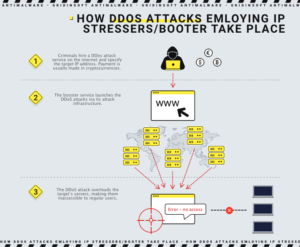
The same wording is often abused by DDoS-for-hire sites. A service that lets a customer enter someone else’s IP address, game server, Discord rival, business site, or home router is not a normal stress test. It is an attempt to cause a denial of service.
IP stresser vs DDoS booter
| Situation | What it means |
|---|---|
| You test your own server or a client system with written approval. | This can be legitimate load testing when the scope, timing, and traffic limits are documented. |
| A site asks for any IP address and promises to take it offline. | Treat it as a DDoS booter or stresser abuse service. Do not use it. |
| Someone threatens to boot your home internet, game server, or small site. | Save the messages, timestamps, target IP or domain, and outage times. Contact your ISP, hosting provider, platform, or game service. |
| A stresser page asks you to install an app, extension, VPN profile, or script. | Assume account theft, malware, or browser hijacking is possible. Remove it and scan the device before logging in again. |
Free IP stresser and booter trial red flags
Many current search results for IP stresser, free stresser, or booter trial mix legitimate load-testing language with abuse-service marketing. Treat “no logs,” crypto-only payment, “take any website offline,” “Layer 4/Layer 7 methods,” or “test any IP” claims as warning signs, not proof that the service is safe. A legitimate load test should require authorization, target ownership, scope limits, contact details, and a stop condition before any traffic starts.
| Claim on the site | Safer interpretation |
| “Free IP stresser” or “booter trial” with any target field. | Do not test it against third-party systems. If it accepts someone else’s IP, it can cross into DDoS-for-hire abuse. |
| “No logs,” crypto payment, or anonymous dashboard. | This does not protect users from legal exposure, scams, malware downloads, or payment theft. |
| Requires a client, extension, VPN profile, or script. | Treat the download as suspicious until scanned and removed; it may be unrelated malware or account-theft tooling. |
Why DDoS booters are risky even for the buyer
Booter services are marketed as simple tools, but they create legal, financial, and security risk for the person using them. Law-enforcement operations repeatedly target DDoS-for-hire infrastructure, and payment records, account emails, chat logs, and service dashboards can become evidence. Even when a site looks polished, it may also be a scam that steals payment data, pushes fake VPNs or cracked tools, or redirects users into malware downloads.
If you paid a booter or entered credentials on one, change the password for that account and any reused password. Review payment-card or wallet activity, enable two-factor authentication where possible, and be careful with follow-up messages offering refunds, “private stressers,” or support tools. For cryptocurrency-payment traps and fake support flows, see Gridinsoft’s guide to cryptocurrency scams.
What to do if you are being DDoSed
- Record the timeline. Note the start time, end time, affected service, error messages, packet-loss symptoms, and any threats received before the outage.
- Contact the right provider. Home users should contact the ISP or game/platform support. Website owners should contact the hosting provider, CDN, DNS provider, or DDoS mitigation vendor.
- Do not engage the attacker. Do not pay, threaten back, or test a booter yourself. That can escalate the incident and create more evidence against you instead of helping recovery.
- Rotate exposed IPs only through the provider. Rebooting a router sometimes changes a home IP address, but persistent attacks require ISP help. Website operators should avoid exposing the origin IP behind a CDN or WAF.
- Check for account or malware overlap. If the outage followed a download, cracked tool, fake panel, or stolen account threat, scan the device and review account sessions. Some attacks are paired with phishing or malware to keep pressure on the victim.
If a suspicious stresser, game cheat, or “network tool” was downloaded before the incident, run a full security scan. Gridinsoft Anti-Malware can check for hidden files, startup entries, scheduled tasks, bundled apps, browser changes, and other persistence that a simple uninstall may miss.
How booters differ from botnets and amplification attacks
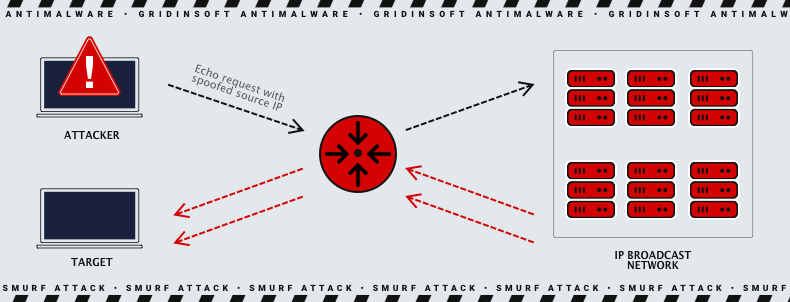
A booter is the paid service or dashboard sold to the customer. A botnet is one possible source of the attack traffic: infected computers, servers, routers, cameras, or other devices controlled without their owners’ knowledge. Many DDoS attacks also abuse reflection and amplification, where traffic is bounced through third-party services so the victim receives a larger flood than the attacker sent directly.
The Lucide Proxy campaign showed another source of attack traffic: ordinary browser tabs visiting a malicious student proxy could be turned into DDoS nodes.
IP spoofing is often part of reflection attacks because the request is forged to look as if it came from the victim. The third-party service then sends the response to the victim instead of the attacker. This is one reason DDoS response is usually a provider-level problem, not something a single desktop firewall can solve.
Safe load testing rules
- Test only assets you own or are contracted to test.
- Get written permission, a target list, and a time window before traffic starts.
- Warn the ISP, hosting provider, CDN, or security team when the test may look like an attack.
- Use reputable load-testing platforms that provide scope controls, audit records, and support contacts.
- Stop immediately if traffic affects unrelated systems, shared infrastructure, or real users outside the test.
For websites and APIs, the larger defense plan belongs in a DDoS prevention checklist: CDN or DDoS-aware hosting, origin protection, WAF rules, caching, rate limits, monitoring, and an incident runbook. Gridinsoft covers those operator controls in How to Prevent DDoS Attacks.
FAQ
Are IP stressers illegal?
An IP stresser is not automatically illegal, but using one against a system you do not own or are not authorized to test can be illegal. The safe distinction is permission: your own network or a contracted test is different from pointing traffic at someone else’s IP address.
Is a free IP stresser safe to try?
Assume it is unsafe unless you can prove authorization, scope controls, provider identity, and a legitimate testing purpose. A free trial that accepts any IP address, hides behind anonymous payment, or asks you to install a client is a red flag.
Can a booter attack infect my computer?
The traffic flood itself usually targets availability, not files on your PC. The surrounding scam can still infect you if you install a fake stresser client, crack, extension, VPN profile, or support tool. If that happened, remove it, change passwords from a clean session, and scan the device.
Should I pay a ransom to stop a DDoS attack?
No. Payment can invite repeated demands and does not guarantee the attack will stop. Preserve the messages and payment demands, then work with your ISP, host, platform, or law enforcement contact.
References
- U.S. Department of Justice. “U.S. Authorities Conduct Cyber Operations as Part of Global Crackdown on DDoS-for-Hire Services.” U.S. Attorney’s Office, District of Alaska, accessed June 29, 2026. https://www.justice.gov/usao-ak/pr/us-authorities-conduct-cyber-operations-part-global-crackdown-ddos-hire-services
- Cybersecurity and Infrastructure Security Agency. “Understanding and Responding to Distributed Denial-of-Service Attacks.” CISA, March 2024, accessed June 29, 2026. https://www.cisa.gov/sites/default/files/2024-03/understanding-and-responding-to-distributed-denial-of-service-attacks_508c.pdf
- Canadian Centre for Cyber Security. “Defending against distributed denial of service (DDoS) attacks.” Government of Canada, accessed June 29, 2026. https://www.cyber.gc.ca/en/guidance/defending-against-distributed-denial-service-ddos-attacks-itsm80110