
Cineby is not a name you can treat as a blanket safety guarantee. A streaming page, the site opened by its Play button, and an app with the same name may be different things. A pop-up alone does not establish that your device has malware. What matters now is whether you only visited, allowed notifications, downloaded something, installed it, or entered a password or card details. Close unwanted pages, leave unexpected downloads unopened, and use the matching recovery steps below. If you shared account or payment information, start protecting it from a clean device immediately; do not wait for a malware scan.
What the Cineby evidence actually shows
There is a useful distinction between a reported nuisance and a verified infection. A June 8, 2025 report in the uBlock Origin filter project described clicks on cineby.app opening an advertising tab on another domain. The issue was closed the next day with an unable to reproduce label. It documents one reported browsing experience, not a confirmed malware test or a promise that the behavior still occurs for every visitor.
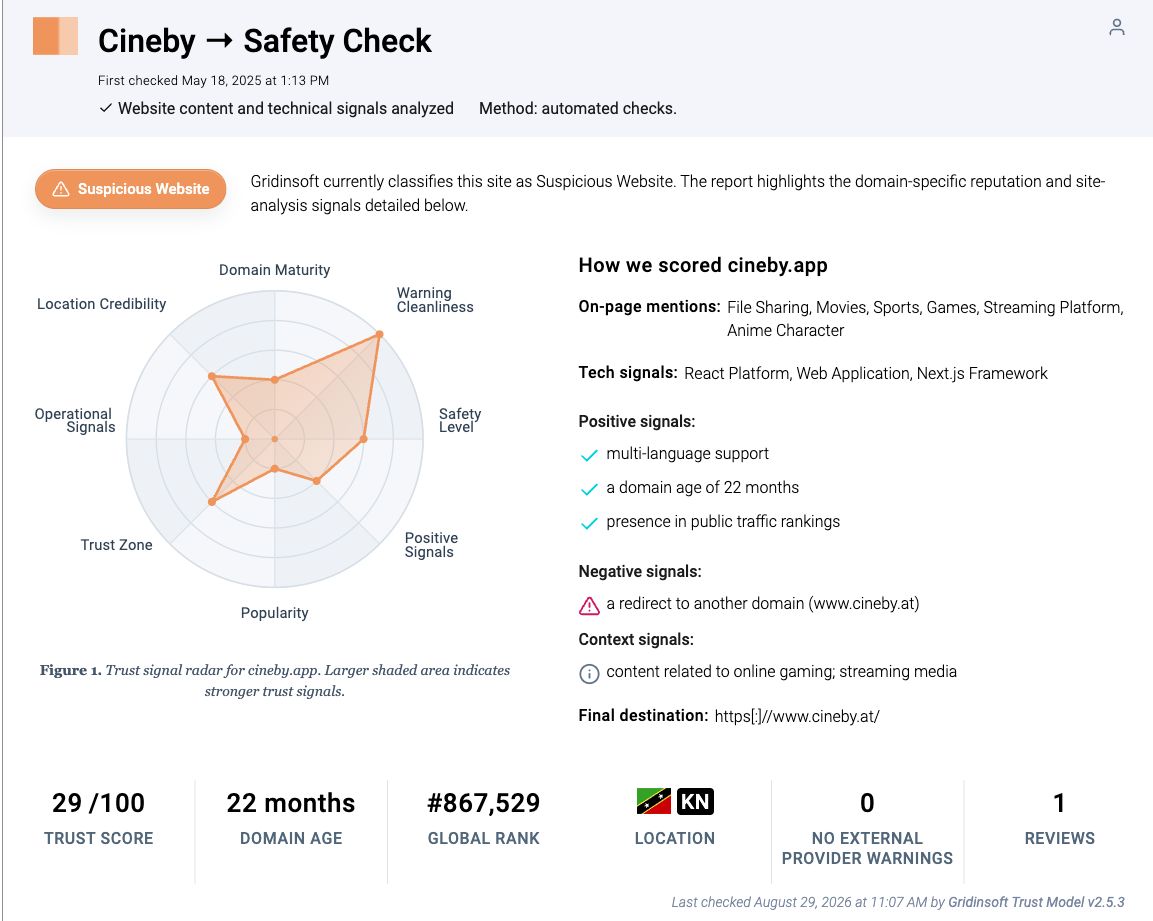
When we reviewed the Cineby.app domain report on October 26, 2026, its report card showed 29/100 and “Suspicious Website,” with a scan date of August 29, 2026. The card recorded a redirect to www.cineby.at and no external-provider warnings. That is a dated assessment of one host. It does not authenticate another Cineby-named domain, identify the operator of an app, or tell you whether a downloaded file ran on your computer.
Use those findings to ask a more precise question: which address or file did I actually interact with? This guide does not identify an official current Cineby domain or recommend a replacement mirror. A familiar name, a working movie player, and an encrypted connection are not interchangeable with a verified publisher.
Choose the step that matches what happened
- A page or extra tab opened; you approved nothing. Close it, check the browser’s downloads list, and keep the browser updated. A visit alone is not a reason to assume infection.
- You allowed notifications and now receive alerts. Block the sending site’s notification permission. The sender may be a redirect domain rather than the original Cineby address.
- A file downloaded, but you did not open or install it. Keep it closed; delete the unwanted file or leave it quarantined. Do not run it to find out what it does.
- You ran a Windows player, codec, script, or command, or redirects keep returning. Stop using the suspect installer and follow the Windows scan path. Check accounts separately if credentials or sessions may have been exposed.
- You installed an Android APK or unfamiliar app. Review that app and its granted access, scan with Trojan Scanner, and remove unwanted findings through Android.
- You entered a password, approved a login, or provided a card. Use a clean device to secure the account or contact the card issuer now. Closing the tab or scanning the device cannot undo disclosure.
Check the domain, player, and app separately
Record the hostname from browser history or the address bar without revisiting a suspicious page. If pressing Play opened a new tab, note that tab’s hostname too. For a security warning, record the blocked URL and the warning text. A warning about an advertising destination does not automatically describe the page you started on.
For a downloaded “Cineby app,” identify the actual item:
- Browser shortcut or installed web app: check which website it opens. An app-like window does not by itself mean an Android APK or Windows program was installed.
- Store listing: check the developer, description, linked website, and app identifier. A similarly named catalogue or trailer app does not authenticate a separate streaming site.
- Downloaded APK or installer: retain the filename and source address if you need to investigate. A logo or filename is easy to copy; judge the package and publisher, not just its label.
- Payment page: check the merchant and transaction details independently. The name above a movie player does not identify who receives a payment on another domain.
Do not install a codec, browser extension, or “verification” app just because a player asks for it. If a page asks you to paste a command into Windows Run or a terminal, stop. A movie does not need that kind of verification. The broader free movie streaming scam guide explains these handoffs between the player, adverts, downloads, and payment prompts.
Stop pop-ups and notification spam
A pop-up is a page or window. A website notification uses permission you previously granted and can arrive after you have left the page. Treat them differently: closing a tab stops that page, but does not revoke notification permission.
- Close the unwanted tab using the browser controls. Do not click a page’s fake “Close,” “Scan,” or “Call support” button. If the browser must be closed, reopen it without restoring the unwanted tabs.
- In desktop Chrome, open Settings → Privacy and security → Site settings → Notifications. Find the unwanted sender and change its permission to blocked. Also review Pop-ups and redirects for exceptions you did not intend to allow.
- On other browsers or phones, open the corresponding site-permissions settings. Match the hostname shown on the alert, including an unfamiliar redirect site. Our browser notification guide covers the separate controls.
- If unwanted tabs or settings return on unrelated websites, review recently added extensions. Remove an extension you installed for the stream. Persistent activity after that belongs in the device-cleanup branch below.
If alerts stop after you block the permission and there are no unexpected downloads, installed apps, or continuing symptoms, do not escalate a notification subscription into a diagnosis of a trojan. Conversely, blocking notifications will not remove a program you already installed.
If you downloaded a file but did not open it
Open the browser’s downloads list to identify the item; do not double-click the file itself. Delete an unwanted player, codec, APK, archive, or script, and keep anything your security tool quarantined in quarantine. Do not restore it just to make the stream work.
A download and execution are different events. If you are uncertain whether a file launched, or the device began behaving differently afterward, use the cleanup branch. For the narrower case, see what to do with a suspicious file you did not open. If an EXE claims to be legitimate software you actually need, obtain it from its verified publisher and check the file and its signature before running it.
If a Windows download ran or redirects keep returning
Close the suspicious page and stop using its installer. If you entered credentials or approved access, begin the account steps in the next section on a clean device at the same time. Removing the visible download may leave bundled software, a browser extension, a startup entry, or another persistence mechanism behind; recurring redirects and security warnings are reasons to check the computer more broadly.
- Download and install Gridinsoft Anti-Malware from Gridinsoft’s own site.
- Update its threat database, then run a Full Scan.
- Review the findings and apply cleanup to detected threats and unwanted components. Keep suspicious files quarantined rather than adding exclusions to make them run.
- Restart Windows and check whether the original redirects, unwanted apps, or warnings return.
If a player or installer ran, or browser changes return after you remove them, check the PC for unwanted software and persistence beyond the original tab.
Scan this Windows PCIf the same symptom returns, record its exact URL, file path, or extension name and the detection result. Targeted extension or startup troubleshooting can then focus on what returned. If security software cannot run, seek help with Safe Mode or offline recovery, then return to a scan when access is restored. A scan can detect unwanted software; it cannot recover a stolen password or establish that no information was exposed.
If you entered a password or card details
Act from a clean device immediately, independently of the scan. Open the affected service through its known app or a saved, verified address. Change an exposed password, change it anywhere else you reused it, sign out unfamiliar sessions, and review recovery email addresses, phone numbers, connected apps, and multifactor authentication settings. If access has been lost, use that service’s official account-recovery process.
For card details or an unfamiliar charge, contact the issuer using the number on your card or its official app. Explain what you entered and ask how to protect the card and handle unauthorized transactions. Save the merchant name, charge description, receipts, and the addresses involved. Do not return to a suspicious “cancel subscription” page to give it more information. No malware-removal tool can cancel a payment or revoke an account session for you.
If you installed a Cineby-named APK on Android
Check Settings → Apps for the app you installed, including its installation source and permissions. If you only added a browser shortcut, remove the shortcut or web app and review the originating site’s permissions instead; do not assume it is the same thing as a sideloaded APK.
For an unfamiliar installed APK, use Gridinsoft Trojan Scanner on Google Play to scan the phone’s apps, review detections, and confirm removal of unwanted apps through Android. Also revoke powerful access you granted to the suspect app, such as Accessibility, device administration, or notification access. Menu names vary by phone. Do not disable protections to reinstall a blocked player.
If the app prevents removal, use your phone manufacturer’s Safe Mode or removal instructions, or ask for support. Account recovery still starts separately on a clean device. A Windows scanner is not the cleanup tool for an Android phone.
FAQ
Does a VPN make Cineby safe?
A VPN does not verify an app’s publisher, remove a notification permission, or make a downloaded installer trustworthy. It also cannot recover information you typed into a deceptive page. Choose the recovery step based on the action you took.
Should I bypass a browser warning if other people say the site works?
No. Keep the warning in place and check the exact blocked address. Another visitor may have used a different host, player, or app. A working stream is not a safety test.
Is deleting my browser history enough?
No. History is a record of visits. Deleting it does not necessarily revoke website permissions, remove extensions or installed apps, or sign out an attacker who obtained access to an account.
References
- uBlock Origin contributors. “cineby.app: popups,” issue #28751. GitHub, opened June 8, 2025; closed June 9, 2025; accessed October 26, 2026. Original report and resolution.
- Google. “Use notifications to get alerts.” Google Chrome Help, accessed October 26, 2026. Notification and pop-up permission controls.