
AleaClient.exe is the client module of Alea, the anti-cheat software used by Retrac. If Retrac says “failed to start Alea client,” open Windows Security → Protection history and look for an entry naming that file at the time of the error. If your antivirus quarantined it, leave it there while you check which copy it blocked. A launch error alone gives you no detection name, file path or verdict.
Two public records help explain the confusion. One shows a Gridinsoft detection on a signed file seen in October. In November, the Alea team asked a different vendor to review a file identified by SHA-256. Here’s how to tell which evidence applies to the file on your PC.
Did antivirus actually block the game?
Expand the relevant Protection history card. You may need administrator access to see the details. Record the action, time, detection name and full path under Affected items. If another antivirus handles protection on your PC, check its quarantine or event history as well.
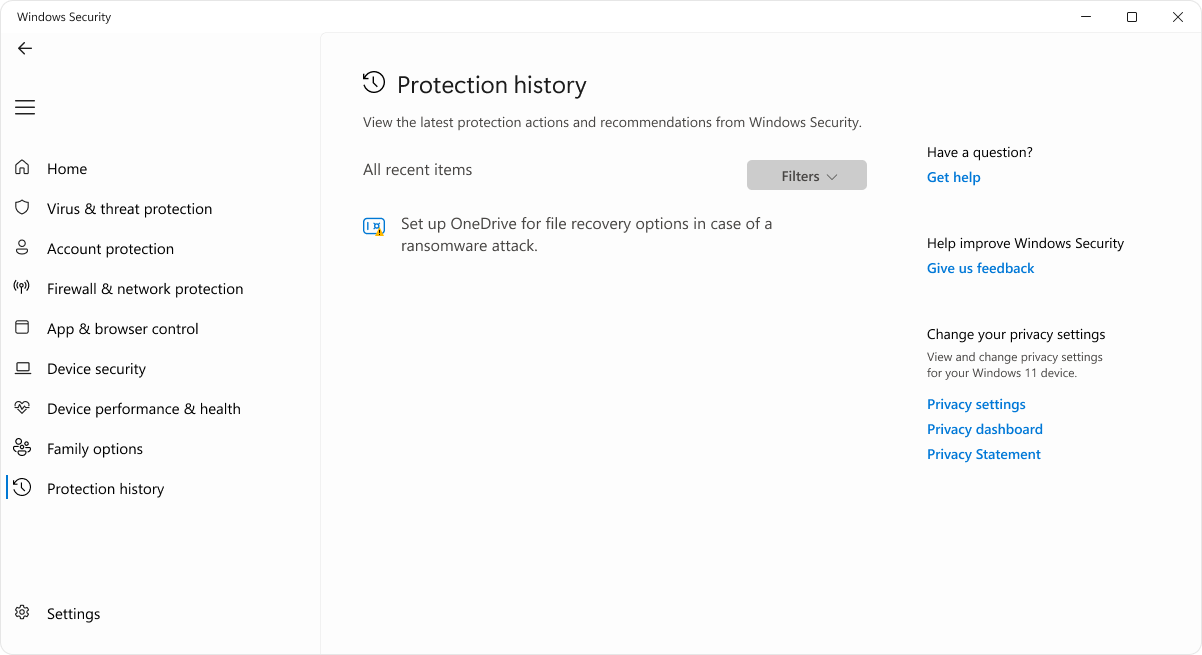
- The time and file match, and the card says quarantined. Keep the file isolated and give Retrac support the launcher version, detection name and timestamp. If they confirm an updated build, get it through the project’s usual distribution channel with protection enabled. Avoid replacement executables shared in comments or chat.
- The launcher failed but there is no matching entry. Microsoft keeps Protection history entries for two weeks. For a recent error, check the other security tool you use, then send the exact error and launcher version to Retrac support. Changing security settings on the strength of a launch error can leave your PC exposed without fixing the game.
- The alert points to another item. Read the entire path. A ZIP in Downloads, a partially downloaded file and an installed client are different items. If the detection specifically says Kepavll, see how to interpret the Kepavll Protection History card. Keep the filename and the detection label together when asking for help.
What the two public file reports actually show
October 15, 2026 · Gridinsoft ThreatInfo. The AleaClient.exe sample record lists MD5 5f634f6982610ec85174b2e427421a43, a valid Lezah Limited signature and the detection Trojan.Packed. A valid signature identifies a publisher and helps check file integrity. It can coexist with a security alert, as this record shows.
November 17, 2026 · Alea developer submission. Lezah Limited asked Palo Alto Networks to review a Generic.ml detection for its client. The team identified that client by SHA-256, said it signed the file, and suggested that software protection used by its anti-cheat could explain the alert. The thread contained no vendor reply at the time of review. It also lists a separate game loader with its own hash. Use the digest labeled AleaClient.exe for the client.
The October record gives MD5 and the November submission gives SHA-256. Those are different calculations. The published identifiers alone cannot establish whether the two records describe identical bytes. Neither report settles what Microsoft Defender detected on your PC.
How to compare your file without opening it
If the file is already quarantined, leave it there. The alert details are enough to start a support request. If you already have an accessible copy, use these read-only checks without launching it:
- Check how you obtained it. An expected Retrac update and a standalone “fix” sent by a stranger have different origins even if the files share a name. In File Explorer, use Properties → Digital Signatures → Details to check the signer and Windows’ signature status, when a signature is present.
- Open PowerShell in the folder containing the file. Run
Get-FileHash -LiteralPath '.\AleaClient.exe' -Algorithm SHA256. Compare the entire Hash value with the client entry in the developer submission. For the October record, repeat the command withMD5to compare like with like. - A different SHA-256 means a different file from the submitted client, which can also happen after a normal update. A match connects your file to that specific report. In either case, keep protection enabled while the publisher or antivirus vendor reviews the alert.
If an unexpected copy already ran
If you launched a replacement client from a chat attachment or unofficial mirror, close it, disconnect the PC from the network and run a full scan. Quarantining a later download cannot undo an earlier execution. If alerts return, record whether the same launcher recreates the file during an update or whether a different path appears after restart.
Run Gridinsoft Anti-Malware to check for additional files and startup entries if the copy ran or keeps returning. If you see unfamiliar account sessions or messages sent in your name, use a clean device to revoke sessions and change affected passwords. The recovery guide for a suspicious game or mod download walks through that account and device cleanup.
References
- Alea Anti-Cheat Team, Lezah Limited. False Positive – Generic.ml – Alea Anti-Cheat (Lezah Limited). Palo Alto Networks LIVEcommunity, November 17, 2026.
- Microsoft. Protection History in the Windows Security App. Microsoft Support. Accessed November 24, 2026.