
Malicious replies in Steam discussion forums are posing as helpful fixes for game crashes, missing items, and other PC problems. Public reports from affected Steam users document replies that tell people to run PowerShell as administrator; community inspection of the campaign found an XMRig miner, a Microsoft Defender exclusion, and a scheduled task that starts the miner with Windows. [1]
Reading the reply or opening the discussion does not infect a PC by itself. The important boundary is whether the command was actually run. Anyone who approved the PowerShell prompt should check the exact folder, task, exclusion, and CPU activity below rather than relying only on whether Steam still opens normally.
Who should check a Windows PC now
Check the device if a Steam reply claimed to fix a game problem and asked you to open PowerShell, Terminal, or a command window as administrator. The campaign disguises its script as msf utility \ PC Opt and prints believable maintenance messages about temporary files, DNS, drivers, disk checks, startup items, malware scans, DISM, and System File Checker.
| What you observe | What it means |
|---|---|
| You only read or reported the forum reply | No execution is established. Do not run the command to test it. |
| You approved administrator PowerShell | Treat the PC as exposed even if the utility showed normal-looking progress. |
C:\Windows\Background\system.exe exists |
This is the miner path documented in the campaign, not a normal System32 file. |
A task begins with XMRig- |
The task can relaunch the miner with SYSTEM privileges at startup. |
Defender excludes C:\Windows\Background |
The script weakened scanning for the miner folder. |
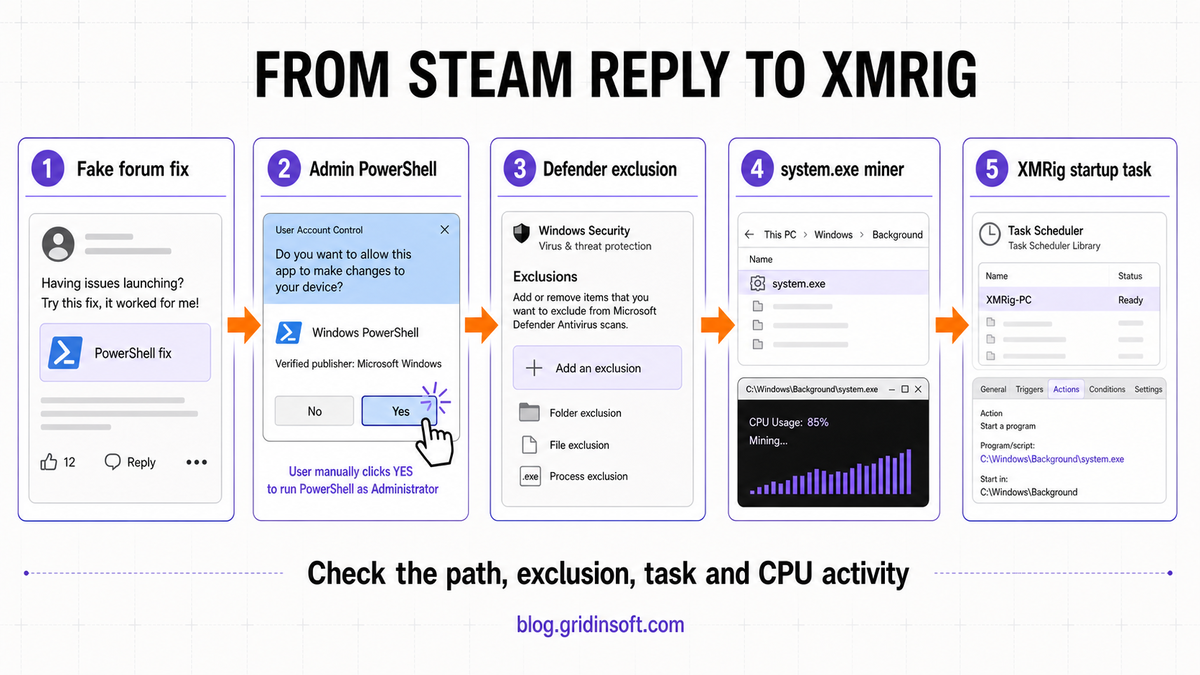
How the fake Steam fix installs the miner
The lure works because the reply appears under a real problem at the moment a player wants a quick solution. The PowerShell window then reinforces that trust with staged “optimization” output. Most of those maintenance messages are theater: the malicious function checks for administrator rights, disables TLS certificate validation, creates C:\Windows\Background, and adds that folder to Defender exclusions.
The script contacts msfconfig[.]icu over TCP 443 and downloads an executable into a temporary file before moving it to C:\Windows\Background\system.exe. Gridinsoft’s current reputation record for msfconfig[.]icu shows a newly registered domain and multiple provider warnings, supporting the decision to treat that infrastructure as untrusted without visiting it. The script also removes competing or previous miner artifacts, then creates a scheduled task named in the form XMRig-{computer name}. Public analysis did not establish an infostealer or account-theft module, so high CPU and the documented persistence are the confirmed impact. A remotely downloaded payload can change, however, which is why the response should not assume that deleting one EXE proves the device clean.
XMRig itself is a legitimate open-source mining program. [2] The security problem here is the unauthorized installation, disguised path, Defender exclusion, and persistence—not the project name alone. For a broader path-based cleanup decision, see the XMRig.exe virus removal guide. For a different ClickFix payload that targets browser credentials and sessions, compare the ACR Stealer ClickFix response.
What to check before deleting files
- Disconnect the PC from the network. Do not rerun the command or visit the payload domain. Preserve the original forum URL and the time you ran the command if the device belongs to an employer or holds sensitive data.
- Open Task Scheduler as administrator. Look for a task whose name begins with
XMRig-. Confirm whether its action points toC:\Windows\Background\system.exe. Disable it before removal so it cannot restart the process. - Review Defender exclusions. In Windows Security, open Virus & threat protection, Manage settings, then Exclusions. An unexpected exclusion for
C:\Windows\Backgroundmatches the campaign. Microsoft also documents theRemove-MpPreferencecmdlet for removing a known exclusion. [3] - Inspect the path, not only the filename. A file called
system.exeunder the campaign folder is suspicious. Do not confuse it with legitimate Windows components under protected system locations. - Check current symptoms. Sustained high CPU while idle, loud fans, heat, game lag, a returning
system.exeprocess, or the task reappearing after reboot means persistence is still active.
Remove the XMRig task and verify cleanup
Quarantine the detected executable with Windows Security or another trusted security tool before manually deleting the folder. Remove the malicious scheduled task and the matching Defender exclusion, then run a full scan. Stopping the visible process alone is not enough: the task, exclusion, temporary downloader, or another script can recreate it.
If the command ran, use a full Gridinsoft Anti-Malware scan to check for detections, hidden files, scheduled tasks, startup entries, security exclusions, and other persistence. Remove confirmed detections, reboot, and scan again if the process, task, or CPU spike returns.
After reboot, confirm that the XMRig- task is gone, C:\Windows\Background is no longer excluded, the suspicious process does not return, and idle CPU usage has normalized. A scan cannot prove that no other payload ever ran. For a work device, an administrator-level execution, or a PC used for financial access, preserve evidence and consider a clean Windows reinstall through your incident-response process.
What not to assume
- Steam itself is not the payload. Attackers abused discussion replies and the trust of users looking for help.
- PowerShell is not malware by itself. The danger is the untrusted command and the actions it performs with administrator rights.
- High CPU alone is not proof of XMRig. Confirm the path, scheduled task, exclusion, process, and scan result together.
- No reported stealer does not mean no account risk. The analyzed chain confirmed a miner, but any mutable download executed as administrator deserves a complete device review before you resume sensitive logins.
References
- SteamScams community thread. “A scam that is currently spammed in the Steam community forums.” Reddit, July 25, 2026. User reports and campaign inspection.
- XMRig project. “XMRig: open-source cross-platform CPU/GPU miner.” GitHub, accessed July 25, 2026. Project repository.
- Microsoft. “Remove-MpPreference.” Microsoft Learn, accessed July 25, 2026. Defender PowerShell documentation.