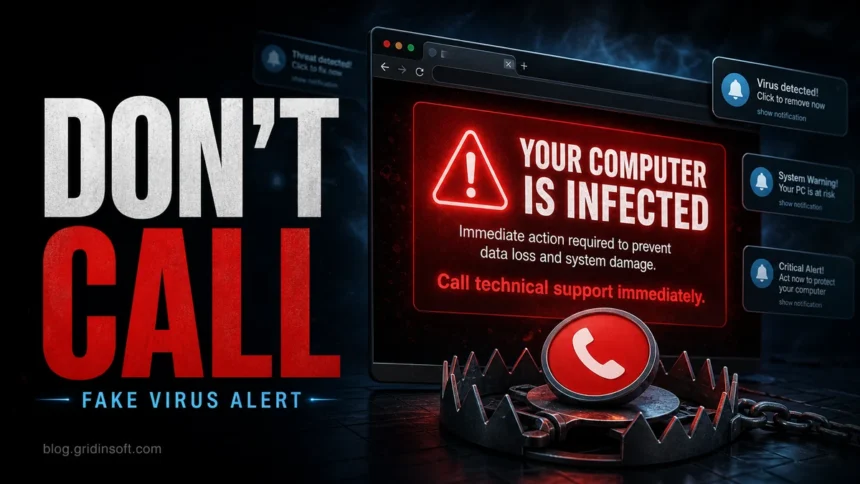
If a browser page says “Your computer is infected”, treat it as a scam unless the warning also appears inside your installed security app. Fake infected-computer pop-ups use panic, countdowns, loud audio, and fake support numbers to make you click, call, pay, or install a tool. Close the page first, then check Windows Security or your antivirus from the Start menu, not from the pop-up.
What to do first
- Do not call the phone number shown in the alert.
- Do not click “Remove”, “Scan”, or “Renew” inside the browser page.
- Close the tab or browser; if it will not close, use Task Manager.
- Reopen the browser without restoring the old session.
- Check your real security app and remove suspicious notification permissions if alerts return.
| Most likely | Scareware, tech support scam, notification spam, or adware redirect |
| High-risk signs | Phone number, full-screen lock, countdown, loud audio, fake Microsoft/Apple/Geek Squad wording |
| Real alert check | Open Windows Security or your antivirus directly and review its protection history |
| Escalate if | You called, paid, gave remote access, downloaded a file, or the pop-ups keep returning |
Check Windows before continuing
Close the fake warning first. If you only allowed site notifications, remove that permission using the browser steps below. If you installed its suggested cleaner, granted remote access, or redirects return after browser cleanup, check the Windows PC for unwanted software.
Check what the scam left behind. Gridinsoft Anti-Malware can scan for malicious downloads, adware, and unwanted startup components. The web warning itself is not evidence that your PC is infected.
Download Anti-Malware for WindowsAfter downloading: install Gridinsoft Anti-Malware, activate the trial if eligible, update its database, and run a Full Scan. Review detections, clean the items you confirm, then restart Windows. If the same symptom returns, use the source and persistence checks below.
Is the “Your computer is infected” pop-up real?
A random website cannot run a real full-system antivirus scan. It may know your browser, language, rough location, or device type, but it cannot honestly prove that Windows is infected just by showing a web page. A real antivirus warning appears in the security product itself and can be reopened from that product’s history or quarantine screen.
The phrase usually belongs to a scareware or fake virus alert flow. The page may claim that files will be deleted, banking data is exposed, or the browser is locked. Those details are designed to make you act before you think.
Close it without clicking the fake alert
- Try Esc to leave full-screen mode.
- Close the tab from the browser tab bar, not from buttons inside the warning.
- If the browser is stuck, press Ctrl + Shift + Esc, select Chrome, Edge, Firefox, or another browser, and choose End task.
- Open the browser again and choose do not restore if it offers to reopen the previous session.
- If the same site opens automatically, check startup pages, extensions, and notification permissions.
Do not enter card details, do not install a “cleaner” offered by the page, and do not allow remote access tools because a stranger on the phone tells you to.
Why the infected-computer alert keeps coming back
If the alert returns after you close it, the cause is usually one of these:
- Browser notifications: a site was allowed to send alerts and now pushes fake virus messages outside the tab.
- Malvertising redirects: an ad network or compromised page opens scareware pages when you browse certain sites.
- Rogue extension: an extension changes search results, injects ads, or opens unwanted pages.
- Adware or PUA: an installed program restores the redirect or notifications after every reboot.
- Brand-specific scareware: pages may mimic Defender, McAfee, Norton, Apple, or browser warnings. For example, see our guide to fake Windows Defender Security Center alerts and McAfee-style pop-ups.
Remove returning alerts from Chrome, Edge, or Firefox
- Open your browser settings and search for Notifications.
- Remove unknown sites from the allowed notifications list.
- Search settings for Pop-ups and redirects and block suspicious allowances.
- Open the extensions page and remove anything you do not recognize or recently installed.
- Check the homepage, new tab, and default search engine settings.
- In Windows, review installed apps for unknown cleaners, coupon tools, PDF tools, download helpers, or browser managers.
- Run a full scan if the browser reopens fake alerts, multiple browsers are affected, or a file was downloaded.
If redirects return, follow the Windows scan and cleanup steps above.
What scammers want from this warning
Modern scareware is not just an annoying pop-up. Microsoft’s Edge guidance describes pages that try to lock the browser in full-screen mode, play loud audio, simulate system messages, claim the computer is infected, and push victims toward fake tech support or remote access. Barracuda researchers also reported a 2026 browser-locking scareware kit called CypherLoc and observed about 2.8 million attacks using that kit since the start of 2026. That is why an old-looking fake alert can still be part of a current scam pattern.
The attack usually wants one of four things:
- A phone call, so the scammer can pressure you live.
- A payment for fake support, cleanup, warranty renewal, or antivirus licensing.
- Remote access, which lets the scammer browse files, install tools, or stage fake evidence.
- A download, often presented as a scanner, cleaner, update, or support utility.
If you clicked, called, paid, or gave remote access
| Clicked only | Close the page, clear suspicious notifications, and scan if a download started or alerts return. |
| Called the number | End the call. Do not follow instructions to install tools, reveal codes, or log in to banking sites. |
| Installed remote access | Disconnect from the internet, uninstall the remote tool, scan, then change passwords from a clean device. |
| Paid the scammer | Contact your bank or card issuer, dispute the charge if possible, and monitor accounts for follow-up fraud. |
If you entered passwords, reset them from a clean device and enable two-factor authentication. If the scammer saw banking, email, or password-manager screens, treat those accounts as exposed.
When it might be a real infection
The pop-up itself is usually fake, but repeated redirects can still point to adware or unwanted software. Treat the system as suspicious if alerts appear across multiple browsers, unknown extensions keep returning, your search engine changes without permission, downloaded files are detected, or Windows Security shows a real item in Protection history.
Open Windows Security from the Start menu and check Virus & threat protection. If you use another antivirus, open it directly from its official app icon. When fake alerts keep returning or a support tool was installed, use the Gridinsoft scan and cleanup steps above. A scan does not undo a payment or recover accounts shared with a scammer; handle those separately.
Common victim search phrases
People usually search the wording they just saw, not the technical term. This page is for searches like:
- “your computer is infected” pop-up
- “your computer has been infected” pop-up
- “if a pop up says you have a virus is it true”
- “computer virus pop up”
- “how to remove virus warning your computer is infected”
For a broader cleanup walkthrough across fake alerts, browser notifications, and device-specific variants, use the Fake Virus Alert removal guide. This article focuses on the exact infected-computer message and the call-support trap behind it.
FAQ
Can a website really know my computer is infected?
No ordinary website can perform a full system scan. A page that instantly claims your computer is infected is usually trying to scare you into clicking, calling, or installing something.
Should I call the number in the alert?
No. Real security warnings from trusted companies do not ask you to call a phone number shown inside a random pop-up. Open your security app or the vendor’s official website instead.
Why do I see the warning after closing the website?
You may have allowed a site to send notifications, installed an extension, or have adware that keeps restoring the redirect. Remove notification permissions and extensions first, then scan if it returns.
Is it safe to click the X button on the pop-up?
Use the browser’s tab close button or Task Manager instead. Fake alert pages sometimes make in-page buttons behave like a download, permission request, or redirect.
What if Windows Security also shows a threat?
Then handle the warning inside Windows Security or your installed antivirus, not through the web page. Quarantine the item, reboot if requested, and run a full scan if symptoms continue.
References
- Microsoft Support. “Prevent online scams with the scareware blocker in Microsoft Edge.” Microsoft, accessed June 7, 2026. https://support.microsoft.com/en-us/edge/prevent-online-scams-with-the-scareware-blocker-in-microsoft-edge
- Barracuda Networks. “Threat Spotlight: CypherLoc, an advanced browser-locking scareware targeting millions.” Barracuda Blog, May 20, 2026, accessed June 7, 2026. https://blog.barracuda.com/2026/05/20/threat-spotlight-cypherloc-scareware
- Federal Trade Commission. “Seemingly urgent security messages could lead to tech support scams.” Consumer Advice, April 14, 2025, accessed June 7, 2026. https://consumer.ftc.gov/consumer-alerts/2025/04/seemingly-urgent-security-messages-could-lead-tech-support-scams
- Google Chrome Help. “Remove unwanted ads, pop-ups and malware.” Google Support, accessed June 7, 2026. https://support.google.com/chrome/answer/2765944/