You can hide your public IP address from websites by routing traffic through another server, such as a VPN, proxy, or Tor. This can improve privacy, reduce basic tracking by IP, and make websites see the server’s IP instead of your home or mobile network. It does not make you invisible, and it does not replace account security, anti-tracking controls, or safe browsing.
How do I hide my IP address?
- Use a reputable VPN for everyday privacy and encrypted traffic on public Wi-Fi.
- Use Tor Browser when anonymity matters more than speed and convenience.
- Use a proxy only for low-risk browsing because many proxies do not encrypt all traffic.
- Mobile data can give you a different IP, but it does not hide you from your carrier.
- Remember that logins, cookies, browser fingerprinting, and apps can still identify you.
What is an IP address?
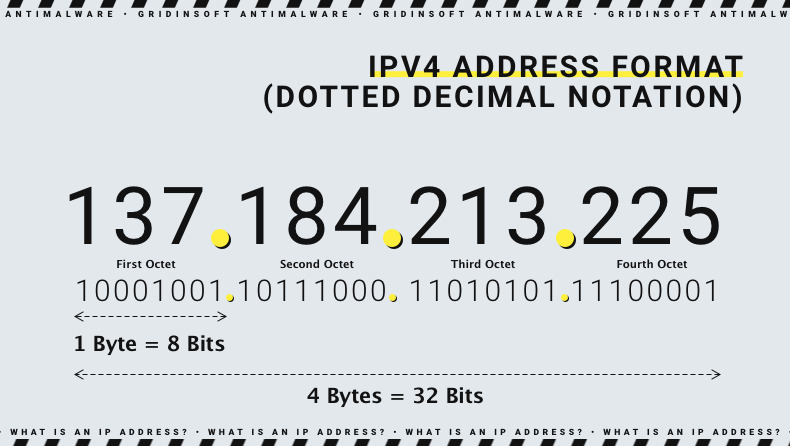
An IP address is a network address used to route internet traffic. Websites you visit can usually see the public IP address assigned by your ISP, mobile carrier, workplace, school, VPN, or proxy. Your IP can reveal approximate location and network provider, but it is not the only way websites identify users.
Best ways to hide your IP address
| Method | Best for | Limitations |
| VPN | Everyday privacy, public Wi-Fi, ISP-level privacy | VPN provider can see your connection metadata depending on policy |
| Tor Browser | Stronger anonymity for browsing | Slower, some sites block Tor, not ideal for account-heavy browsing |
| Proxy | Changing IP for a browser or app | Often lacks full-device encryption and may be untrusted |
| Mobile hotspot | Getting a different network IP temporarily | Carrier still sees traffic metadata |
| Public Wi-Fi | Different IP address | Risky without HTTPS/VPN and does not provide anonymity |
Using a VPN
A VPN routes traffic through a VPN server. Websites see the VPN server’s IP address instead of your original public IP. A VPN is usually the most practical option for everyday privacy, especially on public Wi-Fi. Choose a reputable provider, use modern protocols, and avoid free VPNs that monetize traffic or inject ads.
Using Tor Browser
Tor Browser routes browsing through multiple relays. It is better for anonymity than a typical VPN, but it is slower and some websites block Tor traffic. Do not sign into personal accounts if your goal is anonymity; logging in identifies you regardless of IP address.
Using a proxy
A proxy can hide your IP from a specific browser or app, but it may not encrypt all traffic and may not protect other apps on the device. Treat free public proxies as risky unless you understand who operates them and what data they can see.
What hiding your IP cannot do
- It cannot hide you from accounts you log into.
- It cannot remove tracking cookies or browser fingerprinting.
- It cannot protect you from phishing pages or malware downloads.
- It cannot make illegal activity safe or anonymous.
- It cannot guarantee that a VPN or proxy keeps no logs.
IP privacy checklist
- Use HTTPS websites and avoid entering passwords on insecure pages.
- Limit third-party cookies and clear site data when needed.
- Use a privacy-focused browser profile for sensitive browsing.
- Do not install unknown VPN/proxy extensions.
- Keep the browser and OS updated.
- Scan suspicious downloads before running them.
FAQ
Does a VPN hide my IP address?
Yes, websites usually see the VPN server’s IP address instead of your original IP. Your VPN provider can still know your original connection unless its infrastructure and policies prevent logging.
Can I hide my IP without a VPN?
Yes. Tor Browser, proxies, mobile data, and some privacy relays can change the IP seen by websites. Each option has trade-offs.
Does hiding my IP make me anonymous?
No. Accounts, cookies, device fingerprinting, payment details, and behavior can still identify you.
Can someone hack me with only my IP address?
An IP address alone is usually not enough, but exposed services, weak router settings, or vulnerable devices can increase risk. Keep routers and devices updated and avoid exposing remote access.