


A request for a tiny dictionary icon became a route into Windows computers. ESET’s November 4 investigation says the SlippyNunchucks espionage group redirected Sogou Input Method traffic and used the response to deliver the DarkVigil implant. The affected Windows software needs version 16.10 or later; an update alone does not establish that a previously exposed computer is clean.
Security tools may remove a visible payload while another component or startup path remains. On a personal Windows computer with signs of infection, download Gridinsoft Anti-Malware, update its database, run a Full Scan, review and remove detected threats, then restart. Scanning does not recover stolen data or prove that no exposure occurred. For broader context, see our explanation of remote-access trojans.
The dangerous part was the reply
Sogou’s brand-promotion feature retrieves configuration for dictionary icons. ESET found that attackers redirected its DNS resolution, then substituted the configuration returned over HTTP. A legitimate task dispatcher, SGTool.exe, followed that configuration and downloaded files into application component locations.
The distinction matters: seeing a familiar application make the request does not authenticate the reply. Nor does encrypting a configuration with a key embedded in the client establish who supplied it. The trust decision sits between receiving instructions and letting those instructions choose files and destinations.
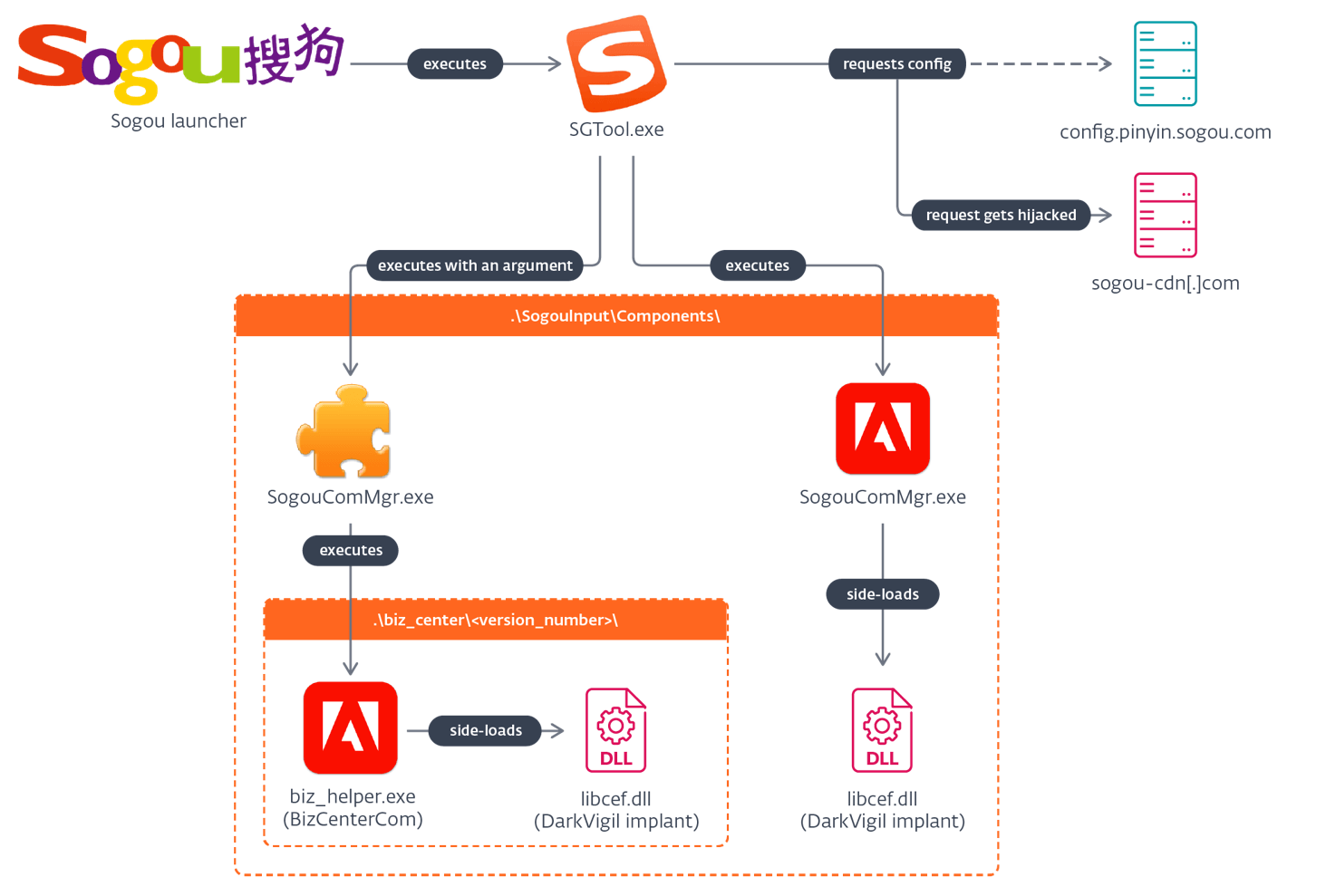
A signed helper loaded the unwanted DLL
In the documented chain, a legitimate Adobe helper was renamed to impersonate Sogou’s component manager and loaded the malicious libcef.dll. Another placement used Sogou’s versioned biz_center directory. ESET says these paths borrowed existing component-loading workflows; they could also break normal application functions.
A digital signature on the helper therefore answers only one question: who signed that executable. It does not certify every adjacent DLL or explain why the executable appeared under another application’s component name. A familiar filename, a valid signature and a legitimate parent application each need context.
What is known—and what is still missing
ESET observed the Sogou delivery route from July 1, 2026; November 4 is the public investigation date, not the beginning of a new outbreak. The researchers have not established where DNS manipulation occurred. Their attribution to a China-aligned group is an assessment, not evidence that every Sogou installation was targeted.
The official CVE-2026-120422 record covers Windows versions below 16.10 and describes arbitrary code execution through substituted HTTP configuration. Sogou’s own release log dates 16.10 to October 30. This Windows finding does not establish an equivalent attack against its Android or iOS editions.
Separate the update from the compromise check
First check the installed Windows Sogou version and obtain the current release through its official distribution. For a managed computer, ask IT to verify deployment rather than installing a replacement from an advertisement. The patched network request closes the documented delivery weakness; it is not a receipt showing that nothing arrived earlier.
If there are detections, unexplained component changes or suspicious activity, preserve the alert details and involve your incident-response team. ESET’s published indicators include sogou-cdn[.]com and the implant hash 8A60A8E90E1F5F08F28FE5A6DD57BD686C20DC23. Do not visit the defanged domain. A filename match alone is insufficient: libcef.dll also appears in legitimate software. Correlate its path, hash, signer and the process that loaded it.
The case is a reminder to inspect small background features as carefully as installers: a request for an icon still carries a consequential trust decision when its reply can place executable files.
References
- Anh Ho. SlippyNunchucks investigation. ESET Research, November 4, 2026.
- ESET CNA. CVE-2026-120422. Published November 4, 2026.
- Sogou. Input Method release history. Version 16.10, October 30, 2026; accessed November 5, 2026.
- ESET Research. SlippyNunchucks indicators of compromise. Accessed November 5, 2026.