

On November 9, Swarm’s own release pipeline shipped two malicious updates: the npm package @ethersphere/bee-js 13.3.0 and Swarm Desktop 0.56.2. The desktop build could reach Windows x64 PCs and Apple Silicon Macs through the app’s updater. It looked like an emergency patch, but its code could send a Bee node’s wallet file and the password that unlocks it to an attacker.[1]
One release pipeline, two ways to run the malware
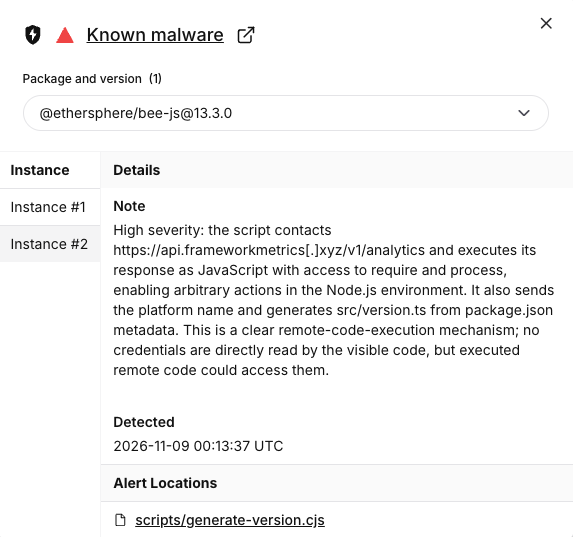
The npm package went live at 00:09 UTC. It added a postinstall hook that fetched JavaScript from an outside server and executed it during installation. A project did not have to import the library for the hook to run. The risk extended to developer machines and build jobs whose dependencies resolved to 13.3.0, even if their developers never named bee-js directly in the project manifest.
About 26 minutes later, Swarm Desktop 0.56.2 appeared on GitHub. The desktop build ran its loader when the app started. Socket found that the altered macOS app carried a valid signature and an Apple notarization ticket. The npm build also carried valid provenance from the project’s release workflow. Those checks identified where the builds came from; in this case, the build process itself had been used to ship the malicious code.[1]
Why the encrypted wallet was exposed
The payload looked for two things in the Bee node’s local data: the encrypted wallet key under data-dir/keys/ and a config.yaml file containing a plaintext password. Stealing both removes the protection that the wallet file’s encryption would provide on its own. Researchers also found a backdoor that could outlast the update. On Windows the payload tried to install a ScreenConnect remote access client; on macOS and Linux it used a LaunchAgent or a user service. The analyses establish what the code could do. They do not establish how many wallets were drained.[1]
Check what actually ran
- Swarm Desktop: Check the version in
bee-desktop.log, including older entries if the app has since updated. Socket says the app loggedBee Desktop version: 0.56.2 (production)before running the loader. The project published 0.56.3 to replace the compromised build. Removing 0.56.2 from GitHub did not roll back computers that already had it.[3] - npm and CI: Look for
@ethersphere/bee-js13.3.0 in lockfiles, installed dependencies, old build logs and caches. Review whether install scripts ran on those machines or runners. Check earlier builds even if today’s lockfile resolves to 13.2.0. See our Keyv npm incident for another example of checking resolved versions before rotating build secrets.
If an affected build ran, isolate the host and use a clean device to replace the Bee wallet key, secure any funds tied to it and rotate credentials the affected process could read, including CI tokens where applicable. Rebuild the affected host or runner from a known good image. A scanner may remove the loader and still leave a remote access service behind; installing 0.56.3 cannot recover a key that was already copied. GitHub’s advisory treats systems with the malicious npm package installed or running as compromised.[2]
References
- Socket Research Team. Technical analysis of the bee-js and Swarm Desktop compromise. November 9, 2026.
- GitHub Advisory Database. Malware in @ethersphere/bee-js (GHSA-hh7j-5m3j-23pf). November 9, 2026.
- Ethersphere. Swarm Desktop 0.56.3 release notes. November 9, 2026.