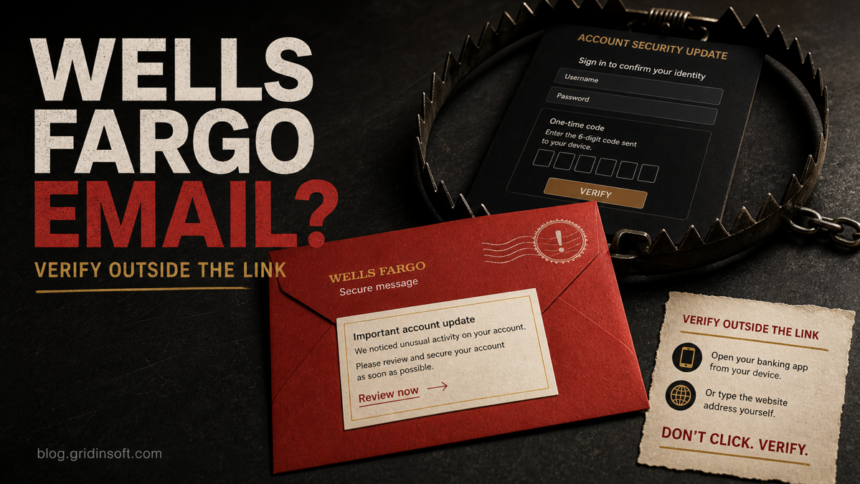
The Wells Fargo “Account Security Update” email that opens a fake Secure Message Center and asks you to “Review & Confirm Account” is a phishing lure. Do not use its button, call a number in the message, or provide your password, PIN, card details, or one-time access code. Open the Wells Fargo app or type wellsfargo.com into a new browser tab, then check your account and messages there. If you already interacted, the right response depends on whether you only clicked, entered credentials or a code, sent money, or installed something.
The reviewed lure claims that Wells Fargo is rolling out a security update and warns that temporary access limitations may apply until the account is confirmed. It also uses wide spacing and lookalike Unicode characters in the subject, a tactic that can make a familiar brand line look unusual to filters while still reading normally to a person.
What Is the Wells Fargo Account Security Update Scam?
This campaign impersonates a bank security notice. The message presents a fake “Secure Message Center,” says a security rollout requires an account review, and makes its email button look like the only way to avoid restricted access. The destination can then ask for an online-banking username and password, a card or identity detail, or a one-time access code.
Wells Fargo’s own phishing guidance says not to sign on from a link in a suspicious message. It tells customers to use the mobile app or type the bank’s address into a new browser tab, and it says the bank will not contact customers to ask for a PIN, online-banking password, or one-time access code [1] [2].
What the Fake Email Looks Like
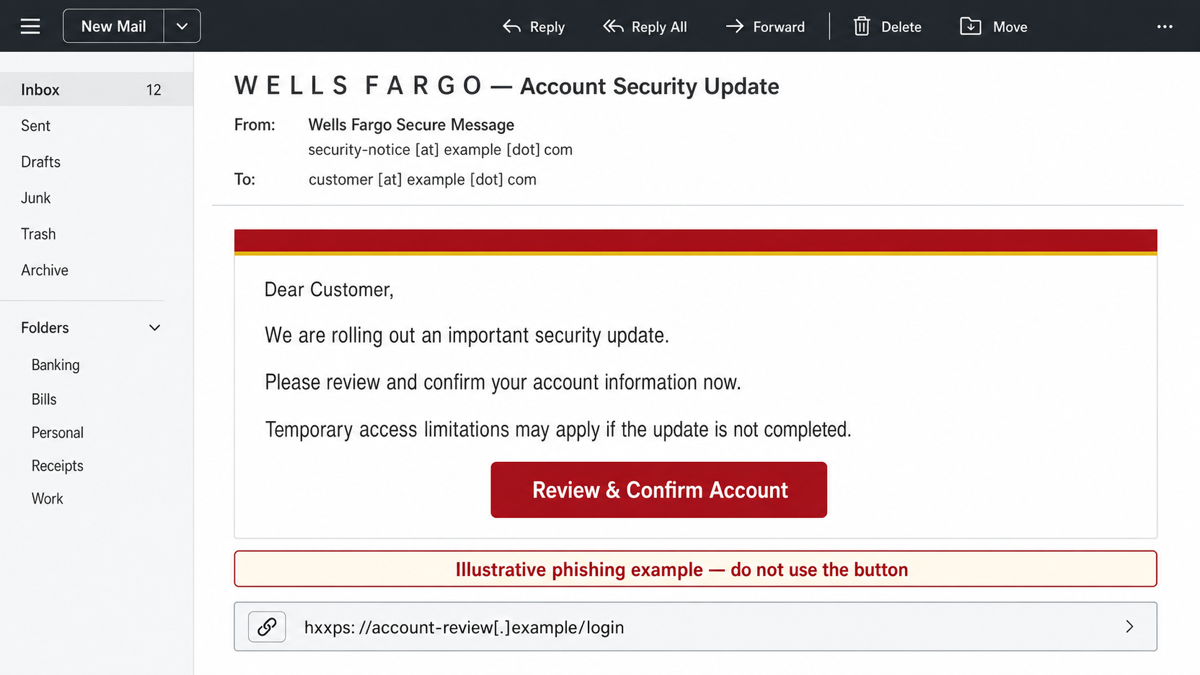
The wording can change.
Example:
Subject: W E L L S  F A R G O — Account Security Update
Display name: Wells Fargo Secure Message
Sender: security-notice [at] example [dot] com

Dear Customer,

We are rolling out an important security update.
Please review and confirm your account information now.
Temporary access limitations may apply if the update is not completed.

Button: Review & Confirm Account
The spaced brand name or unusual characters are a clue, not the only test. A polished message can still be fake, and a plain message can still be genuine. The safer decision is to ignore the message’s route and verify from the app, a saved bookmark, the typed bank domain, or the number printed on the back of your card.
Does Wells Fargo Have a Real Secure Message Center?
Yes. Wells Fargo documents a real Secure Message Center for protected email. Its user guide identifies securemail.wf.com as the portal and [email protected] as a notification sender for that system [3]. That does not make every email using the phrase “Secure Message Center” genuine. Scammers copy the name because it sounds trustworthy.
| What you see | Safe decision |
|---|---|
| An unexpected account-update button, access-limit threat, or request for a password, PIN, or code | Do not use the message. Open the Wells Fargo app or type the bank address yourself. |
| A secure-message notification you expected after speaking with a known Wells Fargo contact | Still verify the sender and destination. If anything differs from the documented portal, contact the bank through a trusted route. |
| A link or number that does not match a Wells Fargo-owned route | Stop. Do not sign in, call, reply, download, scan a QR code, or approve remote access. |
Red Flags in the Account Security Update Email
- The display name does the trust work. “Wells Fargo Secure Message” can be typed by any sender; expand the full sender address.
- The subject uses odd spacing or lookalike characters. This can preserve the visual brand while changing the underlying text.
- The message threatens temporary access limits. The pressure is designed to make the email button feel safer than independent verification.
- The button asks for an account review. A security-themed button can lead to a credential form, code prompt, payment request, or support scam.
- The request begins outside the real account. If the same notice is not visible after you sign in independently, the email has not proved its claim.
- The page asks for secrets Wells Fargo says it will not request in unsolicited contact. Never share a PIN, online-banking password, or one-time access code with someone who contacted you.
What to Do If You Received the Email
- Do not use the button or reply. Do not call a number, open an attachment, scan a QR code, or use an unsubscribe link from the message.
- Open Wells Fargo independently. Use the app, a saved bookmark, or type
wellsfargo.cominto a fresh tab. - Check the account itself. Review secure messages, alerts, profile changes, devices, recent transfers, payees, card activity, and contact details.
- Use the card number for a live check. If the account screen does not settle the question, call the number printed on the back of the card rather than a number in the email.
- Report the lure. Wells Fargo directs recipients who did not interact to forward a suspicious message mentioning the bank to
[email protected]and then delete it [1].
For a broader sender, link, and request checklist, use our phishing email red flags guide. The Account Verification Alert guide covers the same verification pressure across other services.
If You Clicked but Entered Nothing
Close the page and do not approve notifications, downloads, extensions, profiles, remote-access prompts, or clipboard commands. A click without further interaction does not automatically expose a banking password, but it may confirm that the address is active or lead to a second-stage prompt. Check the account from the official app or typed website and use the clicked phishing link checklist if the page opened pop-ups, redirects, or browser-permission requests.
If You Entered a Password, Card Detail, or One-Time Code
- Contact Wells Fargo immediately through a trusted route. Wells Fargo lists
1-866-867-5568for customers who clicked, opened an attachment, sent a payment, or provided information in response to phishing [1]. You can also use the app or number on the card. - Change the banking password from a clean device. Do not return through the phishing page. Change any other account that reused the same password.
- Protect the email account. Change a reused mailbox password, sign out unknown sessions, review forwarding rules and recovery details, and enable strong MFA.
- Review account controls. Check contact details, trusted devices, payees, transfers, card activity, digital-wallet connections, and alert settings.
- Never approve a code you did not request. A one-time code can authorize a sign-in or sensitive account change; report it as exposed if you typed or read it to someone.
- Preserve evidence. Keep the sender, subject, timestamps, screenshots, deweaponized destination, and transaction details for the bank or a fraud report.
If You Sent Money or Approved a Transfer
Call Wells Fargo immediately and clearly state that a scam influenced the payment or transfer. Ask what can still be stopped, recalled, locked, or disputed, and follow the bank’s instructions for cards, Zelle, ACH, wire, or account access. Do not pay a person who later claims they can recover the money for a fee; recovery-service follow-ups are a common second scam.
If the Email Downloaded or Installed Something
Account recovery is the priority for a credential-only page. A device scan becomes important when the email or page downloaded a file, installed an extension or app, enabled notifications, launched a remote-support tool, asked you to paste a PowerShell/Terminal command, or caused recurring pop-ups and redirects. In those cases, deleting the email does not inspect local downloads, browser changes, startup entries, scheduled tasks, or other persistence.
Disconnect an unexpected remote-access session, remove the visible download or extension, and run a full Gridinsoft Anti-Malware scan. Reboot, scan again if symptoms return, and change sensitive passwords from another trusted device until the affected system is checked.
If the page or email made you download an invoice, coupon, tracking app, browser extension, or support tool, scan the PC before opening it again or logging into sensitive accounts.
Scan after a suspicious banking emailHow to Verify a Real Wells Fargo Message Safely
- Start in the Wells Fargo app or type
wellsfargo.com; do not make the email link your source of truth. - Check whether the same alert or required action appears inside the authenticated account.
- Use the number printed on the card when you need a person to confirm the notice.
- Compare a claimed secure-email route with the bank’s documented Secure Message Center information, but stop and call the bank if anything is inconsistent.
- Use Gridinsoft Email Checker to review suspicious wording, sender details, and links before interacting.
- If the message asks for bank details rather than a security review, compare it with the Bank Details email scam.
FAQ
Is the Wells Fargo Account Security Update email real?
The reviewed email is a phishing lure. Treat any unexpected account-update message as unverified until the same issue appears after you open the Wells Fargo app or type the bank address yourself.
Does Wells Fargo use a Secure Message Center?
Yes, Wells Fargo documents a real Secure Message Center. The phrase alone proves nothing because scammers can copy it. Verify the sender, destination, and context through official Wells Fargo routes.
Will Wells Fargo ask for my password or one-time code by email?
Wells Fargo says it will not contact you to ask for your online-banking password, PIN, or one-time access code. Do not provide those secrets through an unexpected message, page, text, or call.
Where should I report a Wells Fargo phishing email?
If you did not interact, Wells Fargo says to forward suspicious messages that mention the bank to [email protected] and then delete them. If you clicked, shared information, or sent money, contact the bank immediately through the app, card number, or official fraud route.
References
- Wells Fargo. “Five steps to avoid phishing scams.” Wells Fargo Security Center, accessed July 9, 2026. https://www.wellsfargo.com/privacy-security/fraud/report/phish/
- Wells Fargo. “How We Protect You.” Wells Fargo Security Center, accessed July 9, 2026. https://www.wellsfargo.com/privacy-security/fraud/protecting-you/
- Wells Fargo. “Wells Fargo Secure Message Center: Using secure email.” Updated December 2021, accessed July 9, 2026. https://www.wellsfargo.com/assets/pdf/personal/help/secure_email_user_guide.pdf