Virus:Win32/Floxif.H is a severe Microsoft Defender detection for Floxif, a file-infecting Windows malware family. Treat the alert as real until you prove otherwise: disconnect the PC from the network, quarantine the detected item, run a full scan, and avoid moving executable files from that machine until a follow-up scan is clean.
For a related file-infector case outside the Floxif family, see our Neshta.Virus.FileInfector.DDS guide, which covers Malwarebytes alerts, false-positive review, and whole-system cleanup decisions.
Floxif is risky because it can modify executable and DLL files, drop a malicious DLL, and download additional payloads. Cleaning one detected file may not be enough if the infection has already touched other programs, startup locations, or removable drives.
What to do first when Defender detects Virus:Win32/Floxif.H
- Stop running installers, cracks, portable apps, or copied EXE files from the affected PC. A file infector can spread when infected programs are launched.
- Disconnect from the internet if the alert appeared after a suspicious download or if detections keep returning. This limits additional payload downloads.
- Let Microsoft Defender quarantine the item, then run a full scan. If Defender offers an offline scan, use it before trusting the machine again.
- Run a second-opinion scan with GridinSoft Anti-Malware or check a suspicious file with the Gridinsoft Online Virus Scanner.
- Back up personal documents only. Do not back up executable files, scripts, installers, game mods, or portable apps from the infected system until they are verified clean.
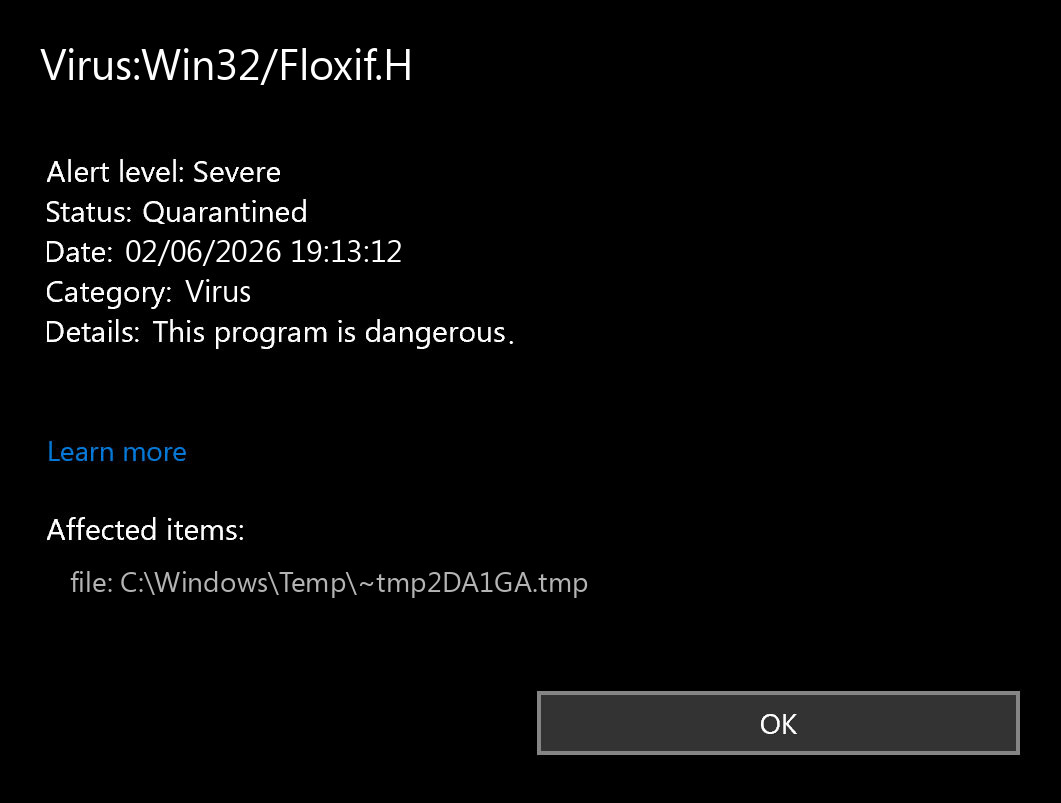
Is Virus:Win32/Floxif.H dangerous?
Yes. Microsoft lists the Floxif family as a severe file-infecting threat. The important part is the infection model: Floxif does not behave like a single unwanted app that can be deleted once. It can alter legitimate Windows executable or DLL files and use those files to keep the infection chain alive.
| What you see | What it means |
|---|---|
Defender shows Virus:Win32/Floxif.H |
A Defender signature matched the Floxif file-infector family or a close variant. |
| Detection appears in Temp, Program Files, Common Files, or copied software folders | The original suspicious download may not be the only infected file. |
| Alerts return after reboot or after opening an app | A startup entry, infected executable, or secondary payload may still be active. |
| Only one old installer is detected and multiple vendors mark it clean | A false positive is possible, but verify the file source before restoring it. |
How Floxif gets on a PC
The most common practical scenario is an infected program: cracked software, a repacked installer, a fake update, a malicious ad download, or an executable copied from another machine. Floxif-style file infectors are especially dangerous on shared folders and external drives because users often copy “known good” tools between PCs without rescanning them.
If the alert appeared after installing pirated software, a game mod, or a portable utility, remove that source first. Do not reinstall the same package after cleanup. If you need the program, download it again from the official vendor and scan the fresh copy before running it.
Technical indicators and behavior
Floxif has historically been associated with infected executable files, malicious DLL drops, command-line activity, and persistence through Windows startup-related locations. The indicators below are useful for triage, but they should not be treated as a complete IOC list for every variant.
Registry and persistence checks
HKEY_CURRENT_USER\Software\Microsoft\RAS Phonebook\AreaCodes
HKEY_LOCAL_MACHINE\SOFTWARE\Microsoft\Windows NT\CurrentVersion\Windows\AppInit_DLLs
HKEY_LOCAL_MACHINE\SOFTWARE\Microsoft\Windows NT\CurrentVersion\Windows\LoadAppInit_DLLs
HKEY_LOCAL_MACHINE\SOFTWARE\Microsoft\Windows NT\CurrentVersion\Windows\RequireSignedAppInit_DLLs
Unexpected values in these locations can be suspicious because AppInit DLL configuration can force a DLL to load into many processes. Do not delete registry values blindly; export a backup first or use a trusted cleanup tool.
Files and commands seen in Floxif activity
C:\Program Files (x86)\Google\Update\1.3.33.17\goopdate.dll.tmp
C:\Program Files\Common Files\System\symsrv.dll
C:\Program Files\Common Files\System\symsrv.dll.000
C:\ProgramData\Microsoft\Network\Connections\Pbk\rasphone.pbk
C:\Windows\System32\wuapihost.exe -Embedding
Floxif can also use cleanup commands to delete temporary files after execution, which makes later investigation harder:
cmd.exe /c del /F /Q "C:\Documents and Settings\Administrator\Local Settings\Temp\EB93A6996E.exe.dat"
cmd.exe /c del /F /Q "C:\Program Files (x86)\Google\Update\1.3.33.17\goopdate.dll.dat"
cmd.exe /c rd /S /Q "C:\Documents and Settings\Administrator\Local Settings\Temp\EB93A6996E.exe.dat"
cmd.exe /c rd /S /Q "C:\Program Files (x86)\Google\Update\1.3.33.17\goopdate.dll.dat"
How to remove Virus:Win32/Floxif.H
Start with the built-in quarantine result, then scan the whole system. If the scan only removed one file but the same alert comes back, assume there is still an infected executable, startup entry, or secondary payload on the machine.
- Open Windows Security and review the Protection History entry for
Virus:Win32/Floxif.H. Note the affected path before clearing the alert. - Run a full Microsoft Defender scan, then run Defender Offline if Windows offers it for the same detection.
- Scan with GridinSoft Anti-Malware and remove detected payloads, suspicious startup entries, and bundled installers.
- Check Startup Apps, Task Scheduler, Services, browser extensions, and recently installed programs for unknown entries.
- Rescan external drives and shared folders before reconnecting them to other PCs.
- After cleanup, change passwords from a clean device if the infected PC was used for email, banking, crypto wallets, game accounts, or work accounts.
After uninstalling the suspicious app or deleting the visible threat, use Gridinsoft Anti-Malware to check hidden files, startup entries, scheduled tasks, bundled apps, browser changes, and other persistence points that can restore malware.
Download Anti-MalwareWhen Floxif.H keeps coming back
Repeated detections usually mean one of three things: an infected program is being launched again, a payload is still starting with Windows, or the user restored infected executables from backup. In that case, avoid “restore and retry” loops. Keep personal files, but replace applications and installers with fresh official downloads.
If many executable files are infected, a clean reinstall can be safer than trying to disinfect every program. Restore only documents, photos, and other non-executable data from backup, then scan the restored folder before opening it.
Can Virus:Win32/Floxif.H be a false positive?
It can happen, especially with old installers, packed programs, game mods, or developer tools. Still, do not whitelist the file just because it came from a familiar folder. Check where it came from, whether the digital signature is valid, whether multiple scanners agree, and whether the detection appears in more than one executable. A single isolated detection in a freshly downloaded official installer is different from several detections across copied programs.
FAQ
Is Virus:Win32/Floxif.H the same as Trojan:Win32/Floxif?
They are related Defender naming patterns for the Floxif family. The important point for cleanup is that Floxif can infect executable files and may download other malware, so the whole system needs to be checked.
Should I delete every file Defender names?
Quarantine detected executables and installers first. For personal documents, do not delete blindly; back them up, scan them, and restore only non-executable files from trusted backups.
Can I keep using the PC after Defender quarantines Floxif.H?
Use it only after a full scan and follow-up scan are clean. If detections return after reboot or after opening a program, continue cleanup or reinstall from a clean Windows image.
Does Floxif spread through USB drives?
It can spread through infected executable files copied between machines. Scan external drives and avoid running portable apps, installers, or cracked software from them until they are verified clean.
References
- Microsoft Security Intelligence. “Virus:Win32/Floxif threat description.” Microsoft, published September 16, 2012, updated September 15, 2017, accessed June 2, 2026. https://www.microsoft.com/en-us/wdsi/threats/malware-encyclopedia-description?Name=Virus%3AWin32%2FFloxif
- Microsoft Security Intelligence. “Threat description search results for Virus:Win32/Floxif.” Microsoft, accessed June 2, 2026. https://www.microsoft.com/en-us/wdsi/threats/threat-search?query=Virus%3AWin32%2FFloxif