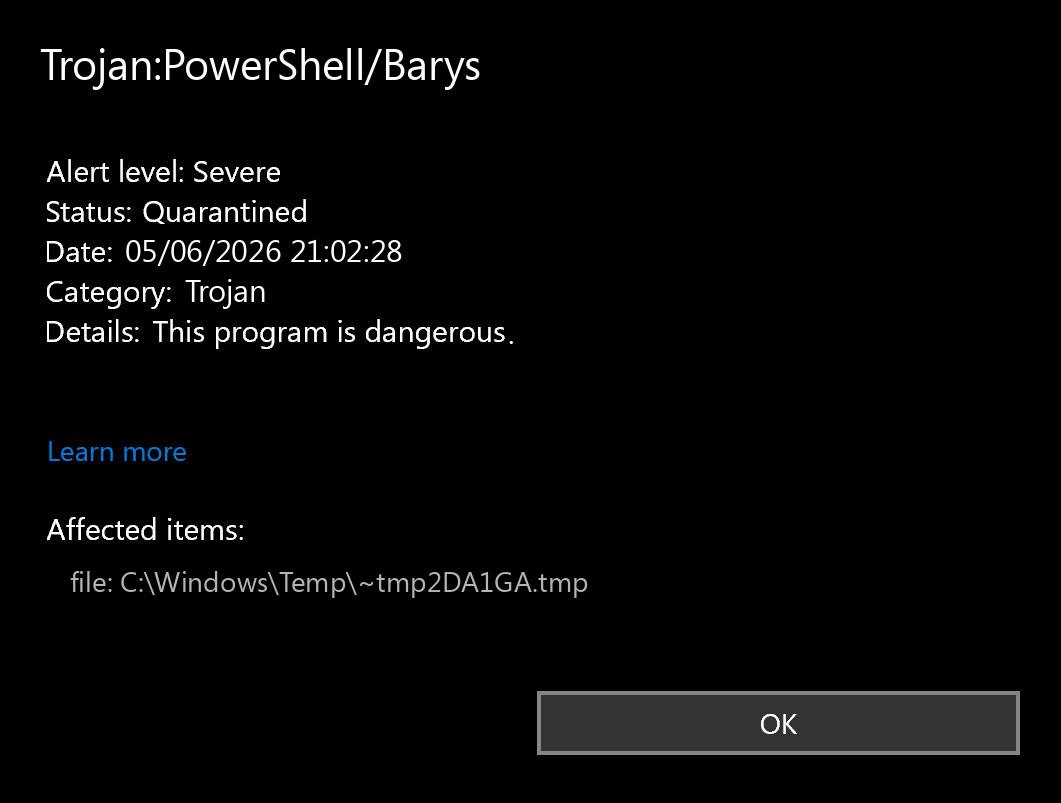
Trojan:PowerShell/Barys is a severe Microsoft Defender alert for PowerShell-based trojan activity. Keep the item quarantined, note the affected path and action status, and do not add exclusions. If the alert returns after reboot, after opening the browser, or after running a cracked tool or script, treat it as a persistence problem rather than a one-time cache hit.
The important detail is not only the name. PowerShell is a legitimate Windows automation tool, so attackers abuse it to start encoded commands, download payloads, change Defender settings, or launch a script from Temp, AppData, ProgramData, Startup, or a scheduled task. Microsoft lists Barys as a trojan family, and Defender may expose different platform or behavior labels for related samples depending on what the engine saw first. [1]
What Trojan:PowerShell/Barys Means
A Trojan:PowerShell/Barys alert means Defender saw PowerShell activity or a script pattern that matches a trojan. It does not prove that every file on the PC is infected, but it does mean you should avoid running the source again until the affected path and restore path are understood.
PowerShell abuse is common because it can run commands without a traditional installer. MITRE tracks PowerShell under command and scripting interpreter abuse: attackers may run inline commands, encoded commands, scripts, or remote payload launchers through a trusted Windows component. [2]
What To Do First
- Keep quarantine enabled. Do not click Allow on device and do not restore the file just to test it.
- Copy the affected item path. The folder tells you whether the alert came from a browser cache, archive extraction, Temp script, cracked tool, installer, Startup folder, or another user profile.
- Check whether the alert returns. Reboot once after quarantine. If the same path or a new PowerShell path appears again, look for a startup source.
- Remove the source download. Delete the archive, installer, game crack, script pack, or email attachment that produced the alert.
- Run a full scan. Use Microsoft Defender full scan first, then run Gridinsoft Anti-Malware if the alert repeats, the source is unknown, or the PC ran pirated tools or suspicious scripts.
If you are comparing this alert with another Defender name, see our guide to Microsoft Defender detection names. For outbound PowerShell warnings without this exact name, use the separate PowerShell outbound connection cleanup checklist.
Where Barys Persistence Can Hide
If Trojan:PowerShell/Barys keeps coming back, the quarantined script is often only the symptom. Check these places before assuming Defender failed:
- Startup Apps and Startup folder: shortcuts or scripts that start PowerShell at sign-in.
- Task Scheduler: tasks that launch PowerShell, cmd, mshta, wscript, or a browser URL on a timer or at logon.
- Run and RunOnce keys: autostart entries under the current user or local machine hives.
- Temp, AppData, and ProgramData: dropped scripts, renamed executables, or unpacked archive leftovers.
- Defender exclusions: unexpected excluded folders, files, extensions, or processes. Microsoft documents that exclusions can be managed with Defender PowerShell cmdlets such as Add-MpPreference, which is why unknown exclusions are a serious red flag. [3]
- Browser extensions and downloads: fake update pages, malvertising downloads, and cracked-game installers can relaunch the same script after cleanup.
Do not run random registry cleaners or disable Defender to make the alert disappear. If the trigger is a scheduled task or exclusion, disabling protection only gives the trojan more room to install a second payload.
Can Trojan:PowerShell/Barys Be A False Positive?
A false positive is possible, but it is not the default assumption for this label. Treat it as plausible only when the affected file is part of a known internal administration script, the script came from a trusted signed source, the path is expected, and the detection does not return after the file is removed or submitted for review.
It is much less likely to be harmless when the path points to Downloads, Temp, AppData, a password-protected archive, a crack, a game mod, a fake installer, or a script you did not intentionally run. In those cases, remove the source and check for persistence.
Cleanup Checklist
- Open Windows Security and confirm the action status is Quarantined or Removed.
- Delete the original download, archive, script folder, or installer that produced the alert.
- Review Startup Apps and Task Scheduler for entries that launch PowerShell, cmd, mshta, wscript, or suspicious browser URLs.
- Check Defender exclusions. Remove exclusions you did not create and do not understand.
- Uninstall recently added suspicious apps by install date.
- Inspect browser extensions, notification permissions, search engine, startup page, and sync if the alert followed a fake update, ad redirect, or cracked download.
- Run Defender full scan, then run Gridinsoft Anti-Malware as a second-opinion cleanup scan if any alert, task, script, or browser symptom remains.
- Change passwords from a clean device if the script executed, a stealer was suspected, or account sessions were open during infection.
After uninstalling the suspicious app or deleting the visible threat, use Gridinsoft Anti-Malware to check hidden files, startup entries, scheduled tasks, bundled apps, browser changes, and other persistence points that can restore malware.
Download Anti-MalwareWhen To Escalate
Escalate beyond simple quarantine if the alert returns with a new path, Defender exclusions were added, Task Scheduler entries reappear, PowerShell opens briefly at startup, browser redirects return, or accounts show unfamiliar logins. Those symptoms suggest a loader or stealer chain rather than a single script file.
If the source was a cracked game, fake AI tool, fake browser update, Discord or Telegram download, or password-protected archive, also read our guides on infostealer risk after game or mod downloads and fake Chrome update terminal cleanup.
FAQ
Is Trojan:PowerShell/Barys definitely malware?
It should be treated as malware unless you can prove the affected script is a trusted administrative script from a known source. For home PCs, Downloads, Temp, AppData, archive, and crack-related paths are high-risk.
Why does the Barys alert keep coming back?
The quarantined file may be recreated by a scheduled task, Startup entry, Run key, browser extension, malicious installer, or Defender exclusion. Remove the source that relaunches PowerShell, not only the detected file.
Should I restore the quarantined item to check it?
No. Keep quarantine, copy the path and detection details, then scan and remove the source. Restoring the item can allow the script to download or launch another payload.
Do I need to change passwords?
Change passwords from a clean device if the script executed, if you installed a crack or suspicious tool, if browsers or accounts were open, or if you see unfamiliar sign-ins. Quarantine alone cannot prove that no credentials were exposed.
References
- Microsoft Security Intelligence. “Trojan:Win64/Barys!rfn.” Microsoft, accessed June 5, 2026. https://www.microsoft.com/en-us/wdsi/threats/malware-encyclopedia-description?Name=Trojan%3AWin64%2FBarys%21rfn
- MITRE ATT&CK. “Command and Scripting Interpreter: PowerShell (T1059.001).” MITRE, accessed June 5, 2026. https://attack.mitre.org/techniques/T1059/001/
- Microsoft Learn. “Add-MpPreference.” Microsoft, accessed June 5, 2026. https://learn.microsoft.com/en-us/powershell/module/defender/add-mppreference