A free-TV app that asks to become your Home app, install another APK and control Accessibility settings is asking for much more than video playback. ThreatFabric describes StreamRat, an Android banking trojan promoted through a Spanish-language streaming lure. The installer temporarily blocks other apps’ Internet access through a non-functional VPN; the final payload supports remote control. One Meta campaign reached about 570,000 users, a reach figure rather than a confirmed infection count. [1]
If you installed the suspect app and granted control permissions, stop using that phone for banking or password changes while you investigate. Use a separate trusted device to contact your bank or workplace support. A familiar account screen on a phone under remote control is not a safe place to begin recovery.
How far did you get?
Your action — Next step
- Saw or clicked a streaming advertisement: Close the lure. This alone does not establish that the described Android installation succeeded.
- Downloaded an APK but did not install it: Do not open it or follow its permission tutorial. Remove the unwanted download.
- Installed an app or accepted a second “update”: Record both app names and installation times. Review the installed-app list; deleting one icon may miss a second component.
- Granted Accessibility, VPN or default-Home permissions: Treat the phone as potentially controlled. Move sensitive communications to a clean device and get help containing the installation.
Recognize the installation pretext
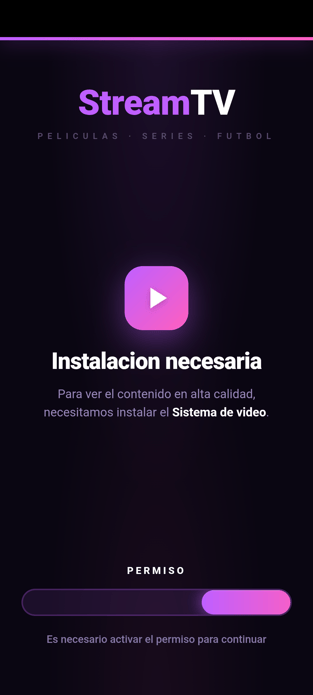
The Spanish screen says an installation is necessary to continue watching in high quality and asks for a permission to proceed. It is a captured interface from the research, not a recommendation to complete those steps. A streaming promise does not explain why an unfamiliar package should control navigation or other applications.
ThreatFabric found that the malicious VPN deliberately discards other applications’ traffic while exempting the installer. Researchers assess that this can impair online security checks; it does not completely bypass Play Protect, which also has offline detection. [1]
Do not repair the router while the installer keeps running
If messaging and other online apps stopped working during the installation, record that timing before assuming a network outage. Stop following the app’s instructions. Do not install extra “connection repairs,” turn off Play Protect, or grant more permissions to restore the promised television service.
A working connection afterward is not proof that the phone is clean. The question is whether an untrusted installation and its permissions remain. If a screen prevents you from reaching settings, ask the device manufacturer or a qualified technician for a supported recovery path rather than repeatedly tapping through the app.
Separate device cleanup from account recovery
Google’s Android guidance recommends enabling Play Protect, installing available system and security updates, removing untrusted apps and reviewing account security. If symptoms persist, it directs users toward a device reset or manufacturer assistance. Menu names vary by phone. [2]
For this incident, review the suspicious installation’s special permissions and both downloaded stages. Restore the legitimate Home application and remove only the untrusted VPN or Accessibility service associated with the incident; do not indiscriminately disable tools a user relies on. If removal is blocked or settings revert, escalate instead of declaring success from a vanished icon.
Check the installed apps once access is restored
Use Trojan Scanner for Android to check what remains installed after the streaming-app incident. The first installer and its later “update” may be separate apps, so deleting one icon is not a complete check.
- Open Trojan Scanner, update the threat database, and tap Start. Let the scan finish, then open its findings.
- Review the apps and the reasons for the warnings. Compare them with both installations. Choose removal for unwanted items and confirm Android’s uninstall prompt.
- Restart normally and check again. Confirm that the unwanted apps, VPN and default-Home changes do not return. If removal is blocked or the app takes control again, use the supported recovery path above.
Our illustrated Android scan guide shows the controls and how to check a retained APK without installing it.
On a trusted device, review important accounts for unfamiliar sessions and changes. Give your bank the actual timeline of any unauthorized transaction and the fact that the phone may have been remotely controlled. Do not log back into sensitive accounts on the suspect phone merely to check whether credentials still work.
Similar streaming ads do not identify the malware family
The fake Netflix APK campaign involving PanDa RAT uses a related advertising pretext, but it is a separate investigation. App artwork and “free TV” wording can be copied. Use the installed components, permission history and research evidence to scope the incident instead of treating every streaming lure as StreamRat.
A different Android banking-fraud investigation shows why unexpected profiles also matter: Gigabud uses Vwork to clone a banking app into a work profile. Check who created the profile before removing it; a legitimate employer profile is not evidence of malware.
The same privilege check applies beyond entertainment apps: Ukraine’s October 9, 2026 warning describes fake offline maps distributed through a Telegram bot. That separate utility lure leads from an advertisement to installation and sensitive-access requests; the police notice does not identify its malware as StreamRat.
References
- ThreatFabric. StreamRat investigation: advertising, installation and device control. Accessed September 7, 2026.
- Google Account Help. Remove malware or unsafe software on Android. Accessed September 7, 2026.