
A cat-themed daily planner was one of the disguises used by MATCHBOIL, a Windows malware downloader that ESET has traced in Ukrainian organizations. Opened by hand, one version displayed two boxes labeled “Today” and a window titled “Dairy.” Started with the argument its operators expected, it took a different route: checking the machine and fetching another malicious program.
ESET’s October 8 investigation follows that contrast across nearly two years of development. The downloader moved from a one-time retrieval to repeated checks for a new payload, while its harmless-looking interface became more plausible. The case explains why a program that opens normally—or appears to do very little—cannot establish that an emailed download is safe.
The investigation began with two uploaded samples
Researcher Fernando Tavella began examining the family in February 2026 after two samples appeared on VirusTotal. Their contact with a domain already associated with UAC-0099 led ESET to related samples in its own telemetry, then back to binaries with April 2024 compilation timestamps.
ESET observed MATCHBOIL at Ukrainian transportation companies in July and August 2025, a manufacturer in December 2025, and an energy-sector company in June 2026. Those are the reported sightings; October 8 is the investigation’s publication date. The report does not establish a transport disruption, factory shutdown or power outage.
ESET assesses with medium confidence that UAC-0099 is aligned with Russian interests. The group also uses Lonepage, covered in an earlier campaign, and can provide initial access to Sandworm. That context does not attribute every MATCHBOIL infection to a subsequent Sandworm operation.
Three requests turn a script into persistent access
The delivery chain described by ESET begins with a spearphishing link, an archive and a VBScript file. The recipient must be persuaded to run the script; merely reading the email is not the execution step. The script downloads and starts MATCHBOIL and can establish persistence for the downloader or its loader.
MATCHBOIL then identifies the machine using details such as its CPU ID and BIOS serial number. Its conversation with the command server has three parts:
- A first request obtains a number used in a header of the next request. ESET considers its precise purpose uncertain; it may help select or validate the payload.
- The second response contains HTML with a payload encoded as hexadecimal text. MATCHBOIL extracts that text, decodes it and writes the resulting program to disk.
- A third response supplies a string saved separately, potentially as configuration for the installed program.
In most cases ESET analyzed, the installed program was MATCHWOK, a C# backdoor. MATCHBOIL also arranges for that payload to run again through a scheduled task or a Windows startup registry entry. Removing the first downloaded script alone therefore does not account for the software it may already have installed.
A planner for the person, a timer for the operator
Late-2025 versions introduced the cat planner. The awkward interface was a useful clue, but its more important feature was the split between visible and malicious behavior: without the expected -auto argument, the program showed its planner; with it, the downloader proceeded into its checks and command-server communication.
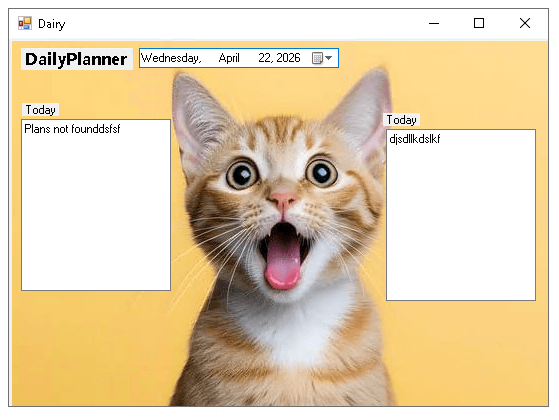
One check searched Windows event logs for at least three uptime entries showing two hours or more. The malware also checked for a debugger. These tests attempted to distinguish a lived-in computer from an analysis environment, rather than asking whether the person really wanted a planner.
Once past those checks, the downloader used a two-minute timer to repeat its server requests. A failed first connection no longer ended its opportunity to retrieve a payload. Separately, a scheduled task used by that generation relaunched the installed payload every seven minutes. The two intervals describe different mechanisms: fetching software and keeping the fetched software running.
The disguise improved, and the names changed
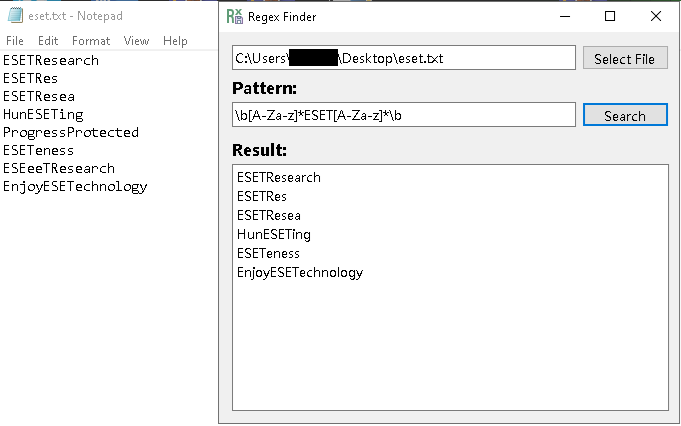
In February 2026, another variant replaced the conspicuous planner with a utility for searching text using regular expressions. Its expected argument changed to -renew. A working-looking search window was still the visible branch, not a reliable account of what the program could do under another startup condition.
The April 2026 variant examined in the report was a DLL run by a custom C# loader, rather than a standalone executable. Its installed payload used %LOCALAPPDATA%\SMTPClient\SMTPClientApplication.exe and a task named MailClient\Checker. Earlier versions had used names such as MeowMeowProgramm.exe under MeowCheck. These are dated research artifacts, not universal filenames or proof of infection on their own.
UAC-0099’s separately reported Notepad++ campaign illustrates why the family name is broader than one lure or path. Investigators should correlate the downloaded archive, script execution, installed files, startup entries and network activity instead of treating one familiar-looking application name as a verdict.
A different Ukrainian-targeted operation used an invitation rather than a planner: GitPower’s fake conference materials hid a Windows shortcut behind a PDF icon. The cases illustrate different execution lures; they do not establish shared operators.
October 23 follow-up: access passed to a destructive operator
ESET’s October 22 report documents a separate case at a Ukrainian grain logistics company. MATCHBOIL deployed MATCHWOK on July 16, 2025; MythicRatatoskr followed the next day. On September 17, 2025, SDelete was deployed through Active Directory Group Policy to wipe data. ESET assesses with high confidence that UAC-0099 handed access to Sandworm, but could not determine which group primarily operated MythicRatatoskr. These are historical intrusion dates, not new October infections or evidence that every planner infection ended in wiping. [2]
The additional backdoor used the legitimate Yggdrasil mesh network for command communication and started as a Windows service named ieupdate. Incident review therefore needs to look beyond the initial downloader to later services and network activity. A service name or Yggdrasil connection alone is not a verdict: correlate execution, installation and the wider intrusion timeline.
If the suspicious script ran
On an organization’s computer, report the archive and execution time to the incident-response team and follow its isolation instructions. Preserve the original message, files and relevant logs; changing tasks or deleting samples before evidence is collected can obscure which stage ran.
On a personally managed Windows PC, stop using the suspicious download. A security tool may remove a visible file while a loader, scheduled task, service or second payload remains. For cleanup, download Gridinsoft Anti-Malware, update its database, run a Full Scan, review and remove detected threats, then restart. If the installer cannot run, use the available recovery or Safe Mode route and return to scanning once access is restored. A scan can look for remaining threats; it cannot recover stolen information or prove that no access occurred.
If the page or email made you download an invoice, coupon, tracking app, browser extension, or support tool, scan the PC before opening it again or logging into sensitive accounts.
Check this PC after a suspicious downloadMATCHBOIL’s evolution made the first impression less useful and the hidden access more durable. The important boundary is the execution chain and what it installed, rather than whether the window on screen looked like an ordinary tool.
References
- Fernando Tavella. “MATCHBOIL: New tricks, same old evil intentions.” ESET Research / WeLiveSecurity, October 8, 2026. Research report.
- Anton Cherepanov and Peter Strýček. MythicRatatoskr: An Yggdrasil-enabled backdoor deployed in a UAC-0099-Sandworm collaboration. ESET Research / WeLiveSecurity, October 22, 2026; accessed October 23, 2026.