
A free offline navigator advertised on social media can lead to something much more invasive than maps. Ukraine’s Cyberpolice warned on October 9 that scammers are routing people through a website and a Telegram bot to a malicious app that asks for installation privileges and access to phone functions. The crucial decision comes when the supposed navigator asks you to lower installation barriers or grant access unrelated to navigation.
The download takes a detour through Telegram
The pitch bundles three familiar attractions: offline maps, no advertising and no charge. According to the police warning, tapping the advertisement opens a purpose-built website, which then directs the visitor to a Telegram bot for the file. The installation flow asks the user to allow installation from unknown sources and grant additional access.
That hand-off matters. A convincing website can make a file feel like the next normal step in getting the advertised service. A bot delivering it does not establish who built the app, what it contains or whether it is the official navigator. An ordinary navigation feature and the method used to distribute an installer are separate things to verify.
- Advertisement: the promise is free, ad-free offline navigation.
- Website: the page moves the download into a messenger.
- Telegram bot: the user receives a file to install.
- Phone settings: installation approval and access requests become the point where the lure can gain device privileges.
This sequence summarizes the police warning; it is not a captured conversation or a reproduction of the malicious application.
Permission to navigate is not permission to watch
Cyberpolice describes possible access to SMS, contacts, notifications, screen contents and entered data, with the risk extending to remote control and bank accounts. The notice does not identify a malware family, package name, sample hash, bot address or number of affected devices. Those possible capabilities should not be read as a confirmed loss on every phone that encountered the advertisement.
Location access can have an obvious purpose in a navigation app. Reading other apps’ notifications, observing screen activity or controlling the device raises a different question: which advertised map function needs that power? A request to show notifications is also different from access to read notifications from other apps. Check the actual permission, rather than treating every prompt containing the word “notifications” as the same thing.
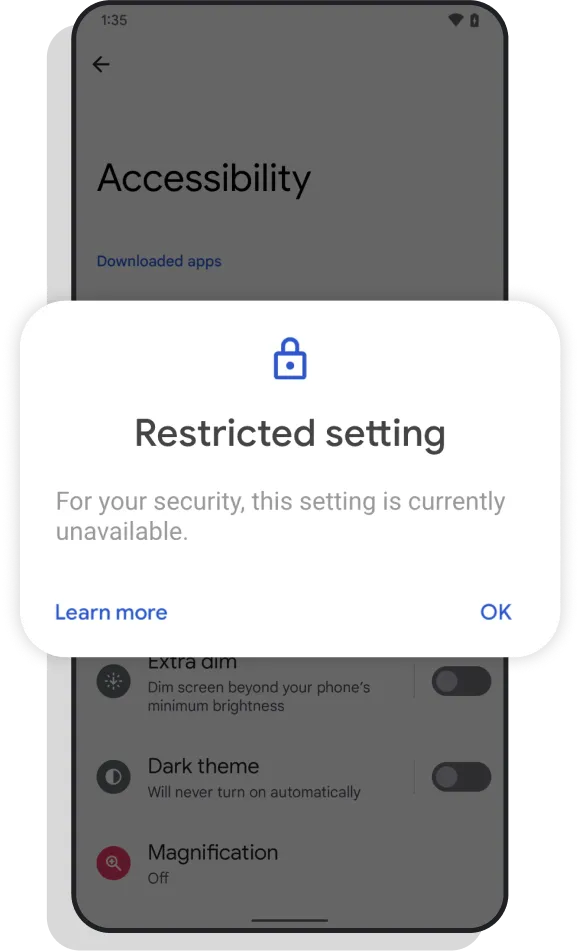
Google explains that attackers can persuade people to authorize installation through a browser or messenger, and that accessibility access can be abused to spy on or manipulate a phone. If Android displays a restricted-settings warning, stop and verify the app independently. Instructions from the download bot are not independent verification.
A different fake-app case, StreamRat’s streaming lure, shows why an attractive entertainment or utility promise deserves a separate check from the privileges an installer requests. That comparison does not identify the navigator malware as StreamRat.
Match the response to what you actually did
If you only saw the ad or opened the page, close it and obtain a navigator through its verified publisher and an official store. The warning does not establish that viewing the advertisement alone installs the app. If you downloaded the file but did not install it, delete the unused installer and decline further prompts.
If you installed the app, especially after granting sensitive access, stop using that phone for banking or password changes while you address it. Cyberpolice advises removing the suspicious application, changing important account passwords, contacting your banks and reviewing transactions. Use a separate trusted device for account recovery and bank contact so you are not entering replacement credentials into a potentially observed session.
If you installed the navigator, open Trojan Scanner for Android, update its threat database, and tap Start. Review the installed-app findings, check the app name and reason for concern, and confirm Android’s uninstall prompt for unwanted apps. This gives you a concrete way to investigate the unfamiliar app rather than trusting its map icon. Anti Spy can also help review suspicious combinations of hidden-app behavior and sensitive access.
Continue the bank and account steps even after removing the app: local cleanup cannot reverse a transfer or cancel stolen credentials. If removal is blocked or control problems persist, seek trusted device support instead of following more commands from the bot. Our Android malware guide illustrates the scan, review and removal steps.
The useful warning sign is the change in the deal: you wanted offline directions, but the installation asks you to hand over access to the rest of the phone.
F6’s separate October 26 case shows another utility disguise: ZloyRAT droppers advertised as a fuel finder and traffic radar. That report names its malware family and describes message and call permissions plus a legitimate-site front; it does not identify the earlier offline-map campaign as ZloyRAT.
References
- Cyberpolice of Ukraine. “A free navigator may conceal malicious software.” October 9, 2026, accessed October 10, 2026. Official warning.
- Google. “How Android helps you stay safe from mobile fraud apps.” November 16, 2023, accessed October 10, 2026. Installation and access safeguards.