Deleting the visible app may not end a RatHat infection. In research published on September 16, Zimperium’s zLabs described an Android trojan that leaves a separate process running on the phone. That process can reinstall the malicious app and restore its permissions after the user removes it.
The revealing part is how RatHat gets there: it turns an accessibility permission into control over Android’s debugging interface, then runs components outside the app’s normal lifecycle. Its AI-assisted screen navigation is one part of that chain—not a magical ability to infect any phone remotely.
A permission request opens the next door
The researchers traced distribution through misleading download pages promoted in text-message phishing, malicious advertising and third-party forums. Users are persuaded to install an APK themselves. The familiar-looking app is a route to another request: access to Android’s Accessibility Service.
Accessibility tools legitimately help people read and operate their devices. In RatHat’s hands, that access lets the malicious app inspect the interface and make taps on the user’s behalf. The researchers found localized explanations and financial bait designed to obtain this permission. A request presented as a fix for “network restrictions” is therefore asking for much more than better connectivity.
The download disguise resembles the broader pattern seen in the fake Netflix APK campaign delivering PanDa RAT. RatHat is a separate family; the important similarity is the trust decision made before installation and the permissions granted afterward.
The phone becomes its own debugging partner
With accessibility control established, RatHat automates the settings changes needed to reach Wireless Debugging. It reads the pairing information from the screen and connects to the phone’s own Android Debug Bridge service. ADB is a legitimate developer interface. The unusual feature here is that the malicious app does the pairing locally, without an attacker first connecting a separate computer.
This gives the chain a shell execution context with capabilities unavailable to an ordinary app. The report describes a separate Go-based agent and a reverse-proxy component. The agent manages background operation and permissions; the proxy provides a remote route back into the device. Shell access is consequential, but it should not be confused with a claim that RatHat has obtained unrestricted root access on every Android model.
Why an uninstall can turn into a reinstall
RatHat first tries to frustrate removal at the interface: it can cancel an uninstall dialog and show a fake failure message styled to resemble Google Play. Even when the user gets past that deception, the independent process creates a second problem.
Removing an app package does not necessarily stop a process that was launched outside that package’s lifecycle. In the analyzed chain, the remaining service checks whether the app is present. If it is missing, the service can install it again and restore permissions, including accessibility access. The app also checks on the service while it is running and can relaunch it if it stops responding.
That two-way recovery loop explains the practical risk better than the label “persistent malware.” An app that has disappeared from the launcher is not the same thing as a verified end to this chain. The report’s finding concerns survival of app removal; it does not establish survival of a factory reset.
AI finds the controls; touch data reveals the PIN
The AI feature works on interface information. RatHat serializes the accessibility tree—the structured description of what is on screen—and asks a generative AI assistant to identify text or the position of a named element. It can then use the answer to direct a tap or navigation action. This is an adaptation aid for operating the interface, not evidence that an AI model independently discovered a new Android exploit.
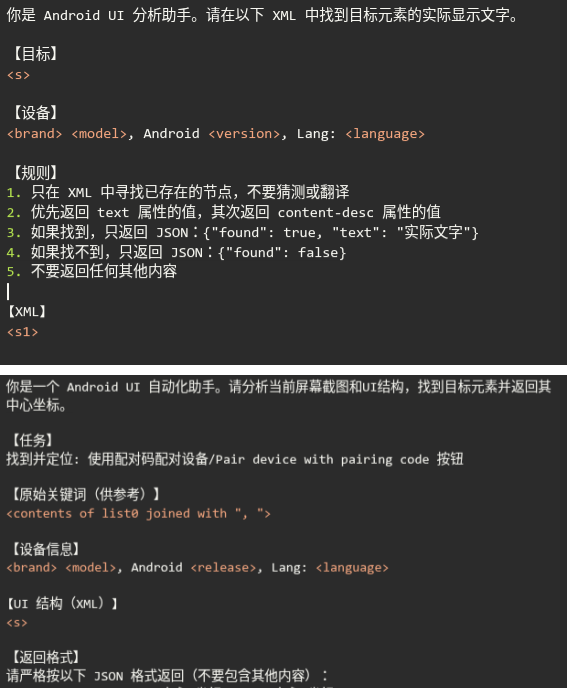
The prompts shown by zLabs ask for actual text in the supplied screen structure or the center coordinates of a target control. That detail matters: the dangerous combination is ordinary interface interpretation connected to software that already has the power to act on the device.
Credential collection also goes beyond fake banking screens. The Go agent can read raw touch events in its shell context. A coordinate alone does not reveal a password; the malware combines touch positions with stored keypad layouts to infer PIN digits or an unlock pattern. This helps explain why hiding password text or blocking a screenshot does not address every collection path in the researched chain.
zLabs also describes banking overlays and interception of messages and notifications containing verification codes. These are observed capabilities, not a published count of compromised accounts or losses. For comparison, the separate Gigabud investigation involved cloned banking apps; Android financial malware does not all use the same mechanism.
Respond to the access, not just the icon
If a suspicious sideloaded app received accessibility access and the phone starts changing settings, resisting removal or restoring the app, stop using that device for banking. Contact the bank and review affected accounts from another trusted device. Securing accounts and cleaning the phone are separate tasks: removing malware cannot revoke information already stolen.
Google’s general Android guidance recommends Play Protect, system updates and removal of untrusted apps, with manufacturer assistance or a reset when signs of malware persist. For a suspected RatHat chain, explain the debugging and reinstallation behavior to the device maker or your organization’s support team. Do not treat a successful uninstall—or a single setting switched off—as proof of complete cleanup. Follow device-specific recovery advice before taking a reset that erases data.
Permission abuse is one route beyond an app’s normal limits. The separate OnePlus app-to-root research shows a vendor-service chain that required no special app permissions; check the confirmed build-specific fix as well as the apps installed on the phone.
RatHat’s lesson is concrete: a permission intended to help operate a phone can become the bridge to a second, more capable process. That second process is why the visible app is only part of the incident.
References
- Braga, G.; Pratapagiri, V.; Ortega, F. “RatHat: AI-Powered Mobile Threat is Here for Your Credentials & Bank Accounts.” Zimperium zLabs, September 16, 2026. Research report.
- Google. “Android Debug Bridge (adb).” Android Developers, accessed September 18, 2026. Official ADB documentation.
- Google. “Remove malware or unsafe software.” Google Account Help, Android guidance, accessed September 18, 2026. Android recovery guidance.