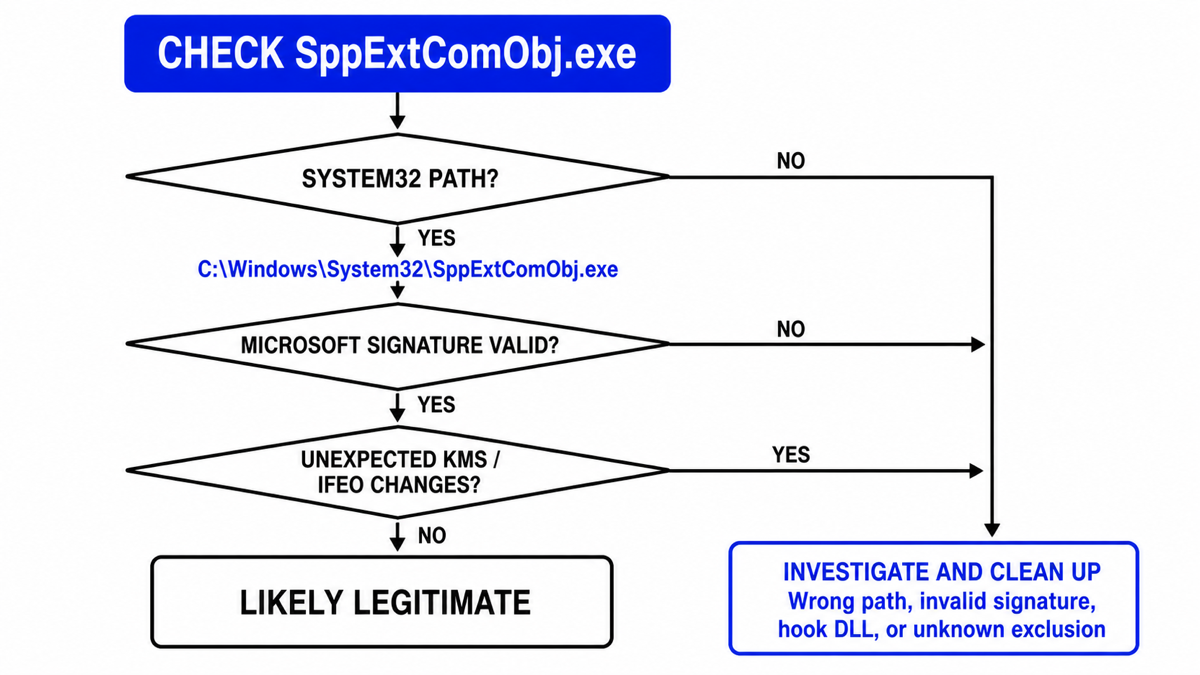
SppExtComObj.exe is normally the legitimate Microsoft KMS Connection Broker used by Windows volume-activation clients. The expected file is C:\Windows\System32\SppExtComObj.exe and should have a valid Microsoft signature. Do not delete that signed System32 file just because it opens a network connection. Investigate when the executable runs elsewhere, has an invalid signature, appears with SppExtComObjHook.dll, points through an unexpected Image File Execution Options entry, or contacts unknown infrastructure after an activator was installed.
| What you find | Risk and what to do |
|---|---|
| System32 path, valid Microsoft signature, organization-managed volume license | Usually legitimate. Leave the file in place and ask the administrator about expected activation traffic. |
| System32 path and valid signature on a normal retail PC | The file itself can still be genuine. Check Activation settings and confirm why Windows is configured for volume activation. |
| Wrong path, missing signature, altered file, or lookalike spelling | Suspicious. Keep it contained, inspect persistence, and run a full security scan. |
SppExtComObjHook.dll, unknown Defender exclusion, or unexpected IFEO value |
Likely activator residue or unauthorized tampering. Remove the source, repair Windows, and restore legitimate activation. |
| Repeated connections to an unknown host after a crack or activator | Do not allow the endpoint just to silence an alert. Treat the install as a security incident and investigate the whole chain. |
What is SppExtComObj.exe?
SppExtComObj.exe is part of the Windows Software Protection Platform. Its description is KMS Connection Broker. KMS is a legitimate client-server activation model used by organizations with volume licenses. Microsoft documents that KMS clients use TCP/IP and DNS to locate an organization’s KMS host, then periodically renew activation.[1]
That explains why a genuine broker may appear briefly and use the network. It does not mean every home PC should be contacting an unfamiliar activation server. A managed work device may have a valid reason; a personal retail device that started making repeated KMS connections after a crack, repack, repair image, or second-hand purchase deserves investigation.
Do not confuse the broker with sppsvc.exe, the Software Protection service. The two participate in the licensing platform but are separate executables with different roles. Likewise, SppExtComObjHook.dll is not merely another spelling of the normal broker.
How to check whether SppExtComObj.exe is safe
- Open the running file location. In Task Manager, open the Details tab, right-click
SppExtComObj.exe, and choose Open file location. The normal location isC:\Windows\System32\SppExtComObj.exe. - Check the signature. Open Properties → Digital Signatures and verify that Windows reports a valid Microsoft signature. A filename and folder are strong clues, not proof by themselves.
- Confirm the result with PowerShell. Open Terminal as administrator and run the read-only check below. Microsoft documents
Get-AuthenticodeSignatureas the cmdlet for retrieving a file’s Authenticode status.[2]
$file = "$env:WINDIR\System32\SppExtComObj.exe"
Get-AuthenticodeSignature -LiteralPath $file |
  Format-List Status, StatusMessage, SignerCertificate
Status : Valid and a Microsoft signer support the legitimate-file decision. A missing or invalid signature can also result from corruption, so do not classify the file from one signal. Continue with system repair and a scan rather than downloading a replacement executable from a file-library site.
- Check activation context. Open Settings → System → Activation. On an organization-managed PC, ask IT whether the device is meant to use volume activation. On a personal PC, note unexpected volume-license messages or recent activator use.
- Review network timing. A short activation attempt is different from constant traffic, repeated firewall alerts, or connections that began immediately after an unofficial installer. Record the remote host, time, parent process, and whether the activity returns after reboot.
- Check Windows Security. Review Protection History, Allowed threats, and exclusions. Remove an exclusion only when you know it was added without authorization; do not add a new one to make the broker, hook DLL, or activator disappear from scans.
What does SppExtComObjHook.dll mean?
SppExtComObjHook.dll is a separate library name commonly associated with unofficial activation tools. Its presence does not make the signed Microsoft broker malicious, but it changes the incident. The important questions are who installed the hook, how it loads, whether security exclusions were added, and what else arrived in the same package.
Some activators use Image File Execution Options (IFEO) entries to change how a licensing process starts or which DLL is loaded with it. IFEO is a real Windows debugging and mitigation mechanism, so the registry path alone is not automatically malicious. An entry becomes suspicious when you did not create it, it references SppExtComObjHook.dll or an unknown executable, and it appeared with a crack, KMS tool, security exclusion, scheduled task, or service.
You can inspect the relevant keys without modifying them:
$ifeo = "HKLM:\SOFTWARE\Microsoft\Windows NT\CurrentVersion\Image File Execution Options\SppExtComObj.exe"
$ifeo32 = "HKLM:\SOFTWARE\WOW6432Node\Microsoft\Windows NT\CurrentVersion\Image File Execution Options\SppExtComObj.exe"
Get-ItemProperty -LiteralPath $ifeo, $ifeo32 -ErrorAction SilentlyContinue
Look for values such as Debugger or VerifierDlls that point to an unfamiliar file. Do not delete registry data blindly on a company-managed device or a developer test machine. Export the evidence, identify the software that created it, and let IT or a trusted technician remove confirmed unauthorized changes.
Why does SppExtComObj.exe access the network?
A legitimate volume-activation client needs network access to locate and contact its organization’s KMS host. Microsoft says KMS uses DNS service records and TCP/IP, and that clients renew activation periodically.[1] A firewall event therefore needs context rather than a reflexive allow-or-block decision.
- Managed work or school device: compare the destination with the organization’s documented activation service. Ask IT before blocking it.
- Personal retail device: inspect Activation settings and recent software changes. Unexpected KMS behavior may indicate an old repair image, a previous owner’s configuration, or an activator.
- Unknown destination after a crack: do not whitelist it. Disconnect from sensitive accounts, remove the activator source, and scan the PC.
- Connection errors with a signed System32 file: repair Windows and legitimate activation. Do not paste public KMS server names, hosts-file edits, or bypass scripts from forums.
Network activity alone cannot prove malware. The strongest decision combines path, signature, activation type, registry hooks, exclusions, persistence, and the software installed immediately before the behavior started.
Repair SppExtComObj.exe and Windows activation safely
If the correct file is signed but activation errors or broker failures continue, repair Windows components before changing services or registry permissions. Microsoft recommends running DISM before System File Checker when protected system files may be damaged.[3]
DISM.exe /Online /Cleanup-Image /RestoreHealth
sfc /scannow
Restart after both commands finish, install pending Windows updates, and check Settings → System → Activation again. Use the built-in Activation troubleshooter, a valid digital license or product key, or the organization’s approved activation path. Do not replace SppExtComObj.exe manually, download a random copy, disable Software Protection, or install another activator.
Remove suspicious hooks and activator leftovers
- Keep detections contained. Do not restore a hook DLL, wrong-path executable, or activator merely to preserve activation.
- Uninstall the source. Remove KMSPico, AutoKMS, AutoPico, Microsoft Toolkit, or another unofficial activation package you find. The AutoKMS removal guide covers the detection-specific workflow.
- Check persistence. Review scheduled tasks, services, Startup apps, IFEO values, firewall rules, and Windows Security exclusions created around the same time.
- Delete the original installer. Remove the crack, archive, repack, or repair image that introduced the change. Do not keep a supposedly clean activator for later.
- Scan the whole PC. If the file ran, the warning returns, or exclusions were added, check for hidden files, scheduled tasks, services, bundled apps, browser changes, and other persistence.
- Repair and reactivate. Run DISM and SFC, restart, then restore legitimate Windows or Office activation.
Removing the visible DLL or executable may leave the installer, scheduled task, service, exclusion, or bundled module that created it. A full Gridinsoft Anti-Malware scan can check those persistence points and related detections before you sign back into important accounts.
If the process path is wrong, the name imitates a Windows component, or high CPU started after an unknown installer, scan for hidden miners, services, startup entries, and bundled components.
Scan SppExtComObj leftoversIf the activator came from an unknown download and the PC stored browser passwords, email sessions, work credentials, or cryptocurrency wallets, follow the post-malware Windows security audit. Change important passwords from a clean device if a stealer or other credential threat is detected.
FAQ
Can I end SppExtComObj.exe in Task Manager?
You can end a current activation attempt, but Windows may start the broker again when licensing needs it. Ending the process does not remove a hook, fix activation, or prove the file is malicious.
Is SppExtComObj.exe safe in System32?
The System32 path is expected, but also verify the Microsoft signature. A valid signature and legitimate volume-activation context are strong safety signals. A wrong path, invalid signature, unexpected hook DLL, or unauthorized IFEO entry requires investigation.
Should SppExtComObj.exe connect to the internet?
It can use the network on a legitimate KMS volume client. The destination should belong to the organization managing activation. Repeated connections to unknown infrastructure on a personal PC, especially after an activator, are not something to whitelist automatically.
Is SppExtComObjHook.dll a Windows file?
Do not treat it as the normal Microsoft broker. It is a separate hook-library name associated with unofficial activation tooling. Identify what installed it, keep security detections contained, inspect related tasks, services, IFEO values, and exclusions, and restore legitimate activation.
Will cleanup deactivate Windows?
It may if an unofficial activator supplied the bypass. That is expected. After cleanup, use a valid digital license or product key, your OEM activation, or the organization’s approved volume-activation service.
References
- Microsoft. “Key Management Services (KMS) activation planning for Windows Server.” Microsoft Learn, updated May 20, 2025; accessed August 28, 2026. https://learn.microsoft.com/en-us/windows-server/get-started/kms-activation-planning
- Microsoft. “Get-AuthenticodeSignature.” PowerShell documentation, accessed August 28, 2026. https://learn.microsoft.com/en-us/powershell/module/microsoft.powershell.security/get-authenticodesignature?view=powershell-7.5
- Microsoft. “Use the System File Checker tool to repair missing or corrupted system files.” Microsoft Support, accessed August 28, 2026. https://support.microsoft.com/en-us/windows/experience/backup-recovery/use-the-system-file-checker-tool-to-repair-missing-or-corrupted-system-files