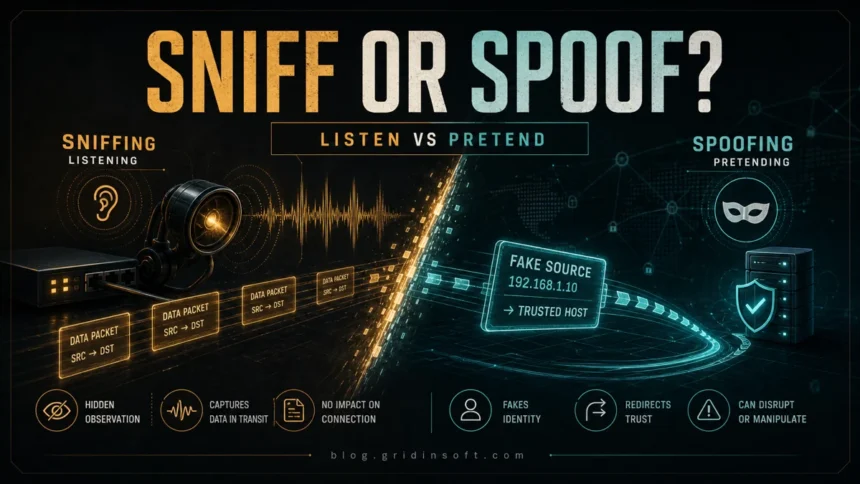
Sniffing and spoofing are often mentioned together, but they are not the same attack. The difference between sniffing and spoofing is simple: sniffing watches or captures traffic, while spoofing pretends to be a trusted source. A sniffer may quietly read packets moving across a network. A spoofing attack forges an email sender, IP address, DNS answer, website, caller ID, file extension, or another identity signal so the victim trusts the wrong thing.
That distinction matters because the defenses are different. Encryption and safer networks reduce what sniffing can expose. Authentication, sender/domain checks, packet filtering, and cautious link/file handling reduce what spoofing can trick you into trusting.
Sniffing vs Spoofing: Quick Difference
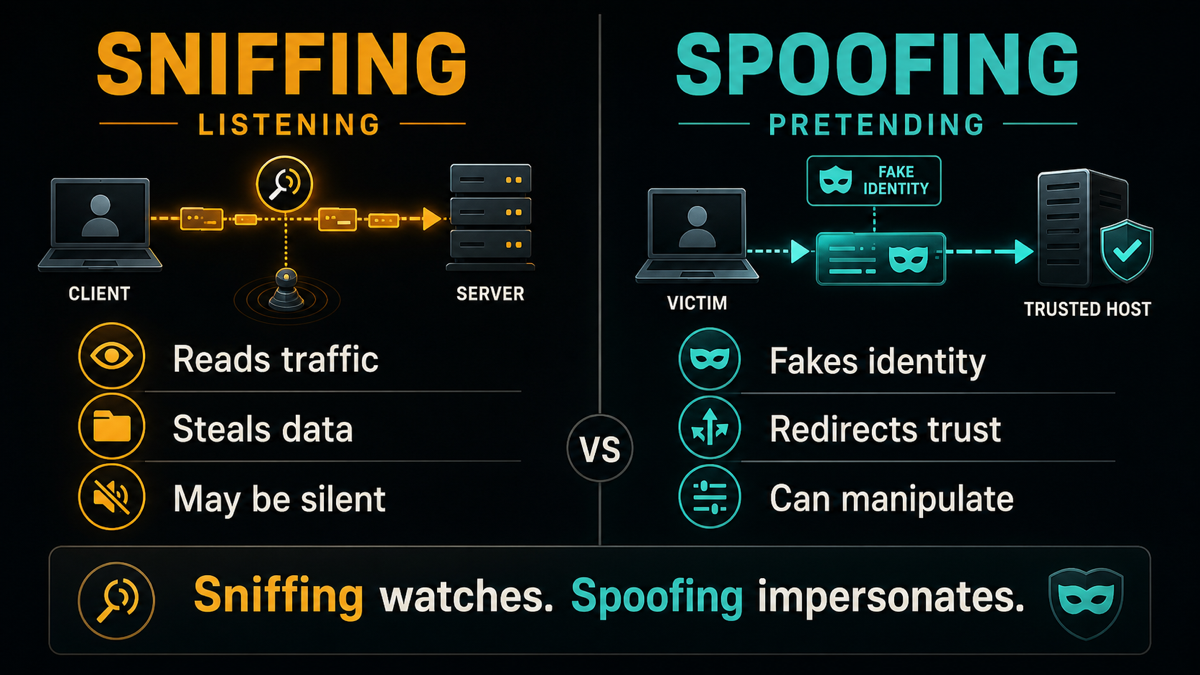
- Main idea: sniffing listens to traffic; spoofing impersonates a trusted identity.
- Attacker action: sniffing captures packets, credentials, cookies, or traffic patterns; spoofing forges a sender, source address, DNS answer, website, or file identity.
- Typical behavior: sniffing can be silent and observational; spoofing usually injects or presents false information.
- Common examples: sniffing includes open Wi-Fi capture and ARP-based interception; spoofing includes email, DNS, ARP, IP, caller ID, website, and file-extension spoofing.
- Main risk: sniffing exposes private data in transit; spoofing makes the victim trust the wrong source.
- Best first defense: use encrypted connections and trusted networks against sniffing; verify senders, domains, files, and account prompts against spoofing.
What Is Sniffing?
Sniffing is the capture and inspection of data packets as they travel through a network. Network administrators use packet capture for troubleshooting: finding failed connections, overloaded services, misconfigured devices, or suspicious traffic. Attackers use the same basic idea for a different goal: reading traffic that should have stayed private.
A sniffing attack is most dangerous when the attacker can see unencrypted or poorly protected traffic. That may happen on an open Wi-Fi network, inside a compromised router, on an infected computer, or on a local network where an attacker has already gained access. If passwords, session cookies, tokens, or form data travel without strong encryption, sniffing can expose them.
Passive Sniffing
Passive sniffing means the attacker listens without trying to change traffic flow. On old hub-based networks this was easier because traffic was visible to more devices. On modern switched networks, passive sniffing is more limited, but it can still happen on wireless networks, misconfigured infrastructure, mirrored ports, infected endpoints, or compromised network devices.
Active Sniffing
Active sniffing means the attacker first manipulates the network so traffic passes through a place they can observe. ARP poisoning is a common example: the attacker tricks devices on a local network into sending traffic through the attacker-controlled machine. This is why sniffing and spoofing are often discussed together. A spoofed ARP message can create the position needed for sniffing.
What Is Spoofing?
Spoofing is impersonation. The attacker makes something look as if it came from a trusted source, even when it did not. Spoofing can target technical network identifiers, such as IP, DNS, or ARP data, or user-facing signals, such as an email sender, website address, caller ID, QR code, or file extension.
The goal is to redirect trust. A fake sender can make a phishing email look internal. A fake DNS answer can send a browser to a malicious site. A forged IP source can hide where traffic came from or support a DDoS reflection attack. A renamed file such as invoice.pdf.exe can make malware look like a document if file extensions are hidden.
Common Types of Spoofing
- Email spoofing: a message appears to come from a trusted person or company. It is often used with phishing links, fake invoices, account warnings, and malware attachments.
- Website spoofing: a fake page copies the look of a login, payment, delivery, crypto, or support website to steal credentials or payments.
- DNS spoofing: a false DNS answer sends users to the wrong IP address. See our deeper guide to DNS spoofing and cache poisoning.
- ARP spoofing: forged ARP messages on a local network can redirect traffic through an attacker. See our guide to ARP spoofing attacks.
- IP spoofing: packets carry a forged source IP address. This is common in some DDoS and reflection scenarios. See our guide to IP spoofing.
- Caller ID or SMS spoofing: a phone call or text appears to come from a bank, delivery service, government office, coworker, or family member.
- File extension spoofing: a malicious file is named to look like a document, image, invoice, or installer.
How Sniffing and Spoofing Can Work Together
Sniffing and spoofing are different, but they can appear in the same incident. For example, an attacker on the same local network may spoof ARP replies so a victim’s traffic flows through the attacker’s device. Once traffic is redirected, the attacker can sniff packets and look for exposed data. In another case, spoofed email may deliver malware, and that malware may later capture local traffic or steal browser session data.
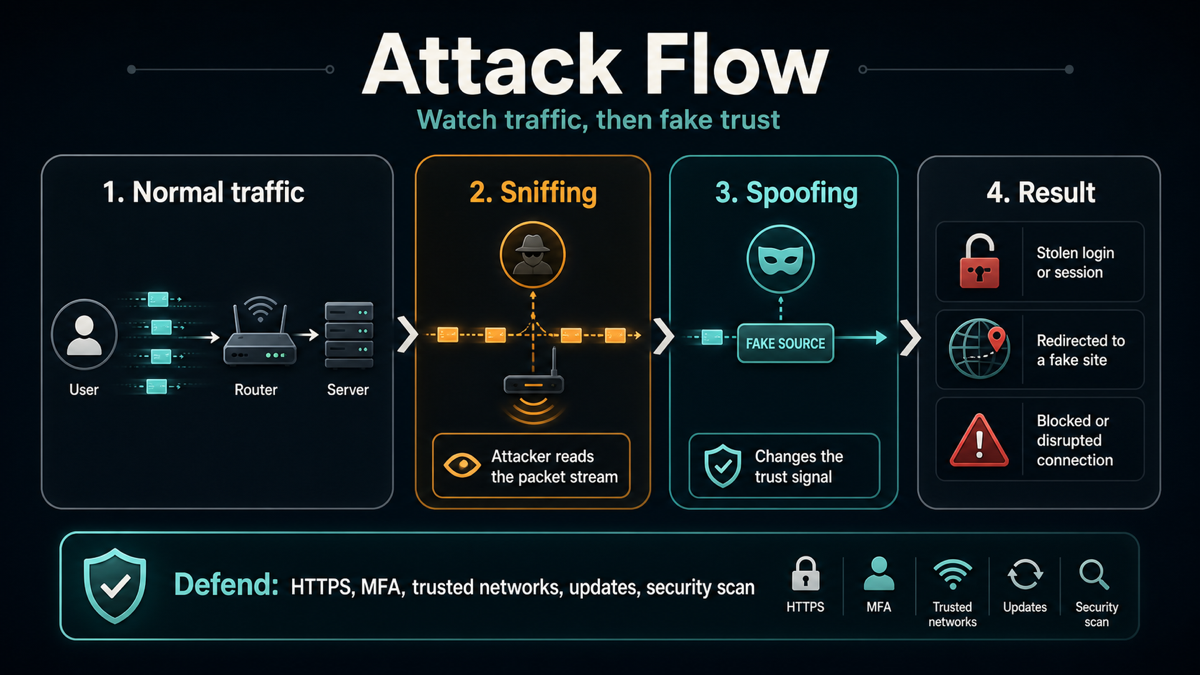
For normal users, the important lesson is not to memorize every packet-level detail. Watch for two questions: Could someone be reading my traffic? and Could this source be fake? The first question points to sniffing defenses. The second points to spoofing defenses.
How to Protect Against Sniffing
- Prefer HTTPS websites. HTTPS helps protect page content, credentials, and cookies from simple traffic capture.
- Avoid sensitive logins on open Wi-Fi. If you must use public Wi-Fi, use a trusted VPN and avoid entering passwords on unfamiliar or captive-portal-like pages.
- Keep routers and devices updated. Old router firmware, weak Wi-Fi passwords, and infected devices make local traffic attacks easier.
- Use MFA for important accounts. If a password or session clue is exposed, MFA can reduce the chance of account takeover.
- Watch for certificate and browser warnings. Do not ignore warnings about invalid certificates, unsafe connections, or suspicious redirects.
How to Protect Against Spoofing
- Check the real domain before signing in. Look beyond the logo. Attackers copy design more easily than they control the legitimate domain.
- Treat urgent messages carefully. Spoofed emails and calls often pressure you to pay, reset a password, open an attachment, or approve a login.
- Verify payment and account requests through a separate channel. Do not reply to the same email thread or call back the number in the message.
- Show file extensions in Windows. This helps reveal files disguised as documents, such as double-extension malware.
- Secure DNS and router settings. Use trusted DNS settings, protect router admin access, and investigate unexplained DNS changes.
- Scan suspicious downloads. If a file, installer, archive, or email attachment looks unusual, check it before opening. Gridinsoft Anti-Malware can help detect malicious files and cleanup after suspicious activity.
When Should You Suspect an Attack?
Suspect sniffing when account activity appears after using public Wi-Fi, browser warnings appear during login, or network behavior changes after joining an unfamiliar hotspot. Suspect spoofing when a familiar sender asks for unusual action, a login page looks almost right but the domain is wrong, a call claims to be urgent but cannot be verified, or a file name is crafted to hide what will actually run.
If you already clicked a suspicious link or opened a questionable file, disconnect from the risky network, change passwords from a trusted device, enable MFA, review account sessions, and scan the affected computer. For links and domains, Gridinsoft’s online checking tools can help you verify whether a site is suspicious before you trust it.
FAQ
Is sniffing passive or active?
Sniffing can be passive when an attacker only observes traffic. It becomes active when the attacker first manipulates the network, for example by using ARP poisoning to redirect traffic through a device they control.
Is spoofing the same as phishing?
No. Spoofing means pretending to be a trusted source. Phishing is the social-engineering attempt to make you reveal information or take an unsafe action. Many phishing attacks use spoofing, but spoofing can also happen at the network level.
Can HTTPS stop sniffing?
HTTPS can prevent simple packet capture from revealing page content, passwords, and cookies. It does not protect you from every risk, especially if the device is infected, the user ignores certificate warnings, or the attack redirects the user to a fake site.
Can a VPN prevent sniffing on public Wi-Fi?
A trusted VPN can reduce exposure on public Wi-Fi by encrypting traffic between your device and the VPN provider. It does not make phishing pages, malware downloads, or spoofed messages safe.
What should I do if I suspect sniffing or spoofing?
Move to a trusted network, change important passwords from a clean device, enable MFA, check active account sessions, inspect router/DNS settings if the problem is local, and scan the computer for malware or unwanted tools.
References
- SEED Labs. “Packet Sniffing and Spoofing Lab.” Syracuse University, accessed June 11, 2026. https://seedsecuritylabs.org/Labs_20.04/Networking/Sniffing_Spoofing/
- Wireshark Foundation. “Wireshark User’s Guide.” Wireshark Documentation, accessed June 11, 2026. https://www.wireshark.org/docs/wsug_html_chunked/
- Cybersecurity and Infrastructure Security Agency. “More Than a Password.” CISA, accessed June 11, 2026. https://www.cisa.gov/MFA