
ARP spoofing, also called ARP cache poisoning, is a local-network attack where a device is tricked into sending traffic to the wrong MAC address. In a typical case, the attacker pretends to be the router or gateway, so the victim’s traffic passes through the attacker before it reaches the real destination. That can enable man-in-the-middle interception, traffic modification, session hijacking attempts, or a denial-of-service condition on the local network.
The important detail is scope: ARP spoofing works inside the same local network segment. It is most relevant on public WiFi, guest networks without client isolation, poorly segmented office LANs, compromised home networks, and lab or penetration-testing environments. If your security tool reports an “ARP Cache Poisoning Attack,” do not panic, but do verify the gateway MAC address and look for repeated ARP changes before dismissing it as a false alarm.

What Is ARP and Why Can It Be Spoofed?
The Address Resolution Protocol (ARP) maps an IPv4 address, such as 192.168.1.1, to a device’s physical MAC address on a local network. When your computer needs to reach the router, it asks the local network which MAC address owns the router’s IP address. The reply is saved in the ARP cache so the device can send Ethernet frames correctly.
The weakness is that classic ARP does not authenticate replies. A device can announce an IP-to-MAC mapping, and other devices may cache it even when the mapping is false. ARP was designed for address resolution, not for proving identity, so modern networks need additional controls around it.
Key ARP Spoofing Conditions
- Same local network: the attacker normally needs access to the victim’s LAN, WiFi, VLAN, or a compromised device inside it.
- Unauthenticated ARP replies: forged replies can overwrite normal ARP cache entries.
- Gateway impersonation: the most common target is the default gateway IP because most outbound traffic uses it.
- Weak segmentation: flat networks make it easier for one compromised or malicious device to affect many others.
- Short but repeatable effect: ARP cache entries expire, so attackers often keep sending forged ARP replies.
How ARP Spoofing Works
In a normal exchange, your computer learns that the router’s IP address belongs to the router’s real MAC address. In an ARP spoofing attack, a rogue device sends forged ARP replies such as “192.168.1.1 is at my MAC address.” If the victim accepts that mapping, traffic meant for the router goes to the rogue device first.
- The attacker joins the local network. This can happen through open WiFi, a stolen WiFi password, a rogue device, or a compromised endpoint.
- The attacker sends forged ARP replies. The victim is told that the gateway IP belongs to the attacker’s MAC address, while the gateway may be told that the victim IP belongs to the attacker.
- The victim updates its ARP cache. The wrong mapping is stored as if it were legitimate.
- Traffic is rerouted. The attacker can forward it, inspect metadata, attempt to modify unencrypted traffic, or block it.
- The attacker repeats the poison messages. Repetition keeps the false mapping alive after normal cache expiry.
Strong encryption limits what an attacker can read, but it does not make the ARP attack disappear. HTTPS, SSH, and a trusted VPN can protect the content of the traffic; network controls such as client isolation, DHCP snooping, and Dynamic ARP Inspection help stop the traffic from being rerouted in the first place.
Signs of ARP Spoofing or ARP Cache Poisoning
ARP spoofing can be quiet, so a single symptom is rarely enough. Treat the following as signals to investigate, especially when several appear together:
- a security alert saying ARP Cache Poisoning Attack or ARP spoofing detected;
- the default gateway IP suddenly maps to a different MAC address;
- several important IP addresses map to the same unfamiliar MAC address;
- unexpected connection drops, slow network response, or captive-portal-like redirects;
- router, switch, or EDR logs show repeated gratuitous ARP packets;
- the alert appears only on one WiFi network and disappears on another trusted network.
What to Do if an Antivirus Reports ARP Cache Poisoning
Many people first meet this problem through an antivirus or endpoint-security alert. The alert can be real, but false positives also happen on busy home and office networks. Router reboots, DHCP renewals, failover, virtual machines, network bridges, MAC randomization, and devices reconnecting after sleep can all create suspicious-looking ARP activity.
- Record the alert details. Save the IP address, MAC address, interface name, time, and whether the alert names your router IP.
- Check the gateway MAC. On Windows, run
arp -aand compare the MAC for the gateway IP with the router admin page or a known-good record. - Restart the network path carefully. Reboot the router, disconnect suspicious devices, reconnect your computer, and check whether the same MAC mismatch returns.
- Change WiFi credentials if the network is untrusted. Use WPA2/WPA3, disable WPS, remove unknown devices, and enable guest-network isolation where available.
- Scan endpoints if the alert repeats. A local compromise can create the same symptoms as an outside intruder. Gridinsoft Anti-Malware can help check Windows endpoints for malware that may be abusing local network access.
- Escalate on business networks. Ask the network admin to inspect switch logs, DHCP snooping bindings, ARP inspection events, and recent device changes.
If the alert happened once after a router restart and the gateway MAC now matches, it may have been a transient network event. If the gateway MAC keeps changing, multiple devices show the same warning, or the alert appears together with redirects or session problems, treat it as an active network incident.
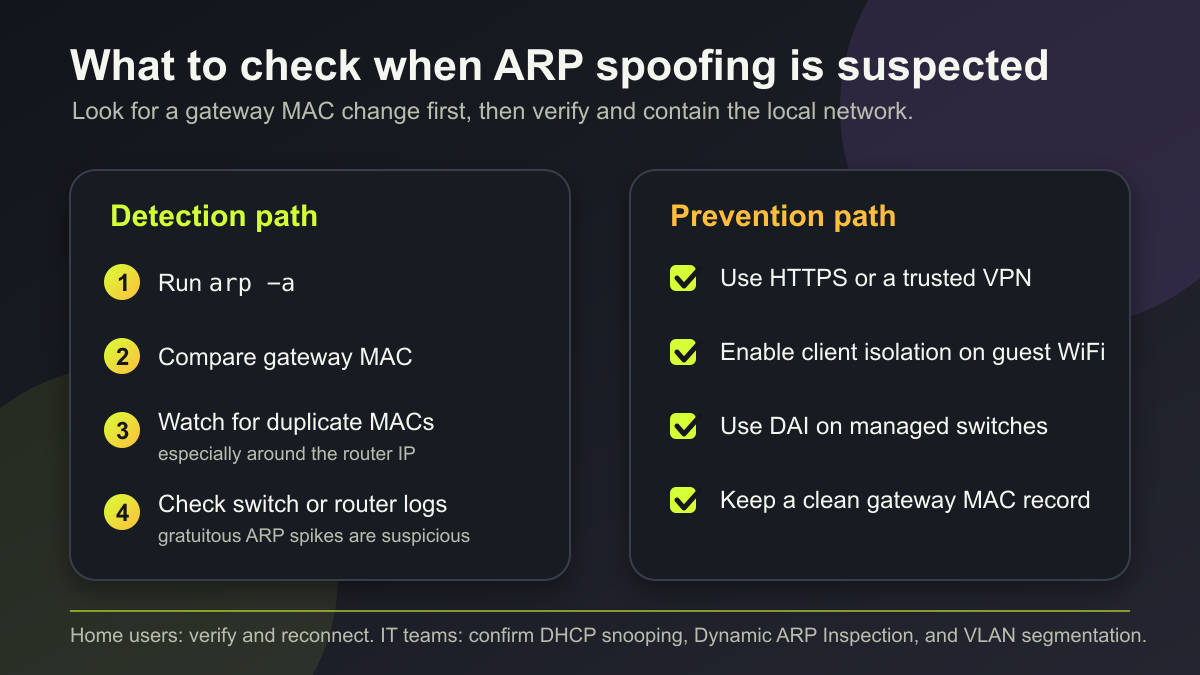
How to Detect ARP Spoofing Manually
The fastest manual check is to compare your ARP cache with the router’s real MAC address. On Windows, open Command Prompt and run:
arp -aFind the row for your default gateway, usually something like 192.168.1.1 or 192.168.0.1. Then compare that physical address with the router label, router admin interface, or a trusted previous record. A changed gateway MAC is not automatic proof of attack – routers can be replaced, bridged, or virtualized – but an unexplained change is a strong reason to investigate.
Other checks help confirm the signal:
- run
arp -aseveral times and look for frequent gateway MAC changes; - check whether multiple IP addresses share the same unexpected MAC address;
- compare results from two devices on the same network;
- capture traffic with an approved network-monitoring tool and look for repeated unsolicited ARP replies;
- review managed-switch logs for ARP inspection drops or MAC flapping.
How to Prevent ARP Spoofing
For Home Networks
- Use WPA2 or WPA3 and a strong WiFi password. ARP spoofing is much harder when untrusted devices cannot join the LAN.
- Enable guest-network isolation. Guests and IoT devices should not be able to talk directly to your main computer.
- Keep router firmware updated. Updates often improve network isolation, logging, and security defaults.
- Use HTTPS and a trusted VPN on public WiFi. This reduces the value of intercepted traffic even if the network is hostile.
- Keep a clean gateway MAC note. Record the router IP and MAC after a known-good setup so future alerts are easier to validate.
For Business and Managed Networks
- Enable DHCP snooping and Dynamic ARP Inspection. DAI checks ARP packets against trusted IP-to-MAC bindings and drops suspicious packets.
- Segment the network with VLANs. ARP traffic stays local to a broadcast domain, so segmentation limits the blast radius.
- Use 802.1X or NAC where practical. Prevent unknown devices from becoming trusted LAN participants.
- Monitor gratuitous ARP and MAC flapping. These signals are useful when correlated with endpoint and switch events.
- Use static ARP only for critical systems. Static mappings can help, but they are hard to maintain at scale and can cause outages when equipment changes.
ARP Spoofing vs DNS Spoofing and IP Spoofing
ARP spoofing, DNS spoofing, and IP spoofing are related, but they target different layers of trust.
| Attack | What is faked | Where it matters most |
|---|---|---|
| ARP spoofing | IP-to-MAC mapping on a local IPv4 network | LAN, WiFi, VLAN, gateway traffic |
| DNS spoofing | Domain-to-IP answer | Website redirection and phishing |
| IP spoofing | Source IP address in packets | DDoS, filtering bypass, protocol abuse |
For a broader overview of identity-based network tricks, see our guide to types of spoofing attacks. If you are comparing social-engineering terms, the phishing vs spoofing guide explains the difference between faking identity and luring a victim into action.
FAQ
Can ARP spoofing affect WiFi?
Yes. WiFi is still a local network, so ARP spoofing can happen if the attacker is on the same network segment. Public WiFi and guest networks without client isolation are higher risk.
Does a VPN stop ARP spoofing?
A VPN does not stop forged ARP messages, but it can protect the contents of your traffic if the attacker succeeds in redirecting it. Use a VPN as content protection, not as the only network-control measure.
Is every ARP cache poisoning alert a real attack?
No. Security tools can flag legitimate network changes, DHCP renewals, router failover, virtual machines, or MAC randomization as suspicious. Confirm the alert with gateway MAC checks, logs, and repeated behavior.
Can ARP spoofing happen across the internet?
Not in the usual sense. ARP is used for local IPv4 address resolution. A remote attacker would normally need to compromise a device inside the local network or gain access to the same LAN or WiFi segment.
What is the quickest check for a home user?
Run arp -a, find the router IP, and compare its MAC address with your router’s known MAC. Then reboot the router, remove unknown devices, and see whether the mismatch returns.
References
- David C. Plummer. “An Ethernet Address Resolution Protocol.” RFC 826, Internet Engineering Task Force, November 1982, accessed June 7, 2026. https://datatracker.ietf.org/doc/rfc826/
- Cisco. “Configuring Dynamic ARP Inspection.” Cisco IOS XE Security Configuration Guide, accessed June 7, 2026. https://www.cisco.com/c/en/us/td/docs/switches/lan/catalyst3650/software/release/16-9/configuration_guide/sec/b_169_sec_3650_cg/configuring_dynamic_arp_inspection.html
- ESET Online Help. “ARP Cache Poisoning.” ESET Glossary, accessed June 7, 2026. https://help.eset.com/glossary/en-US/arp_poisoning.html