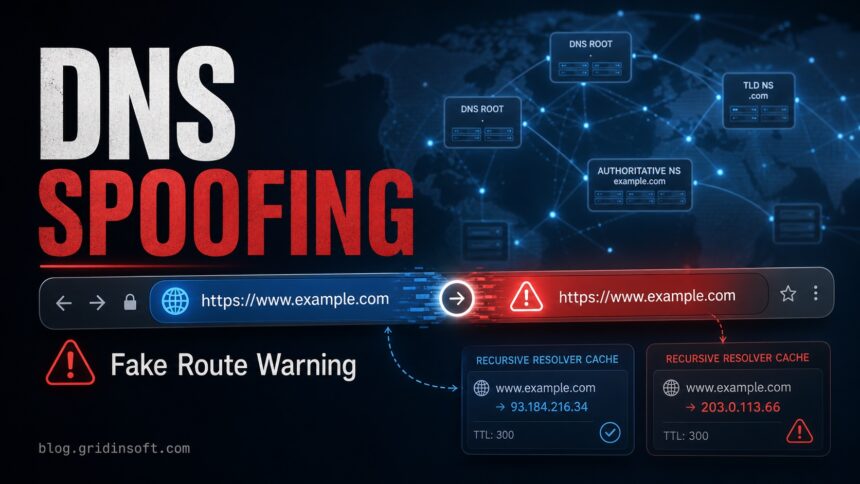
DNS spoofing is an attack that makes a real domain resolve to the wrong IP address. Instead of reaching the legitimate website, the browser, app, or device can be sent to an attacker-controlled server that looks similar enough to steal passwords, push malware, or intercept traffic. The fastest user response is to stop entering credentials, compare the DNS result with a trusted resolver, clear the local DNS cache, check router DNS settings, and scan the device if the DNS settings changed without your approval.
What Is DNS Spoofing?
DNS spoofing, often discussed together with DNS cache poisoning, manipulates the answer returned by the Domain Name System. DNS normally translates a readable domain such as example.com into an IP address. In a spoofing attack, a forged answer is accepted somewhere in that path, so a correct-looking domain can lead to a fake destination.
The practical risk is simple: the address bar may still show the domain you typed, while the DNS answer behind it points somewhere else. HTTPS certificate warnings, login pages that suddenly look different, repeated redirects, or router DNS servers you do not recognize are all reasons to stop and investigate.
Why DNS Spoofing Matters
DNS spoofing is dangerous because it can happen before the website itself loads. A victim may type the correct domain, use a saved bookmark, and still be routed through poisoned DNS data. That makes the attack especially useful for phishing, credential theft, fake software updates, payment-page fraud, and malware delivery.
DNS Spoofing vs Cache Poisoning vs DNS Hijacking
These terms are related, but they do not describe the exact same failure point:
DNS spoofing
A forged DNS answer sends a domain to the wrong IP address. It is the broad attack idea: the user asks for one domain, but DNS points them somewhere else.
DNS cache poisoning
Fake DNS data is stored in a resolver cache, so later users receive the same bad answer until the entry expires or is cleared.
DNS hijacking
The attacker changes the DNS path itself, often by altering router DNS settings, registrar records, browser settings, or malware-controlled network settings. See our separate DNS spoofing vs DNS hijacking guide for that distinction.
How DNS Spoofing Works
A normal DNS lookup asks a resolver for the IP address behind a domain. If the resolver already has a trusted cached answer, it returns it quickly. If not, it queries the DNS hierarchy until it finds an authoritative answer. DNS spoofing abuses weaknesses in this process: an attacker may race a forged response, compromise a local network, tamper with router DNS settings, poison a resolver cache, or alter local host/DNS settings through malware.
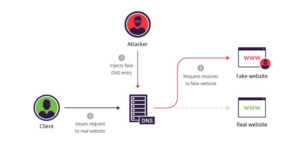
Modern resolvers use protections such as source-port randomization, stronger transaction IDs, DNSSEC validation, and operational monitoring, so broad cache poisoning is harder than it was years ago. For home users, however, DNS spoofing often shows up through a simpler path: a compromised router, unsafe public Wi-Fi, a malicious VPN/proxy profile, browser hijacker, or malware that changes DNS settings.
Warning Signs of DNS Spoofing
- A familiar banking, mail, crypto, or work login page looks slightly wrong or asks for extra information.
- The browser shows a certificate warning, mixed-content warning, or repeated redirects for a site that normally works.
- Different devices on the same Wi-Fi reach different versions of the same domain.
- Your router or adapter uses DNS servers you did not configure.
- Security software reports browser hijacker activity, modified network settings, or blocked outbound traffic.
- Flushing the DNS cache temporarily fixes the problem, but the wrong address returns after reconnecting to the network.
How to Check for DNS Spoofing
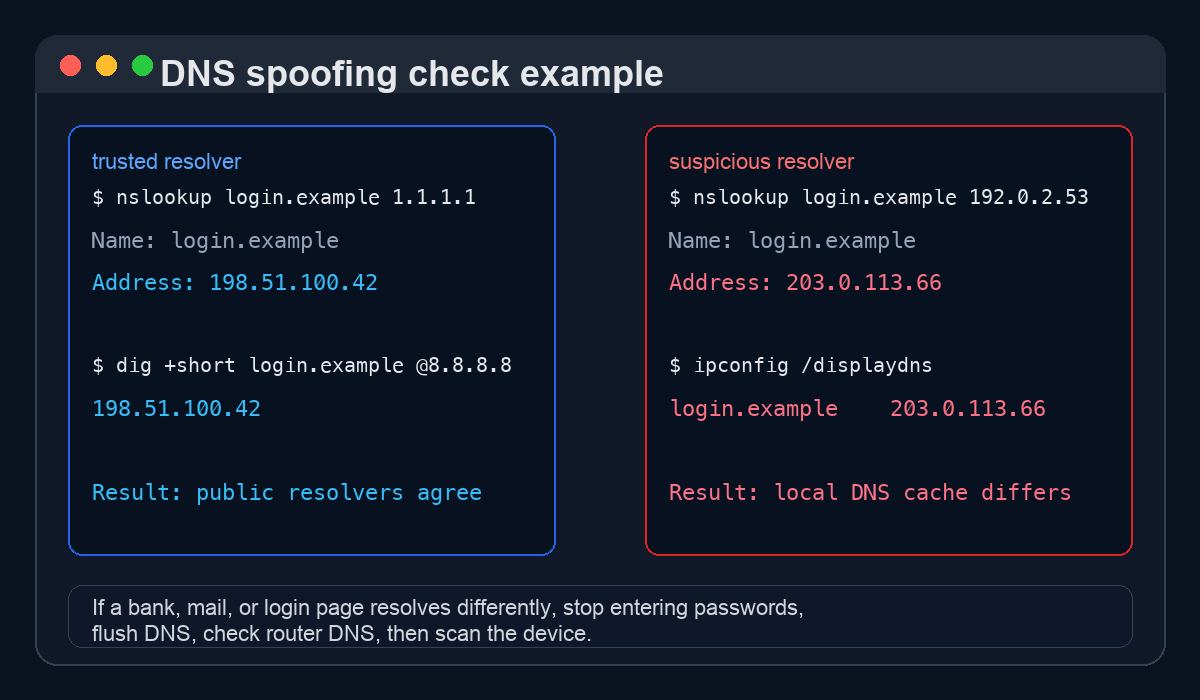
Do not test with a password page first. Use a domain you can safely inspect, and compare answers from more than one trusted resolver. A mismatch does not automatically prove an attack because DNS can vary by region, CDN, load balancing, and record type, but a suspicious mismatch on a login domain deserves immediate attention.
Windows Checks
- Open Command Prompt as administrator.
- Run
ipconfig /alland check the DNS servers assigned to your active adapter. - Run
ipconfig /displaydnsand look for the suspicious domain. - Run
nslookup example.com 1.1.1.1andnslookup example.com 8.8.8.8, replacingexample.comwith the domain you are checking. - If the local cache or router resolver returns a very different answer for a sensitive domain, run
ipconfig /flushdns, restart the browser, and re-check router DNS settings.
Router and Browser Checks
- Log in to the router and inspect WAN/LAN DNS servers. Unknown DNS IPs are a common sign of router hijacking.
- Check browser DNS-over-HTTPS settings. A malicious extension or policy can route browser DNS separately from the operating system.
- Review VPN, proxy, and “web protection” apps. Some are legitimate, but unwanted apps can force their own resolver.
- Use the Gridinsoft Online Virus Scanner to check a suspicious destination URL before opening it again.
What to Do If You Suspect DNS Spoofing
- Stop entering passwords, card details, recovery codes, and one-time tokens on the affected site.
- Disconnect from the suspicious Wi-Fi or switch to a known-good network.
- Clear the OS DNS cache and the browser DNS/socket cache.
- Check adapter, router, VPN, proxy, and browser DNS settings.
- Update router firmware and change the router admin password if DNS settings were changed.
- Scan the device for malware, browser hijackers, and unwanted network tools. If the DNS change appeared after popups, fake updates, cracked software, or a browser extension, run a full scan with Gridinsoft Anti-Malware.
- Change important passwords from a clean device if you entered credentials while the redirect was active.
How to Prevent DNS Spoofing
Prevention depends on where you control the DNS path. A home user cannot enable DNSSEC for every site on the Internet, but they can use a trustworthy resolver, secure the router, avoid unsafe VPN/proxy profiles, and keep the system clean. Domain owners and administrators should add validation and monitoring on top.
For Home Users
- Use a reputable resolver that supports DNSSEC validation and encrypted DNS options.
- Change default router credentials and keep router firmware updated.
- Do not install DNS/VPN/proxy profiles from unknown “free privacy” tools.
- Keep browsers, extensions, and security software updated.
- Scan after browser redirects, fake update pages, or unwanted DNS changes.
For Site Owners and Admins
- Enable DNSSEC signing for domains where your registrar and DNS provider support it.
- Use strong registrar security: MFA, registry lock where available, and restricted DNS account access.
- Monitor A, AAAA, MX, NS, DS, and TXT record changes.
- Keep DNS server software updated; outdated resolver behavior is a recurring cache-poisoning risk.
- Separate recursive resolvers from authoritative DNS services and disable unnecessary recursion.
Does HTTPS Stop DNS Spoofing?
HTTPS helps, but it is not a complete DNS spoofing defense. A valid HTTPS certificate makes it much harder for an attacker to impersonate a real domain without triggering a certificate error. Still, DNS spoofing can send a user to a lookalike domain, trigger warning fatigue, target non-browser traffic, or work together with malware that changes trust settings. Treat certificate warnings on sensitive sites as a stop sign.
FAQ
Is DNS spoofing the same as DNS cache poisoning?
They are closely related, but not always identical. DNS spoofing is the broader idea of returning a forged DNS answer. DNS cache poisoning is one way to do it by storing fake DNS data in a resolver cache.
Can DNS spoofing happen on home Wi-Fi?
Yes. Home cases usually involve router DNS changes, a compromised router password, a malicious VPN/proxy profile, unsafe public Wi-Fi, or malware on the device rather than a large public resolver being poisoned.
How do I know if a DNS answer is fake?
Compare the domain through more than one trusted resolver, check the HTTPS certificate, inspect router DNS settings, and look for local cache entries that disagree with public resolvers. CDN-backed domains can vary legitimately, so focus on suspicious behavior around login, payment, mail, and admin pages.
Should I flush DNS cache after a suspected spoofing attack?
Yes, but flushing is only a first step. If a router, VPN, proxy, extension, or malware keeps forcing a bad resolver, the wrong answer can return. Clear the cache, fix the DNS source, and scan the device.
References
- ICANN. “DNSSEC – What Is It and Why Is It Important?” ICANN, updated March 5, 2019, accessed June 1, 2026. https://www.icann.org/resources/pages/dnssec-what-is-it-why-important-2019-03-05-en/
- CISA. “Emergency Directive 19-01: Mitigate DNS Infrastructure Tampering.” Cybersecurity and Infrastructure Security Agency, accessed June 1, 2026. https://www.cisa.gov/news-events/directives/ed-19-01-mitigate-dns-infrastructure-tampering
- Microsoft Learn. “ipconfig.” Microsoft, updated documentation page, accessed June 1, 2026. https://learn.microsoft.com/en-us/windows-server/administration/windows-commands/ipconfig
- Google for Developers. “Flush Cache.” Google Public DNS, accessed June 1, 2026. https://developers.google.com/speed/public-dns/cache