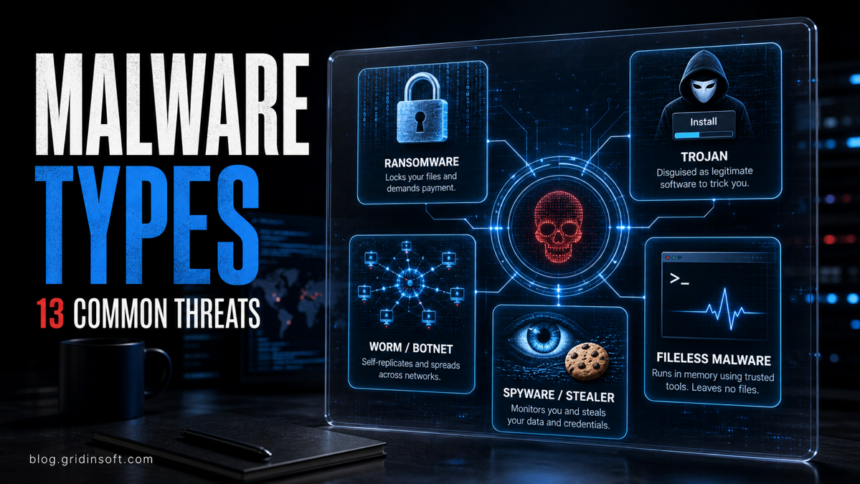
Malware is malicious software built to steal data, spy on users, encrypt files, display unwanted ads, take remote control, or help attackers move deeper into a system. “Virus” is only one type of malware. Modern attacks often combine several types at once: a loader installs a stealer, the stealer collects passwords, and a ransomware payload encrypts the files later. If you need the direct comparison, see our guide to malware vs ransomware.
This guide explains the most common types of malware, how they work, real-world examples, warning signs, and what you can do to reduce the risk. We kept the practical malware-family view because that is how infections often appear in the real world: not as neat textbook labels, but as chains of tools with different roles.
| Main topic | Types of malware |
| Also searched as | malware types, common types of malware, types of malicious software, malware examples |
| Common goals | Steal passwords, encrypt files, spy on activity, show ads, mine crypto, create backdoors, or download more malware |
| Common entry points | Phishing emails, fake updates, cracked software, malicious ads, drive-by downloads, infected attachments, and vulnerable systems |
| Best first defense | Keep software updated, avoid untrusted downloads, use unique passwords and MFA, and run reputable anti-malware protection |
What Are the Main Types of Malware?
The main types of malware are viruses, worms, Trojans, ransomware, spyware, adware, rootkits, keyloggers, loaders, stealers, remote access Trojans, botnets, cryptominers, and fileless malware. Some lists count seven types, some count ten or twelve, but the exact number matters less than understanding the role each one plays.
Official security glossaries describe malware broadly: it can be software, firmware, or code inserted for a harmful or unauthorized purpose, and it includes familiar families such as viruses, worms, Trojan horses, spyware, adware, and ransomware. In real infections, the categories overlap. A Trojan can contain a stealer. A worm can spread ransomware. A rootkit can hide a keylogger. A loader can deliver all of them.
Malware vs Virus: What Is the Difference?
Malware is the umbrella term. It includes any software or code designed for harmful or unwanted activity. A virus is one specific type of malware that attaches to a host file or program and spreads when that host is executed.
That distinction matters because many people call every infection a “virus,” but removal and prevention depend on the real behavior. Ransomware, spyware, adware, Trojans, worms, and rootkits do not all spread or behave the same way. For a deeper comparison, read malware vs virus.
Types of Malware at a Glance
| Type | How to recognize it and respond |
| Virus | Infects files or programs; scan fully, disconnect shared drives, and restore modified files from clean backups. |
| Worm | Spreads without normal user action; patch vulnerable systems, isolate affected devices, and check network traffic. |
| Trojan | Arrives disguised as a useful app, crack, invoice, or update; remove the source package and scan for downloaded payloads. |
| Ransomware | Locks files or shows a ransom note; isolate the device, preserve evidence, and restore from trusted backups when possible. |
| Spyware / stealer | Steals passwords, cookies, screenshots, or banking data; scan, change passwords from a clean device, and revoke sessions. |
| Adware / PUP | Changes search, opens pop-ups, or injects ads; remove unwanted apps/extensions, reset browsers, and scan for bundles. |
| Rootkit | Hides malicious components or blocks tools; use offline scans and consider a clean reinstall if deep compromise is confirmed. |
| Loader / dropper | Installs other malware; delete the original installer or attachment and look for secondary detections. |
How to Tell Which Malware Type You May Have
| What you notice | Likely malware family and first move |
| Files suddenly have new extensions, a ransom note appears, or documents will not open. | Ransomware. Disconnect the device from the network, avoid paying first, preserve evidence, and check clean backups. |
| Accounts show unfamiliar logins, password-reset emails arrive, or browser sessions are hijacked. | Infostealer, spyware, keylogger, or banking Trojan. Scan the device, then change passwords and revoke sessions from a clean device. |
| Search engine, homepage, notifications, or extensions change after installing freeware. | Adware or PUP. Remove the bundled app and extension, reset the browser, and scan for leftovers. |
| CPU/GPU usage stays high when the computer is idle and fans run constantly. | Cryptominer or unwanted background process. Check startup entries, remove suspicious installers, and run a full scan. |
| Security tools fail, detections return after reboot, or hidden drivers/services keep reappearing. | Rootkit or persistent Trojan. Use offline scanning and plan for backup/clean reinstall if persistence is confirmed. |
1. Virus
A computer virus inserts its code into another file, document, script, or program. It usually needs the infected host to run before it can spread. Some viruses corrupt files, some modify documents, and some act as a delivery method for other malware.
Example: an infected executable is shared through a USB drive or cracked software archive. When the program runs, the virus infects other files on the system.
How to reduce risk: avoid running unknown executables, scan removable drives, keep Office macros disabled unless required, and restore infected files from clean backups instead of trusting modified copies.
2. Worm
A worm is malware that can replicate itself and spread without attaching to a normal host file. Worms often move through networks by exploiting vulnerabilities, weak credentials, shared folders, email, or removable drives.
Example: a worm finds unpatched systems on the same network, copies itself, and launches automatically. A famous ransomware incident can also behave worm-like when it spreads without user interaction.
How to reduce risk: patch quickly, disable unnecessary network services, segment networks, use firewalls, and monitor unusual internal traffic.
3. Trojan
A Trojan disguises itself as something useful or harmless. It may look like a game crack, document, browser update, utility, invoice, installer, or free tool. Once launched, it can steal data, open a backdoor, disable protection, download more malware, or prepare the system for ransomware.
Common Trojan types:
- Trojan-Downloader: downloads other malware after execution.
- Trojan-Spy or Trojan-Stealer: steals credentials, cookies, files, or browser data.
- Trojan-Ransom: delivers ransomware or encryption payloads.
- Trojan-CoinMiner: uses the victim’s CPU/GPU for cryptocurrency mining.
- Trojan with adware functions: installs ads, redirects, or unwanted browser components.
4. Ransomware
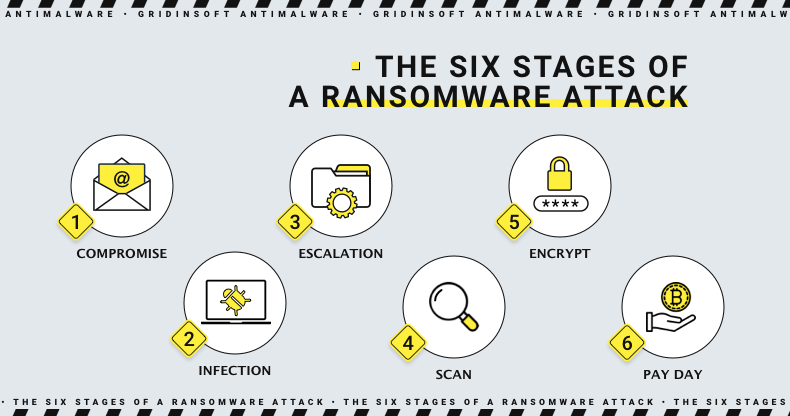
Ransomware encrypts files, locks systems, steals data, or combines those tactics to pressure victims into paying. Modern ransomware often uses double extortion: attackers steal files first, then threaten to publish them if the victim refuses to pay.
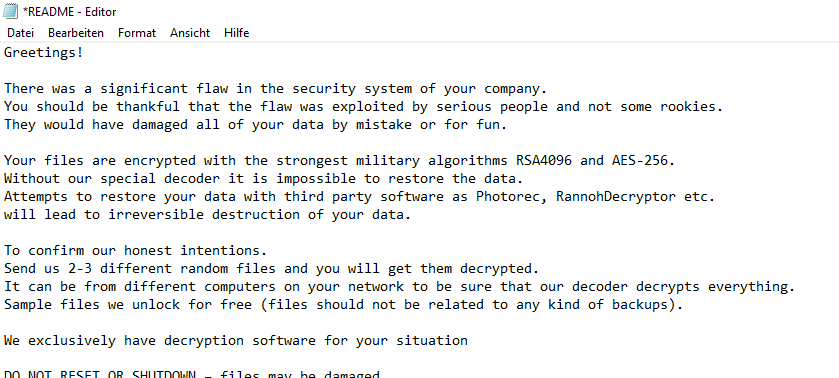
Common ransomware types:
- Crypto ransomware: encrypts files and demands payment for a decryptor.
- Locker ransomware: blocks access to the system or interface.
- Doxware or leakware: threatens to publish stolen data.
- Ransomware-as-a-Service: ransomware operated by affiliates using a shared platform.
- Mobile ransomware: targets smartphones and mobile data.
How to reduce risk: keep offline or immutable backups, patch exposed systems, protect remote access with MFA, limit admin rights, and test recovery before an incident.
5. Spyware and Infostealers
Infostealers collect sensitive data from infected systems. They can steal browser passwords, cookies, autofill data, cryptocurrency wallets, screenshots, files, FTP/VPN credentials, Discord tokens, Telegram sessions, and system information.
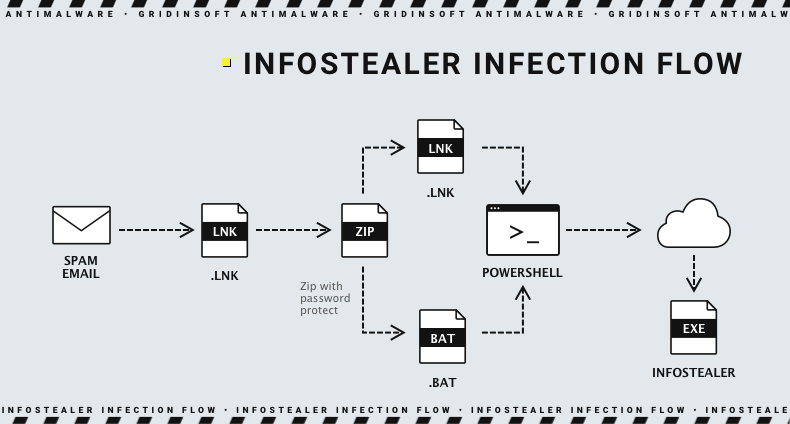
| Stealer subtype | What it targets |
| Password stealer | Saved browser passwords, password stores, FTP/VPN credentials |
| Banking Trojan | Online banking sessions, payment data, browser forms |
| Cookie/session stealer | Web sessions that may bypass password-only checks |
| Clipboard hijacker | Cryptocurrency wallet addresses and copied secrets |
| Form grabber | Data typed into web forms before encryption protects it in transit |
How to reduce risk: avoid cracked software, use MFA, clear compromised sessions after infection, change passwords from a clean device, and avoid storing sensitive credentials in browsers when possible.
6. Adware and Potentially Unwanted Programs
Adware displays unwanted ads, changes browser settings, injects search redirects, opens pop-ups, or installs unwanted extensions. Some adware is merely annoying; some tracks browsing behavior, pushes scam pages, or bundles spyware-like components.
Example: a “free converter” installs a browser extension that changes the default search engine, injects sponsored results, and opens notification spam.
How to reduce risk: use custom install options, decline bundled offers, remove unknown browser extensions, reset browser settings, and scan for PUPs after installing freeware.
7. Rootkit
A rootkit is malware designed to hide itself or other malicious components. It may operate at user level, kernel level, boot level, or firmware level. Rootkits are dangerous because they can make normal security checks unreliable.
Example: malware hides a malicious driver, blocks security tools from seeing files, and keeps reinstalling a payload after every reboot.
How to reduce risk: keep Secure Boot enabled, avoid unsigned drivers and cracks, use offline scans for persistent infections, and consider a clean reinstall if a deep compromise is confirmed.
8. Keylogger
A keylogger records keystrokes to capture passwords, messages, search terms, payment details, or private notes. Keyloggers can be software-based, hardware-based, browser-based, API-based, kernel-based, or part of a larger spyware package.
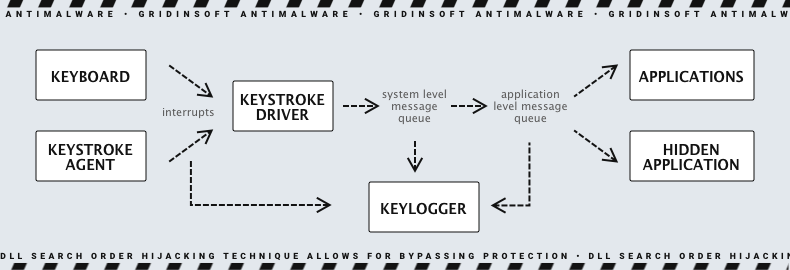
How to reduce risk: scan after suspicious downloads, use MFA, change passwords from a clean device after infection, and inspect physical keyboards or USB adapters in high-risk environments.
9. Loader, Dropper, and Downloader Malware
Loader malware, also called a dropper or downloader, is built to deliver other malware. It may start small and quiet, then fetch a stealer, ransomware, adware, miner, or remote access tool after it checks the system.
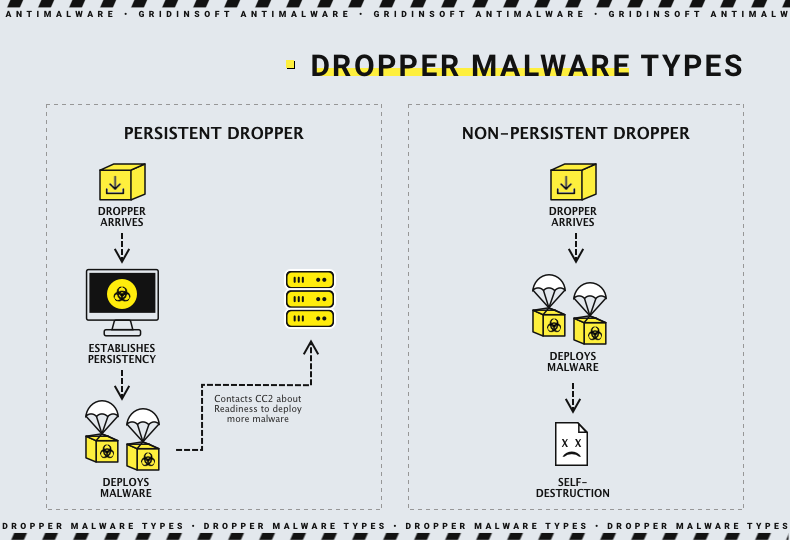
Examples: Amadey, BatLoader, BazarLoader, TrickBot, and QakBot-style campaigns have been associated with multi-stage delivery chains.
How to reduce risk: treat the original installer or attachment as part of the infection, not just the final payload. Delete the source package and scan for secondary malware.
10. Remote Access Trojan (RAT)
A Remote Access Trojan gives attackers remote control over an infected system. It can capture screenshots, browse files, run commands, use the microphone or webcam, install additional malware, and steal credentials.
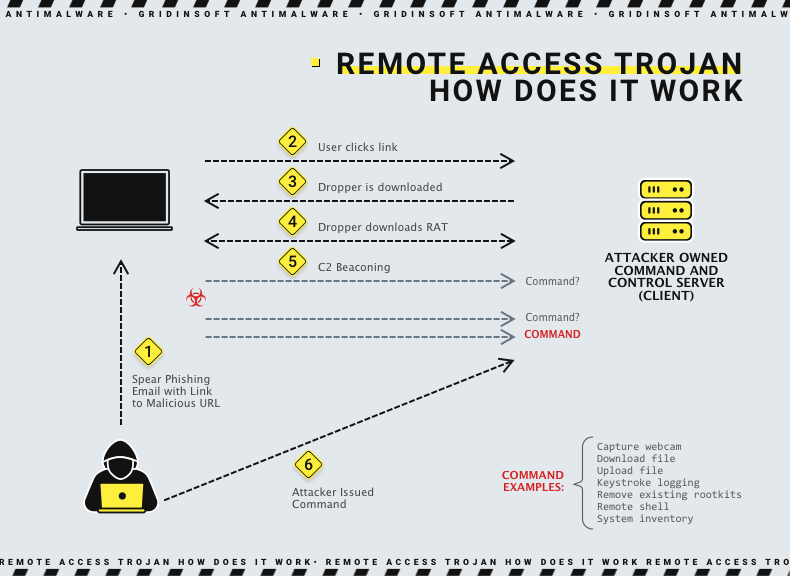
How to reduce risk: avoid remote-access tools from untrusted sources, protect legitimate remote tools with strong authentication, remove unknown startup entries, and investigate unexpected outbound connections.
11. Botnet Malware
A botnet infection turns a device into a remotely controlled “bot.” Attackers can use botnets for DDoS attacks, spam, credential stuffing, proxy abuse, click fraud, or spreading more malware.
Example: a router, IoT camera, or Windows PC is infected and quietly participates in traffic floods or spam campaigns without the owner noticing.
How to reduce risk: change default passwords, patch routers and IoT devices, disable unnecessary remote access, and monitor unusual traffic.
12. Cryptominer Malware
Cryptominer malware uses CPU or GPU resources to mine cryptocurrency for an attacker. It may not steal files, but it can slow the system, overheat hardware, increase power use, and hide other unwanted activity.
Signs: high CPU/GPU usage at idle, fans running constantly, slow games or browsers, unknown mining processes, and security alerts for coin miners.
How to reduce risk: avoid cracked software and fake installers, block malicious scripts, and scan systems that show unexplained high resource usage.
13. Fileless Malware
Fileless malware uses trusted system tools, scripts, memory, registry entries, or legitimate administration utilities instead of relying only on a normal malicious file. This makes detection harder because the attack may abuse tools that already exist on the system.
Example: a phishing email tricks the user into running a PowerShell command that downloads and executes code in memory.
How to reduce risk: restrict script execution, monitor PowerShell and WMI activity, keep macros limited, and use security tools that inspect behavior instead of only files.
How Malware Infections Usually Start
- Phishing emails with attachments or fake login links.
- Cracked games, keygens, activators, and pirated installers.
- Fake browser, Flash, codec, or driver updates.
- Malicious ads and scam redirects.
- Unpatched software, vulnerable plugins, or exposed remote access.
- Bundled freeware that installs adware or PUPs.
- Compromised websites and drive-by downloads.
How to Protect Your Computer From Malware
- Keep Windows, browsers, Office, and apps updated. Many infections rely on old vulnerabilities.
- Avoid cracks and unofficial installers. They are common sources of loaders, stealers, miners, and Trojans.
- Use unique passwords and MFA. This reduces damage when stealers or breaches expose credentials.
- Back up important files. Keep at least one backup disconnected or protected from normal user accounts.
- Review browser extensions. Remove anything unknown or unnecessary.
- Be careful with email attachments and links. Verify invoices, delivery notices, and security alerts from the official site.
- Run regular security scans. A second-opinion scan is useful after fake installers, cracks, pop-ups, or suspicious alerts.
After uninstalling the suspicious app or deleting the visible threat, use Gridinsoft Anti-Malware to check hidden files, startup entries, scheduled tasks, bundled apps, browser changes, and other persistence points that can restore malware.
Download Anti-MalwareFAQ
What are the most common types of malware?
The most common types include viruses, worms, Trojans, ransomware, spyware, adware, rootkits, keyloggers, loaders, remote access Trojans, botnets, cryptominers, and fileless malware.
Is a Trojan the same as a virus?
No. A virus spreads by infecting host files or programs. A Trojan disguises itself as something legitimate and relies on the user or another process to run it.
What type of malware steals passwords?
Infostealers, spyware, banking Trojans, keyloggers, form grabbers, and cookie stealers are commonly used to steal passwords and sessions.
What type of malware encrypts files?
Ransomware encrypts files or locks systems and demands payment. Some ransomware also steals data before encryption.
Can adware be dangerous?
Yes. Some adware only displays unwanted ads, but other adware tracks browsing, changes browser settings, redirects to scam pages, or installs additional unwanted components.
What should I do if I think malware is installed?
Disconnect from suspicious downloads, run a full scan, remove unknown apps and browser extensions, change important passwords from a clean device, and restore files from clean backups if needed.
Bottom Line
Malware types overlap, and modern infections often arrive as a chain. A loader can install a stealer, a stealer can expose credentials, and those credentials can lead to ransomware. Learn what each malware type does, avoid unsafe downloads, keep systems updated, use MFA, and scan quickly when behavior looks suspicious.
References
- NIST Computer Security Resource Center. “Malware.” NIST CSRC Glossary, accessed June 1, 2026. https://csrc.nist.gov/glossary/term/malware
- Cybersecurity and Infrastructure Security Agency. “Malware Tip Card.” CISA, accessed June 1, 2026. https://www.cisa.gov/sites/default/files/publications/Malware_1.pdf
- Microsoft. “How Microsoft identifies malware and potentially unwanted applications.” Microsoft Learn, updated March 13, 2025, accessed June 1, 2026. https://learn.microsoft.com/en-us/unified-secops/criteria
- Enigma LRJ. “LockerGoga – Ransom note.png.” Wikimedia Commons, September 4, 2020, accessed June 1, 2026. https://commons.wikimedia.org/wiki/File:LockerGoga_-_Ransom_note.png