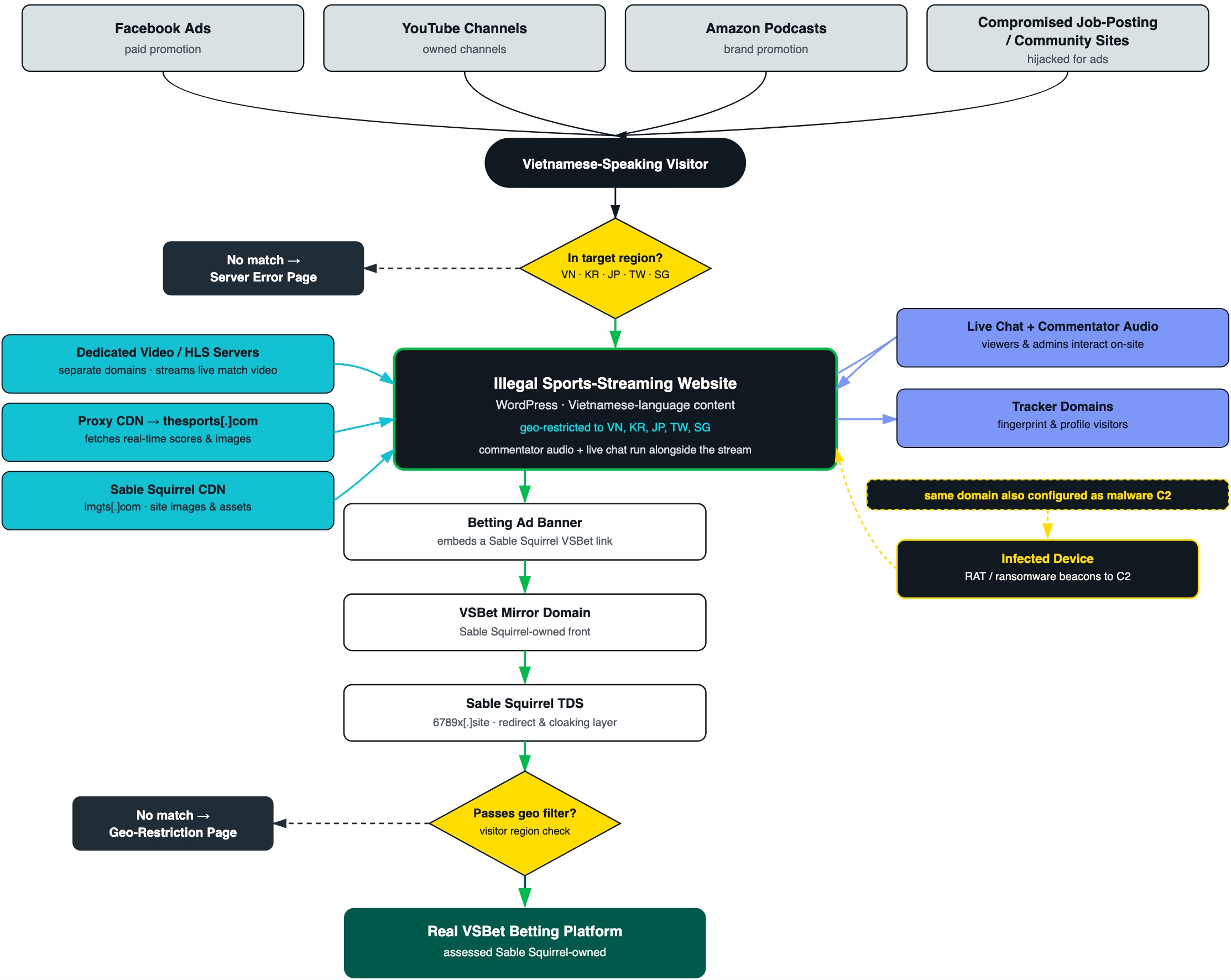
Infoblox says a group it tracks as Sable Squirrel bought more than 10,000 expired domains and turned them into infrastructure for illegal sports streams, betting redirects, and malware command-and-control. The researchers confirmed about $430,000 spent on roughly 160 individually priced domains and estimate the full portfolio cost more than $7 million.
The practical lesson is not that every visitor to a streaming page was infected. It is that an old domain, a valid HTTPS connection, and even a working video are not reliable safety signals after ownership changes. If the page opened redirects, requested notifications, or delivered a file or app, the response should match that interaction.
What Infoblox found
| Finding | Verified detail |
|---|---|
| Domain portfolio | More than 10,000 expired or drop-caught domains linked to Sable Squirrel. |
| Acquisition cost | About $430,000 confirmed across roughly 160 priced purchases; more than $7 million estimated for the wider portfolio. |
| Malware traffic | More than 31,000 samples communicated with the domains, including Quasar RAT, AsyncRAT, DCRat, NanoCore, Remcos, njRAT, and files carrying HiddenTear signatures. |
| Speed of reuse | 24% of domains were activated the same day, 76% within one week, and 94% within two weeks. |
Some domains performed two jobs at once: they displayed live streaming pages to visitors while also receiving traffic associated with infected devices. That distinction matters. The report links malware samples to domain infrastructure; it does not say that merely watching a stream automatically installed malware.
Why expired domains are valuable to attackers
An expired domain can retain backlinks, search history, old bookmarks, direct traffic, and a reputation score earned by its previous owner. A buyer can register it through a drop-catching service and inherit those signals without inheriting the old organization. Forgotten email addresses, DNS records, and third-party accounts may add more opportunities.
Sable Squirrel used that residual trust as an acquisition channel. Social posts and messaging groups promoted free streams; the pages then exposed visitors to aggressive advertising, gambling destinations, or other redirects. The same domain portfolio could support malware traffic in the background, making a domain-age check useful context but never a verdict.
A working stream is not a safety verdict
A convincing player gives the operator time to monetize attention. Fake play buttons, overlays, pop-ups, and notification prompts can move a visitor away from the stream to a download or credential form. The same mechanics appear across free sports-streaming scams and movie-streaming scams.
Check the exact address before interacting. The Gridinsoft Website Reputation Checker can add domain-age, blacklist, and content signals, but a clean result cannot prove that the current owner is trustworthy.
What to do, based on what happened
| What happened | Next action |
|---|---|
| You only opened the page | Close it and any redirects. A page view alone is not proof of infection. Check Downloads and browser notifications for anything the site added. |
| You allowed notifications | Remove the site from the browser’s notification permissions. Do not click later alerts that claim an infection or prize. |
| You entered a password or card details | Use the real service or bank app from a clean path. Change any reused password, revoke active sessions, and contact the card issuer if payment data was submitted. |
| A file downloaded but was not opened | Delete or quarantine it without launching it. If you need to preserve it for work, hand it to your security team instead of testing it yourself. |
| You ran an app, APK, extension, or installer | Stop sensitive activity on that device, remove the unwanted software or extension, and run a full security scan. On Android, verify that Google Play Protect is enabled. Change important credentials from a clean device if an information stealer is possible. |
If a suspicious download appeared but you did not open it, use the narrower downloaded-file response checklist. Record the domain, time, redirect address, filename, and any permissions granted before clearing browser history.
A separate September 2026 investigation into PeckBirdy casino decoys shows why the network connections behind a page deserve attention even when its appearance seems ordinary. Researchers followed a script to another control endpoint; the report also explains why a lone DNS query is not proof of infection. This is a different operation from Sable Squirrel.
What domain owners should check
- Renew important domains before they enter auction or deletion, including campaign and redirect domains.
- Inventory email aliases, DNS records, OAuth callbacks, mobile deep links, and vendor accounts that still reference retired domains.
- Monitor newly registered lookalikes and recently dropped assets that retained traffic or backlinks.
- Remove stale references before allowing a domain to expire, and warn users if an abandoned address has changed hands.
References
- Infoblox Threat Intel. “$7 Million in Expired Domains Fuel a Streaming Empire With a Malware Secret.” August 13, 2026. primary investigation.
- Infoblox Threat Intel. “Drop Something? Don’t Worry, Someone Caught It.” August 13, 2026. domain lifecycle research.
- Google. “Use Google Play Protect to help keep your apps safe and your data private.” Accessed August 14, 2026. official Android guidance.