REVSTEALER malware is being disguised as game cheats and popular software, then stealing browser sessions, passwords, gaming accounts, and cryptocurrency data. If you ran a suspicious download, the danger does not end when its window closes: the core stealer can remove itself while related modules remain available for follow-on tasks. Disconnect the PC, stop signing in from it, and recover important accounts from a separate clean device.
Elastic Security Labs reported the campaign on September 2 after tracing samples promoted through compromised YouTube channels and fake software pages. The report connects REVSTEALER with four separately recovered modules, but it does not establish that every infection receives all four. Response should be based on what you ran and what the computer can still access—not on a claimed victim total.
REVSTEALER spreads through fake cheats and software
In the observed campaign, video descriptions offered cheats for games such as Roblox and Valorant. Links led viewers to attacker-controlled pages where a password-protected archive was presented as the promised tool. Elastic identified at least 17 compromised YouTube channels used for this distribution. Sample metadata also impersonated unrelated software, including Slack, qBittorrent, SteelSeries GG, and Blender, so a gaming lure is not the only possible route.
The archive password helps a malicious file evade automated inspection; it does not make the download private or safe. A convincing video, positive comments, a familiar icon, or a filename matching a real application cannot authenticate an executable. If you are still deciding whether to open such a file, delete it and obtain the software from its official publisher.
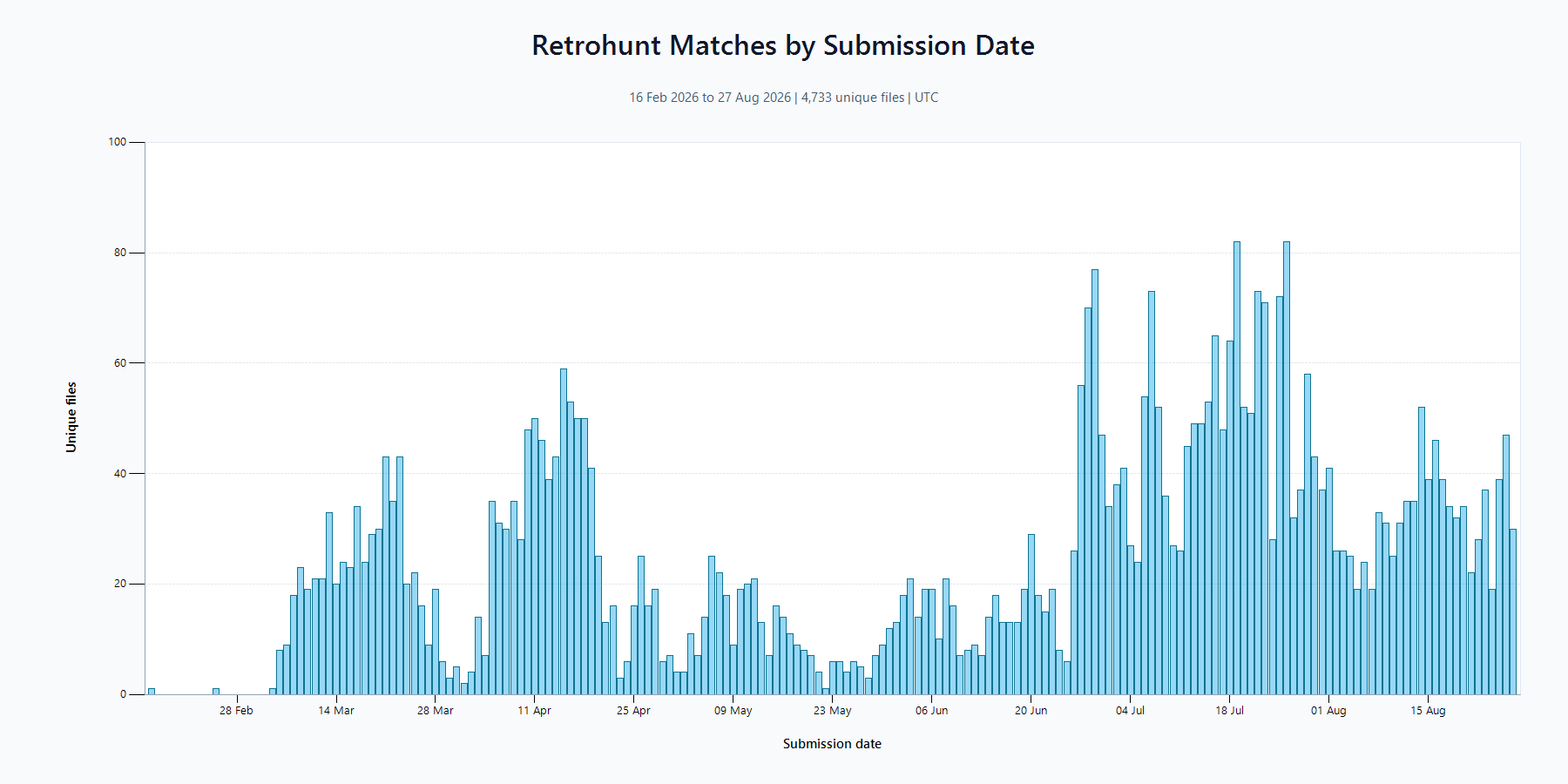
Elastic’s VirusTotal search found 4,733 unique matching files submitted between February 16 and August 27, 2026. These are sample matches, not 4,733 confirmed victims. Multiple uploads can represent the same file or investigation, while infections that were never submitted would not appear in the count.
What REVSTEALER tries to steal
The core malware inventories the Windows host and collects data from browsers, including saved credentials, cookies, history, and autofill information. Elastic documented targeting for 225 browser-extension identifiers and 51 cryptocurrency wallets, along with password managers, chat applications, gaming clients, VPN and FTP tools, screenshots, and selected documents.
Cookies and session tokens matter as much as passwords. A stolen active session may let an attacker enter an account even after the user changes the password, depending on how that service invalidates sessions. That is why recovery must include explicit sign-out or token revocation. Our account recovery checklist covers the order for email, financial, social, and gaming accounts.
REVSTEALER’s main executable may delete itself after collection. A missing download, a clean Downloads folder, or no visible process therefore cannot prove that nothing ran. It also cannot prove that a related payload was installed; persistence has to be checked rather than assumed either way.
Four related modules can extend the incident
Elastic recovered four related executables from the campaign infrastructure and documented command-and-control tasking that can deliver additional components. Treat the list as a set of observed possibilities, not a universal bundle installed on every affected PC.
| Observed module | Why it changes the response |
|---|---|
| ProManager | Targets wallets and browser extensions, can display overlays or capture input, and can deliver another payload. Account and wallet recovery must happen away from the suspect PC. |
| WinUpdate | Monitors the clipboard for cryptocurrency data, replaces wallet addresses, and looks for mnemonic-like text. A changed paste result is a high-priority warning. |
| SoftManager | Provides SOCKS5 proxy and backconnect capability. The machine may be used as a relay even when no theft window is visible. |
| LockAppHost | Deploys XMRig mining behavior, interferes with competing miners, and establishes persistence. High resource use may be a clue, but normal CPU use does not clear the system. |
Choose the response by what happened
| Your exposure | What to do |
|---|---|
| You only viewed a video or download page | Close it, do not return through the same link, and use the official software source. Viewing the lure alone is not evidence that REVSTEALER executed. |
| You downloaded the archive but did not open its executable | Delete the archive and extracted copy, empty the Recycle Bin, and run a full scan. Do not launch it to “check.” |
| You ran the executable or cannot tell whether it ran | Disconnect the PC, preserve basic evidence, scan the entire system, revoke sessions from a clean device, and inspect persistence and security settings. |
| An account changed, a wallet address was replaced, or unknown logins appeared | Treat compromise as active. Secure email first, revoke sessions, rotate credentials, contact the affected service, and move exposed wallet assets to a new wallet from a clean device. |
This exposure-based approach also applies when an infostealer arrives as a cracked game, mod, or utility. The post-download infostealer guide explains how to separate a stored file from a file that actually ran.
If the file ran, isolate Windows and preserve evidence
- Disconnect Ethernet and Wi-Fi. Do not use the suspect computer for email, banking, password management, or cryptocurrency transactions.
- Record what happened. Save the video or page URL, archive and executable names, download source, approximate run time, security alerts, and any changed wallet address. Do not execute the sample again.
- On a work PC, contact the security team. Do this before deleting files or reinstalling Windows, because logs and the original sample may be needed for the investigation.
- Run trusted full and offline scans. Quarantine confirmed detections, restart when instructed, and scan again if alerts or suspicious activity return.
A scanner can find malicious files and persistence, but it cannot revoke a stolen browser session or restore secrecy to an exposed seed phrase. Use Gridinsoft Anti-Malware to check the isolated Windows PC for the stealer and related remnants, then complete account recovery separately.
If a token stealer ran here, logging back in can hand the attacker your new Discord session, email cookie, Steam token, or wallet access. Scan this Windows PC first, then reset passwords from a clean device.
Scan for stealer remnantsRecover accounts, sessions, and wallets from a clean device
Start with the primary email account because it can reset access elsewhere. From a phone or computer you trust, review recent sign-ins, sign out other sessions, remove unknown recovery methods and app passwords, change the password, and enable phishing-resistant MFA where available. Then repeat the process for the password manager, financial services, gaming platforms, chat apps, cloud storage, social accounts, and VPN or remote-work services used on the affected PC.
Do not merely rotate the old password into a new one on the suspect computer. If browser cookies or an active token were stolen, explicitly revoke them. Check mailbox forwarding rules, linked applications, newly created API tokens, purchases, trades, and messages sent from your accounts.
If a wallet seed phrase or private key was stored, copied, typed, or displayed on the compromised PC, consider it exposed. Create a new wallet on a clean device using the vendor’s official software or hardware procedure and transfer assets promptly. Never paste a seed phrase into an online “checker,” support chat, or cleanup tool. For wallet-overlay incidents, the OkoBot recovery guidance explains why malware removal alone cannot make an exposed seed safe again.
Check persistence and restored security settings
After scanning, review programs installed near the incident, Startup apps, Task Scheduler, services, browser extensions, local user accounts, proxy settings, Microsoft Defender exclusions, and Windows Update status. Look for unfamiliar scripts or executables created around the download time and for security tools that were disabled without your action. Do not remove random Windows components because a filename looks generic; confirm the path, signature, creation time, and related detections.
A structured Windows security audit after malware helps turn these checks into an inventory. If remote-access behavior, an unknown administrator, recurring detections, unexplained exclusions, or persistence remains, keep the computer isolated and escalate to a professional or the organization’s incident-response team.
When a clean reinstall is safer
Choose a clean reinstall when the computer held high-value wallet or administrator access, when a related module or remote-control behavior is confirmed, when security settings were tampered with, or when you cannot establish what executed. Back up documents and photos, not scripts, cracked software, installers, or archives from the incident. Build installation media on a clean computer and follow the clean Windows installation guide.
Reinstalling restores confidence in the endpoint, but it does not undo data already copied. Complete the session, credential, wallet, and fraud-response steps even if Windows is rebuilt.
What the REVSTEALER report does not prove
- The 4,733 VirusTotal matches are files, not a verified victim count.
- The report does not show that every fake cheat or every impersonated application contains REVSTEALER.
- It does not establish that all four related modules are delivered together or to every infected computer.
- It does not show a compromise of YouTube, Slack, qBittorrent, SteelSeries, Blender, or the games named in the lures.
- A self-deleted core file does not prove the system is clean, while a downloaded but never executed archive does not by itself prove infection.
References
- Elastic Security Labs. “REVSTEALER: Credential harvesting infostealer.” Elastic, September 2, 2026. Campaign analysis, targeting, module capabilities, and sample-count methodology.