Synology is warning NAS owners to update DiskStation Manager after ransomware attacks on outdated devices. A separate October 29 investigation by 360 describes C3RB3R, a Cerber variant that turns stored files into .L0CK3D files and leaves a ransom note in their folders. The two reports agree that unpatched storage is at risk, but point to different vulnerabilities.
That distinction matters: installing current DSM updates helps close exposed entry points; it does not unlock files that have already been encrypted. If a NAS is showing mass file changes or ransom notes, isolate it before treating the incident as routine maintenance.
A backup appliance becomes the victim
360 says its response service received multiple requests involving Synology NAS devices during October. Its team collected samples from affected devices and identified C3RB3R. This is a newly published investigation into attacks reported during the month, rather than proof that the ransomware first appeared yesterday.
The sample does not simply encrypt everything indiscriminately. It recursively searches directories while skipping 27 system directories, along with certain executable and script files. Keeping the operating system running lets the encryption continue. A NAS that still responds is therefore not evidence that its stored data is safe.
For each targeted file, 360 describes a separate encryption key and nonce, with ChaCha8 encrypting the contents and an embedded RSA-2048 public key protecting recovery information. The encrypted metadata is appended to the file, and its name receives .L0CK3D—with a zero, not the letter O. Some selected file types are encrypted in full; others receive size-dependent selective encryption. Renaming the extension cannot reverse those changes.
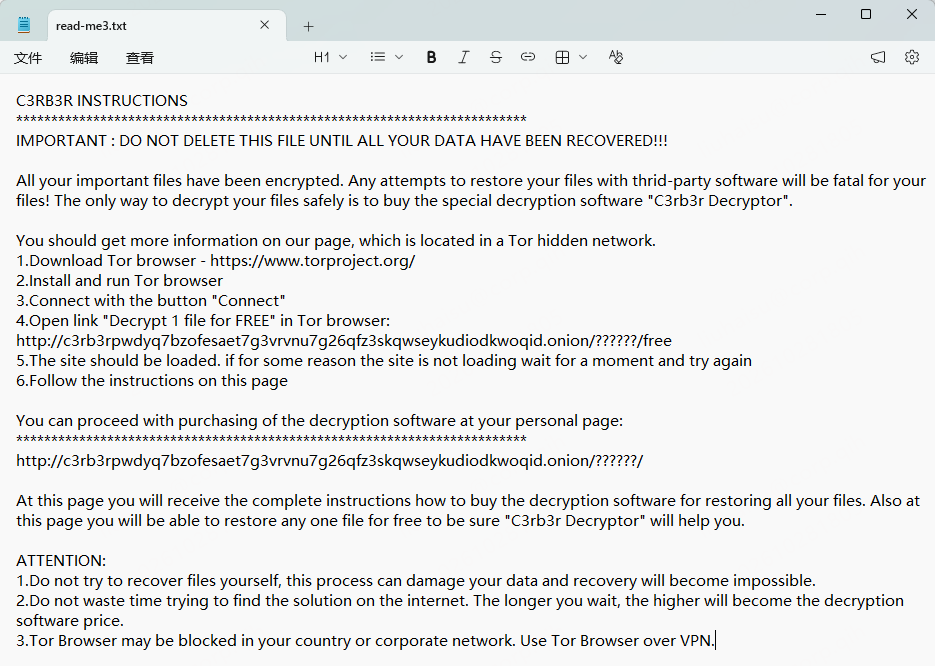
The final step is read-me3.txt. The note shown by the researchers offers a test decryption and steers the victim toward a Tor payment page. Its claims about the only possible recovery method are the attacker’s sales pitch, not an independent recovery assessment.
Two reports, two different entry explanations
Synology’s October 29 notice says attackers are exploiting a vulnerability patched in December 2024 and directs owners to Synology-SA-24:20. That advisory covers several issues, including remote code execution. The new notice does not identify the particular CVE used in each attack.
360, meanwhile, attributes its investigated incidents to CVE-2026-13639 and CVE-2026-13684, disclosed in September under Synology-SA-26:13. Synology’s September advisory confirms that the login-logic and SCGI flaws allow remote attackers to read or write arbitrary files and cause denial of service. It lists these fixed releases:
- DSM 7.4: 7.4-90075 or later.
- DSM 7.3: 7.3.2-86009-4 or later.
- DSM 7.2.2: 7.2.2-72806-9 or later.
- DSM 7.2.1: 7.2.1-69057-12 or later.
These are the advisory’s minimum fixes, not a claim that they are today’s newest releases. Check the current supported update for the specific NAS model and installed packages. The older advisory also covers older DSM branches; do not assume a version absent from the September table is unaffected.
The public reports do not establish whether they describe the same victim set or the same entry route. Their mismatch is not proof of a new zero-day, an attack on fully updated DSM, or a vendor compromise. An individual incident needs its own logs and device history.
Patch intact devices; preserve recovery options on affected ones
For a NAS without signs of compromise, follow Synology’s instruction to update DSM and enable automatic updates. Review installed-package updates too. Synology’s hardening guidance recommends avoiding unnecessary internet exposure of DSM and using a VPN for remote file access. A storage device reachable from the internet needs the same maintenance attention as a PC.
For a NAS with encrypted files or a ransom note, Synology’s response checklist starts with identifying affected systems and separating them from the network. It recommends powering down only if network isolation cannot be achieved, warning that shutdown loses volatile evidence. Preserve the note, affected-file samples, DSM version, installed-package list and relevant logs before resets or a rebuild; contact Synology Support or an incident responder to plan recovery.
Check whether existing backups or snapshots predate the attack and remain intact. Restore into a clean, secured environment after assessing the entry point. An always-connected copy on the same compromised storage is not an independent recovery guarantee. The Gentlemen investigation into stolen backups illustrates a different risk to the same asset: backups can become attacker resources as well as recovery resources.
Removing malware, installing a patch and decrypting data are separate jobs. A Windows anti-malware scan cannot repair DSM or decrypt NAS files. Keep original encrypted files while qualified responders assess available recovery options, and do not treat a paid decryptor promise as a guarantee.
References
- Synology. Synology urges users to update DSM following ransomware attacks on outdated DSM versions. October 29, 2026.
- 360. Cerber ransomware attacks on Synology NAS: incident warning and sample analysis [Chinese]. October 29, 2026.
- Synology. Synology-SA-24:20: DSM (PWN2OWN 2024). November 5, 2024; updated March 28, 2025. Accessed October 30, 2026.
- Synology. Synology-SA-26:13: DSM security update. September 18, 2026. Accessed October 30, 2026.
- Synology Knowledge Center. How can I prevent ransomware attacks on my Synology device? Prevention and response checklist. Accessed October 30, 2026.