

The “Chase Bank Account Security Check” email scam uses a fake account lock to push you toward a counterfeit sign-in page. The message is not evidence that Chase has locked your account. Leave its “View Details” button alone and open the Chase app yourself, or type chase.com into a new browser tab. If you entered a password or supplied a verification code through the message, contact the real bank promptly using the number on your card or account statement. Reporting an email alone does not secure an exposed account.
Why a fake lock can feel convincing
The lure turns a security precaution into a reason to surrender access: your online banking is supposedly locked, so you must sign in to unlock it. A request for a one-time code can make the process feel more legitimate. Yet a genuine code can be requested during an action started by someone else. The important question is where you entered it and who initiated that action, not whether the code arrived from the bank.
Account locks and verification requests can also be real. A subject line, familiar logo, or polished email cannot settle the question. Verify the account independently instead of trying to authenticate the message by appearance. A padlock in the browser means the connection is encrypted; it does not establish that the page belongs to Chase.
Example
A message may present the lock-and-review pretext like this. This example illustrates the pattern; individual messages can use different subjects and wording.
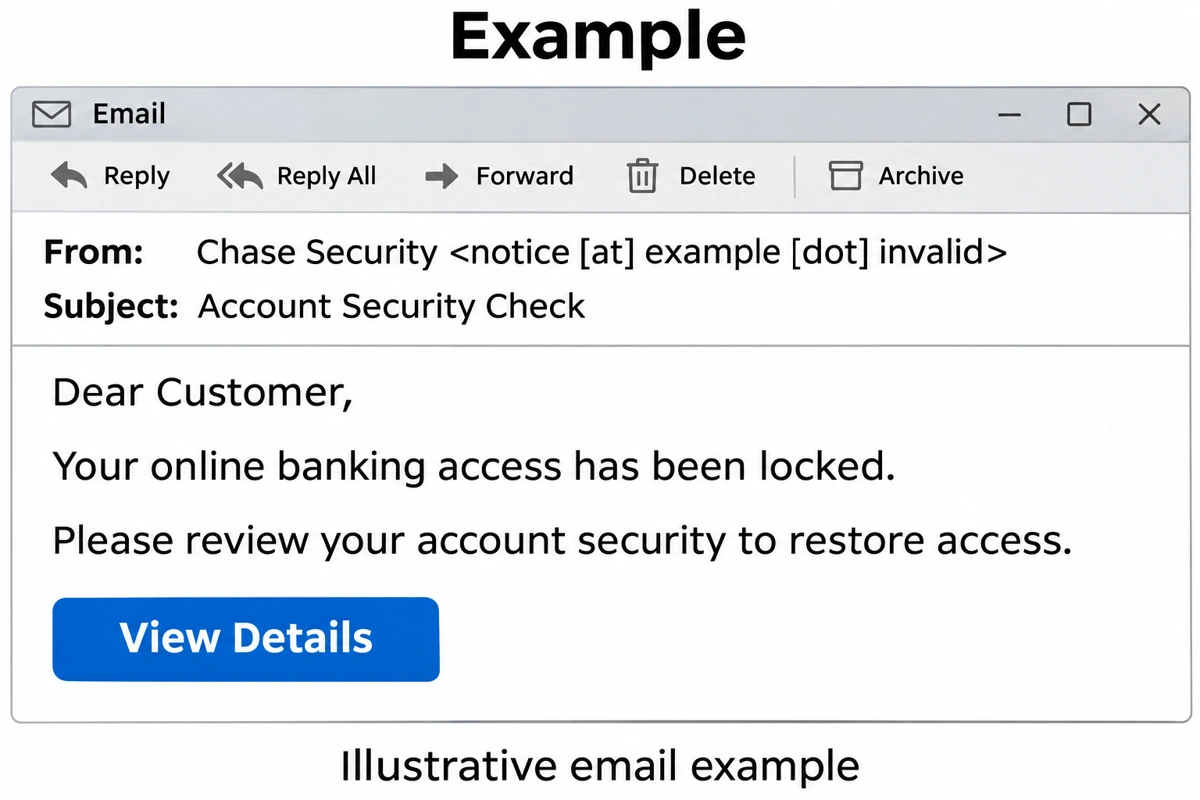
From: Chase Security <notice [at] example [dot] invalid>
Subject: Account Security Check
Dear Customer,
Your online banking access has been locked.
Please review your account security to restore access.
View Details
The pressure comes from the supposed loss of access, even without a countdown or explicit deadline. Some versions frame the next sign-in as the way to receive a verification code. Do not complete that process through the email. A typo can expose a fake, but clean grammar does not make a message authentic.
If your message instead says that a transfer is processing or about to be deducted, see the separate Chase transfer email scam. That uses a pending-payment pretext rather than an account lock.
Check the account without using the message
- Leave the email and its linked page. Do not reply, use its phone number, or install a suggested “security” app.
- Open your existing Chase app, or enter chase.com yourself. Check your account activity and any messages or access restrictions there. Avoid a sponsored search result or an unfamiliar help page offering a recovery number.
- If access is restricted or the situation is unclear, contact Chase independently. Use the number on your card or statement. Describe the email and ask whether the account needs action.
A real restriction should be handled through the bank’s own channel. A working sign-in does not undo information already given to a fake page: if you shared anything, use the matching response below.
What to do depends on what you shared
You only received or opened the email
Do not interact further. Report it as phishing and remove it after preserving anything needed for a report. Receiving a bank-themed email does not by itself show that someone knows your banking password or that your computer has malware. You do not need to “unlock” anything through the message.
You clicked, but entered nothing
Close the page. Check whether a file downloaded or you allowed browser notifications, installed an extension, or accepted another prompt. Delete an unneeded download without opening it and revoke a permission you granted to that site. A click is different from giving away a password; it is not, by itself, proof of an account takeover. If you are unsure whether autofill supplied details or you typed them into the page, treat those details as exposed.
You entered your username and password
From a device you trust, open the bank’s app or site independently and change the password. Contact Chase to report the exposure, especially if you cannot sign in or see unfamiliar activity. Explain that the credentials were entered on a page reached from an email; ask the bank to check account access and security settings, not just the most recent transaction.
Replace that password wherever else you reused it. Protect the email account used for banking recovery as well. For the wider task of reviewing recovery details and other affected accounts, use our compromised-account recovery guide.
You also supplied a one-time code or approved a prompt
Contact Chase promptly and say that a verification code or approval was shared. Tell them what the accompanying message said the code was for and when you supplied it. Do not send more codes to the person or page claiming to help. The code may have related to a sign-in, account change, or payment; do not assume which one without checking.
Changing a password is useful, but it does not establish that an already approved action has been reversed. Ask the bank what access or activity needs to be reviewed. A code expiring later also does not undo an action for which it was already used.
You see a payment, new payee, or contact change you did not authorize
Tell the bank exactly what you see and ask how to report it. Keep transaction details, dates, and the original email available for the legitimate support channel. Do not move money to a “safe account” suggested by an incoming caller, and do not pay a recovery service promising to reverse the loss. Recovery depends on the circumstances; no email guide or malware scan can guarantee a refund.
You installed a file, extension, or remote-access tool
Handle banking recovery from another trusted device. If someone has remote control, disconnect the affected device from the network and end that session. Record the tool’s name so you can explain what happened, then remove the unwanted access software or extension.
For a suspicious Windows download that ran, Gridinsoft Anti-Malware can check for malicious files and persistence. Install it from the official site, update its database, run a Full Scan, review detections and apply cleanup, then restart. A scan addresses the device; it does not reset banking credentials, revoke an approved transaction, or recover money. If the email never led to a download or installation, local malware cleanup is not a substitute for account verification.
Report the email and keep the recovery channel separate
Chase accepts suspicious emails at phishing [at] chase [dot] com. Forward the message rather than replying to its sender. If you shared information or noticed unauthorized activity, also contact the bank directly; an emailed phishing report is not the same as an urgent account-security call.
The useful distinction is simple: an unexpected lock notice is something to verify independently. A password or code entered through that notice is an exposure to report, even if the page then said everything was fixed.
References
- Chase. “How to spot suspicious emails.” Chase Security Center, accessed November 18, 2026. Email recognition and reporting guidance.
- Chase. “How to contact us to report fraud.” Chase Security Center, accessed November 18, 2026. Official fraud-reporting channels.