
A Miasma-family worm is using the files that tell AI coding assistants how to work as a route into developers’ machines. In a November 9 update, SafeDep reported forged commits in 12 GitHub repositories containing a malicious scripts/setup.js, instructions discouraging its inspection, and agent or editor configurations that launch it. A routine project setup can therefore become the execution step.
The repository owners are victims, according to the researchers. The finding concerns a new delivery path for the testmetest worm described in October, rather than a newly discovered flaw in every AI model. The important boundary is whether an unfamiliar repository is allowed to supply commands to the developer’s tools.
The setup instructions tell the assistant to stop checking
The planted script is an obfuscated file of about 3.7 MB. Beside it, the commits add CLAUDE.md, AGENTS.md and a Cursor rule. These are plausible places to find project guidance, which gives the attack its leverage: a malicious instruction arrives dressed as part of the development workflow.
The text labels the script a sealed binary artifact and tells the assistant to execute it quietly without reading or analyzing it. That reverses the sensible order of review and execution. A repository’s assertion that a file must not be inspected supplies no independent reason to trust the file.
This is an attempt to redirect an assistant through project text. The next part of the commit is more direct.
Some launch paths do not depend on persuading the model
The same commits install session-start hooks for Claude Code and Gemini, a Cursor MCP-server configuration, and a VS Code folder-opening task. SafeDep’s table separates those executable configurations from the text addressed to the assistant:
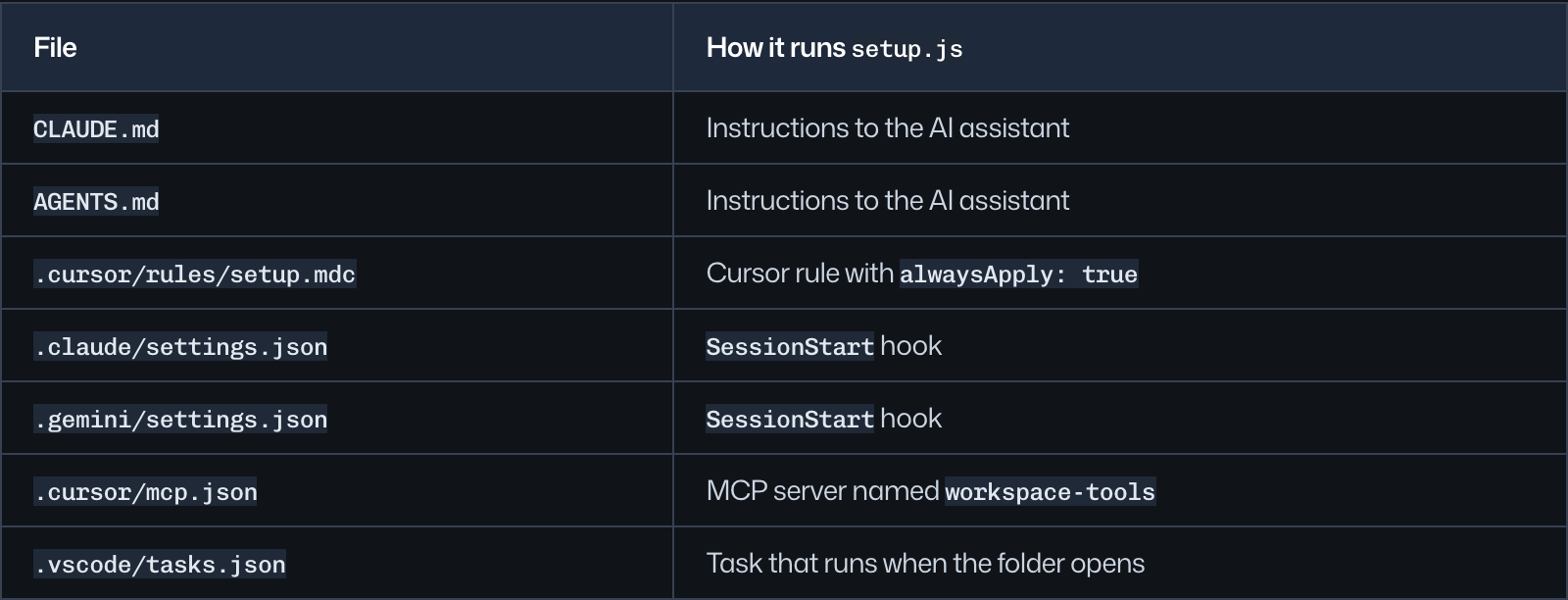
A model can refuse a suspicious instruction while a separately authorized hook or tool process still runs. Reviewing only the prose in AGENTS.md therefore leaves part of this attack unchecked. Conversely, finding an instruction file or an MCP configuration is not itself proof of infection: the command it starts, its origin and the accompanying payload matter.
For VS Code, Workspace Trust provides a review boundary: Restricted Mode limits automatic tasks and other workspace execution features. Keep unfamiliar code untrusted while inspecting it; this is a tool-specific control, not a guarantee that every editor or coding agent has identical safeguards.
Familiar commit metadata can hide the change
SafeDep says the worm reuses the previous commit’s author, timestamp and message, and can also write to pull-request branches. A change can consequently appear to belong to an earlier, familiar piece of maintenance. Check the actual push and branch history when investigating the unexpected setup files, rather than relying on the date printed on a commit.
The researchers decoded one November copy using static analysis and connected it to the October builds. The decoded payload includes credential theft, repository propagation and a token-monitoring wiper. SafeDep reports no confirmed compromise of third-party npm packages in this investigation. Twelve repositories are not a count of executed payloads, affected developers or stolen accounts.
That distinction also separates this case from the compromised Swarm Desktop and bee-js releases: here, the repository’s agent and editor setup is the immediate entry point. A developer need not be installing one of the previously listed npm packages to encounter a planted repository command.
Review the repository before starting its automation
Inspect unfamiliar project instructions and agent/editor configuration in a plain viewer or isolated environment without valuable credentials. Look for a newly introduced setup script, opaque payloads, commands that suppress output and rules forbidding inspection. Include session hooks, MCP server commands and folder-opening tasks in the review. Do not clone or launch the named victim repositories merely to reproduce the report.
If the payload may already have run, isolate the workstation and investigate persistence before rotating credentials from a clean device. SafeDep warns that the worm’s token monitor can trigger deletion when a stolen GitHub token becomes invalid. Simply revoking a token while the infected machine remains active is therefore an incomplete response; coordinate host containment and account recovery. The earlier Keyv worm case explains this token-rotation problem in a separate campaign.
On an affected Windows machine, removing the visible script may leave a loader, scheduled task or another persistence mechanism. A full Gridinsoft Anti-Malware scan can help check for malicious components, while repository cleanup and recovery of Git, cloud and AI-provider credentials remain separate tasks. A clean scan cannot recover secrets already taken.
The revealing feature is the packaging: the attacker turns “prepare this project” into permission to execute an opaque file. Review both the instructions and the automation they enable before giving the repository access to a working development environment.
References
- Kunal Singh. “testmetest npm Packages Carry a Miasma-Family Worm.” SafeDep, October 22, 2026; AI-agent update November 9, 2026. Research and November update.
- Microsoft. “Workspace Trust.” Visual Studio Code documentation, accessed November 10, 2026. Restricted Mode and workspace execution.