A fake iPhone Duo preorder page promises a $500 voucher, but the dangerous part starts before the visitor submits anything. Malwarebytes researchers reported on September 29 that the page loads a DarkSword exploit chain against vulnerable iPhones in the background. Their analysis describes an attempted infection, not a confirmed count of compromised phones.[1]
The preorder is a distraction
The captured site copies Apple’s visual identity and offers a discount without an upfront payment. Its countdown resets when the page reloads. More revealingly, the inspected form does not send the entered contact details: it displays a locally generated success message. The apparent transaction keeps attention on a shopping decision while a hidden frame selects attack code using the visitor’s iOS version.
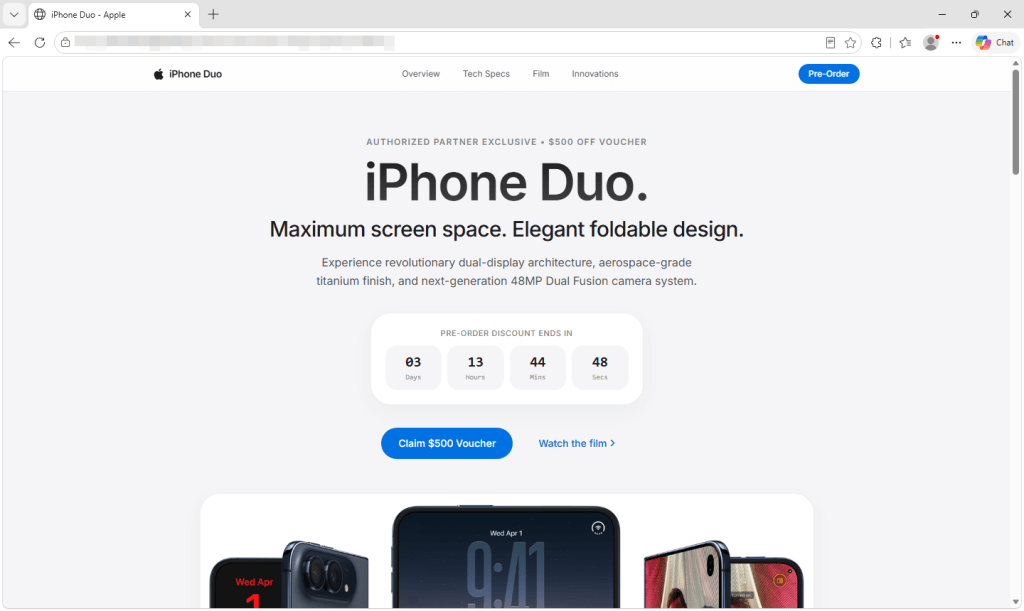
There is also a date check that does not require visiting the offer. Apple’s own announcement says iPhone Duo preorders begin on October 16. A page offering an Apple preorder on September 29 is ahead of that official schedule.[2] Verify availability by opening Apple’s site independently; a familiar logo on an unfamiliar address is not authorization to sell the phone.
Loading code is different from compromising the phone
The researchers found code aimed at credentials, wallet data and notes, but did not test the captured chain on an iPhone or observe data leaving one. They could not establish this page’s exact vulnerable-version range. A page load can therefore start an attempt; it does not establish that every visitor was infected.
That distinction matters because browser identification is imperfect. The report notes that Safari can advertise an older iOS version even on an updated device. Downloading exploit resources alone is not evidence that the exploit defeated the phone’s protections. Likewise, the lack of a payment or download prompt is not a useful safety test for a web exploit.
The page tries to move iPhone visitors into Safari; browsers it does not recognize as Safari receive a “Browser Restricted” message. Other browsers may still fetch background resources. The hidden frame then chooses code by the reported iOS version and starts the exploit attempt. If it succeeds, the payload’s initial server message contains a device identifier, device details and status. The inspected code also attempts to send installed-app information and Apple Notes.
Further collection depends on the next steps working: when a targeted cryptocurrency wallet is found and the initial server exchanges succeed, the payload attempts to upload wallet files, recovered keychain data and photo thumbnails. A repeated server check can retrieve commands to collect more files or photos and run supplied JavaScript; the code also tries to delete diagnostic reports. These are capabilities reconstructed from the captured code, not observed theft from a tested phone.
Check the installed update, not the offer’s reassurance
Apple’s guidance on the reported web attacks says devices with updated software are protected, including the latest updated releases for supported older iOS branches. Its advice is to install the newest compatible update; a major version number alone is not enough to tell whether an older branch has its security fixes.[3] Open Settings → General → Software Update directly and install the update offered for your device.
After updating, restart the iPhone. The researchers found no mechanism in the captured payload that automatically restores it after a reboot. A restart cannot recover information already taken or establish that the phone was never compromised.
If you already opened the fake offer, close it and avoid returning to investigate. Keep the URL from browser history if you need to report it. If account activity suggests theft, handle that separately from updating the phone: secure the affected accounts from a trusted device. Our Apple Account recovery guide explains the account checks. Installing a patch cannot retrieve information already taken.
The useful lesson is specific: on an unpatched phone, deciding not to complete a suspicious order may come too late to prevent the exploit attempt. Check the update and reach the retailer independently before opening an unfamiliar promotion.
References
- Stefan Dasic. “Fake iPhone Duo preorder scam triggers DarkSword attack.” Malwarebytes Threat Intelligence, September 29, 2026. Research report.
- Apple. “Apple unveils iPhone Duo.” Apple Newsroom, September 9, 2026. Announcement and preorder schedule.
- Apple. “Update iOS to protect your iPhone from web attacks.” Apple Support, April 14, 2026; accessed September 29, 2026. Security update guidance.