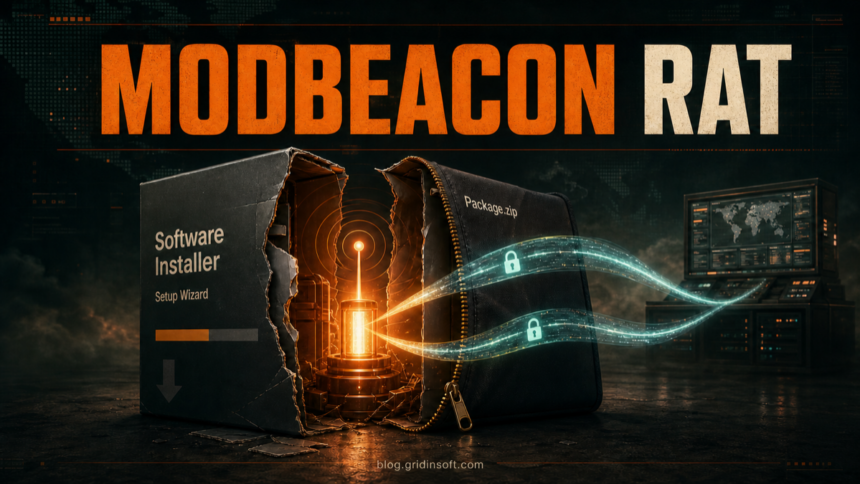
MODBEACON RAT is a Windows remote-access trojan delivered through counterfeit software installers and ZIP archives. If an installer linked to it ran, disconnect the PC from the network, keep the downloaded file quarantined, check scheduled tasks, services, and WMI subscriptions, then run a full malware scan before reconnecting. Microsoft Defender may identify this family as Trojan:Win64/ModBeacon.RV!MTB.
A file that was downloaded but never opened is a different case from an installer that executed. For the first case, delete or quarantine the archive and check it before running anything else. For the second, assume the attacker may have established persistence or loaded extra components in memory even if the fake program appeared to install normally.
What Is MODBEACON RAT?
MODBEACON is a modular Windows x64 remote-access trojan documented by Qianxin Threat Intelligence Center in July 2026. The observed Silver Fox-linked distributor used search-engine visibility and counterfeit software pages to deliver tailored installers to selected technology, education, and state-enterprise targets in Asia.
The malware separates its loader from the main beacon. Its Rust-based stage can fingerprint the host, authenticate to its command server, report status, receive commands, and load additional native plugins in memory. Its command channel uses encrypted gRPC streaming over HTTP/2 and borrows transport components associated with Xray/V2Ray, making the traffic look more like ordinary web-service communication than a simple RAT connection.
That transport detail does not change the first response for a user: isolate the device and look for the installer, persistence, and follow-on activity. For a broader explanation of what remote-control malware can do, see the remote access trojan guide.
How the Counterfeit Installer Chain Works
- A search result leads to a counterfeit software page. The page imitates a legitimate utility or popular application and offers a Windows installer or archive.
- The downloaded package starts a separate loader. The visible setup flow can distract from a stage that prepares the beacon in memory.
- The beacon fingerprints the device. Reported strings refer to the machine GUID, computer and user names, Windows directories, and disk information.
- The infected host opens an encrypted command stream. The beacon uses TLS and bidirectional gRPC communication to receive tasks and return results.
- Plugins expand the attack. The framework can load modules in memory, so the final capabilities depend on what the operator sends after the initial infection.
If you still have the archive and have not run it, use the EXE safety checklist from a separate trusted device. Do not upload a confidential corporate installer to a public service without authorization.
MODBEACON Indicators to Check
The following artifacts come from the documented campaign. They are investigation clues, not proof on their own. Do not visit the domains; they are defanged here intentionally.
| Indicator | Why it matters |
|---|---|
Trojan:Win64/ModBeacon.RV!MTB |
Microsoft Defender’s exact detection name for this family. |
api[.]skystackservice[.]comapi[.]fast-cloud-node[.]com |
Default MODBEACON command endpoints reported by Qianxin. |
cn-mumu[.]com[.]cn |
One counterfeit software domain associated with the delivery chain. |
CBPUserTimer, CBPUserEventFilter, CBPUserCommandLineConsumer |
Names tied to the campaign’s permanent WMI subscription. |
C:\Users\<user>\AppData\Local\CBP\cbvchost.exe |
Example command path shown in the documented WMI consumer. |
Global\CBP.QZKVM.Exe.Mutex, CBPUserSvc |
Mutex and service-related strings found during analysis. |
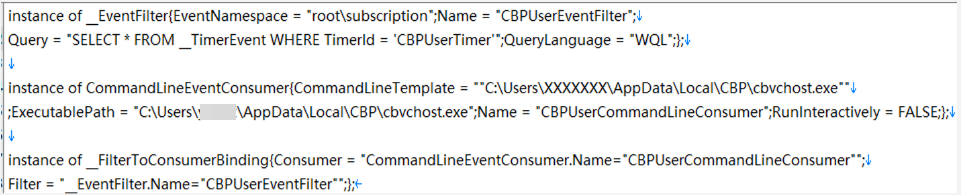
Normal WMI activity is common on Windows. The suspicious combination is a matching filter, command-line consumer, and binding that launches an unfamiliar executable from a user-writable folder. Do not delete WmiPrvSE.exe; it is a legitimate Windows component. The WMI Provider Host troubleshooting guide explains how to distinguish normal callers from persistence.
How to Remove MODBEACON RAT
- Isolate the PC. Disconnect Wi-Fi and Ethernet if the installer ran, an alert appeared, or the device shows unknown remote activity. Do not sign in to sensitive accounts from that computer.
- Record what happened. Note the download URL, file name, time of execution, Defender detection, and any new application or service. Keep the file quarantined; do not rerun it to reproduce the behavior.
- Remove the counterfeit application. Uninstall the unexpected program if it appears in Installed apps, but do not assume that removes the separate loader, beacon, or persistence.
- Check common persistence points. Review Task Scheduler, Services, Startup apps, and recently created files under
%APPDATA%,%LOCALAPPDATA%,%TEMP%, and%USERPROFILE%\Downloads. - Inspect WMI subscriptions. Open PowerShell as administrator and use the read-only commands below. Look for the exact campaign names, a command that launches an unknown AppData executable, and a filter-to-consumer binding that joins them.
Get-CimInstance -Namespace root/subscription -ClassName __EventFilter
Get-CimInstance -Namespace root/subscription -ClassName CommandLineEventConsumer
Get-CimInstance -Namespace root/subscription -ClassName __FilterToConsumerBinding
Do not bulk-delete WMI subscriptions. Management, monitoring, backup, and security tools can create legitimate objects. If the output matches the MODBEACON names or points to an unknown executable, preserve the details and let a trusted security tool or incident responder remove the confirmed malicious entries.
- Run full scans. Update Microsoft Defender, run a full scan, and keep every related detection quarantined. Then run a second trusted malware scan to check for hidden files, startup entries, scheduled tasks, services, bundled programs, and persistence that the visible installer may have left behind.
- Reboot and verify. Scan again after restart. Recheck the scheduled tasks, services, and WMI objects, and confirm that the same alert, outbound connection, or unknown process does not return.
Removing the downloaded archive alone is not enough after execution. The loader, a scheduled task, service, or WMI subscription may survive while the modular beacon can receive more components. Gridinsoft Anti-Malware can check the system for detections and persistence leftovers after the manual containment steps.
If the process path is wrong, the name imitates a Windows component, or high CPU started after an unknown installer, scan for hidden miners, services, startup entries, and bundled components.
Scan for MODBEACON leftoversWhat to Do After Removal
- Change important passwords from a clean device. Start with email, work SSO, password managers, banking, cloud storage, and administrator accounts.
- Revoke active sessions and tokens. A password change does not always end every existing session.
- Review security and account logs. Look for unfamiliar sign-ins, new recovery methods, forwarding rules, remote tools, or administrative changes.
- Check other endpoints. In a company environment, search for the same downloaded file, domains, WMI names, services, and outbound destinations across the fleet.
- Consider reimaging high-value systems. If the RAT ran with administrator rights, loaded unknown plugins, or touched sensitive corporate data, a clean rebuild is safer than assuming manual cleanup found every component.
MODBEACON is one example of a broader fake-download risk. The ScreenConnect and AsyncRAT fake software campaign shows why a convincing installer page and a legitimate-looking setup process are not enough to establish trust.
For a separate Microsoft-observed campaign using counterfeit Razer and Edge pages, see the download-versus-execution response guide. Its recurring tasks and protection exclusions require different checks from MODBEACON’s WMI indicators.
FAQ
Is MODBEACON a normal software component?
No. MODBEACON is the name researchers gave a modular remote-access trojan. A normal installer may be used as the lure, but the beacon and its persistence are malicious.
Does Microsoft Defender remove MODBEACON?
Microsoft says Defender detects and removes Trojan:Win64/ModBeacon.RV!MTB. After an installer ran, also run a full scan and inspect persistence because Microsoft notes that malware infections can leave remnant files and system changes.
Should I delete WmiPrvSE.exe?
No. WmiPrvSE.exe is the legitimate WMI Provider Host. Investigate the event filter, consumer, binding, command path, and process that uses WMI instead of deleting the Windows host process.
Is one clean scan enough after a MODBEACON alert?
Not when the installer executed or symptoms return. Reboot, scan again, recheck tasks, services, and WMI persistence, and review accounts from a clean device. Reimage a high-value endpoint when unknown plugins or administrator-level access cannot be ruled out.
References
- Qianxin Red Raindrop Team. “Operation Phnom Penh: Silver Fox Ghost Distributor Targets Specific Victims with MODBEACON Custom Trojan.” Qianxin Threat Intelligence Center, published July 6, 2026, accessed July 14, 2026. https://ti.qianxin.com/blog/articles/operation-phnom-penh-silverfox-ghost-distributor-targets-specific-victims-with-modbeacon-en/
- Microsoft Security Intelligence. “Trojan:Win64/ModBeacon.RV!MTB threat description.” Microsoft, published and updated July 8, 2026, accessed July 14, 2026. https://www.microsoft.com/en-us/wdsi/threats/malware-encyclopedia-description?Name=Trojan:Win64/ModBeacon.RV!MTB&ThreatID=2147973229
- MITRE ATT&CK. “Event Triggered Execution: Windows Management Instrumentation Event Subscription (T1546.003).” MITRE, version 1.5, last modified October 24, 2025, accessed July 14, 2026. https://attack.mitre.org/techniques/T1546/003/