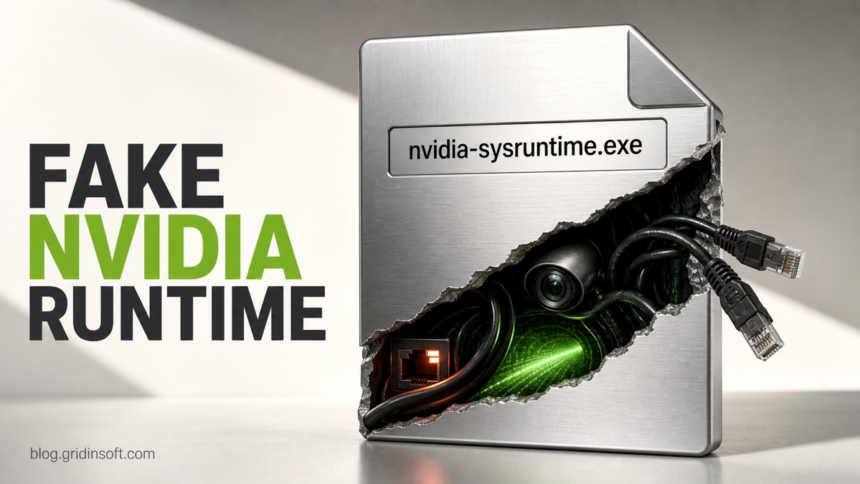
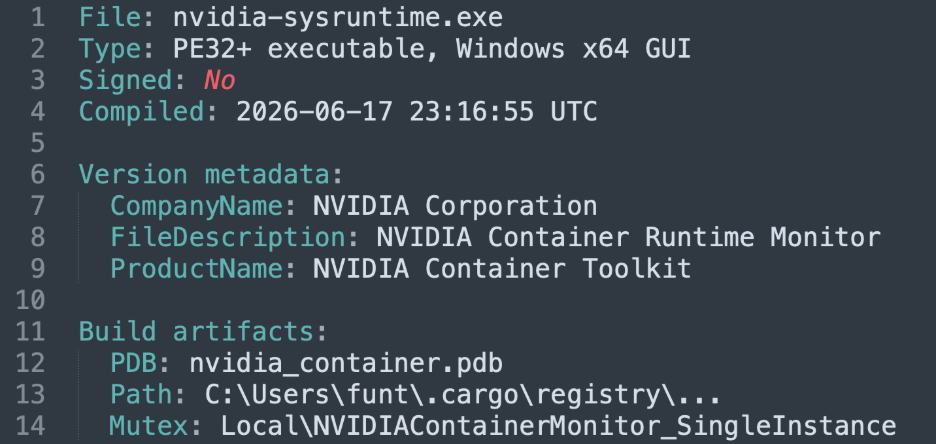
LabubaRAT malware is a Rust-based remote access trojan (RAT) that impersonates NVIDIA software on Windows. The analyzed unsigned file, nvidia-sysruntime.exe, claimed to be an “NVIDIA Container Runtime Monitor.” If that exact file ran, disconnect the PC, disable its verified autorun, run a full malware scan, and reset exposed accounts from a clean device; treat the machine as remotely controlled, not as a graphics-driver problem.
The report does not describe a vulnerability in NVIDIA products or prove that every NVIDIA-looking process is malicious. The useful distinction is the combination of an unexpected executable, no valid signature, mismatched vendor metadata, LabubaRAT artifacts, and remote-control behavior.
What is LabubaRAT malware and what can it do?
LabubaRAT is a complete remote-access implant rather than a small downloader. It can inventory the host and installed security tools, run cmd.exe, PowerShell, or JavaScript tasks, capture screenshots, upload and download files, create archives, and turn the infected computer into a SOCKS5 proxy. It supports HTTPS polling, WebView2 communication, and DNS tunneling.
| Artifact | Why it matters |
|---|---|
nvidia-sysruntime.exe |
Unsigned 64-bit Rust executable with false NVIDIA version information. |
nvctr_sys.db |
SQLite database used to store enrollment, server, device, DNS, and polling state. |
Local\NVIDIAContainerMonitor_SingleInstance |
Mutex that keeps one copy running while preserving the NVIDIA disguise. |
| HKCU Run persistence | An install mode can add user-level autostart with encoded configuration arguments. |
pipicka[.]xyz |
Observed command server whose page exposed the LabubaPanel name and Labubu-themed favicon. |
How to check whether nvidia-sysruntime.exe is LabubaRAT
- Find the full path and command line. In Task Manager, open the process file location. Also check Task Manager Startup apps and Microsoft Autoruns for an entry that launches the file with a long Base64-like argument. For the legitimate Windows driver component and same-name safety checks, see the NVIDIA Container and nvcontainer.exe verification guide.
- Check the digital signature. Open the file’s Properties and look for a valid Digital Signatures tab. The analyzed LabubaRAT sample was unsigned despite claiming NVIDIA Corporation in version metadata.
- Calculate the hash without running the file. In PowerShell, use
Get-FileHash -Algorithm SHA256 "C:\path\to\nvidia-sysruntime.exe". Blackpoint reported SHA-256b7443b0ab48d2f5786d1b6f3a580f02621e9ae5a3877ee3a44e01df13d984328. - Look for supporting artifacts. Search the same folder and user profile for
nvctr_sys.db, its-wal/-shmfiles, unexpectedwupd_JavaScript files, and an HKCU Run value that relaunches the executable. - Do not judge by the NVIDIA name alone. Legitimate NVIDIA software should come from NVIDIA, Windows Update, or the PC manufacturer and carry a consistent path, signature, package history, and behavior.
For a safer way to inspect unknown autoruns before deleting them, use the suspicious startup apps checklist. The broader remote access trojan guide explains why screenshot, shell, file-transfer, and proxy capabilities change the response from simple file removal to full incident cleanup.
How to remove LabubaRAT malware from Windows
Deleting nvidia-sysruntime.exe alone is not enough after it has run. Remove the verified autorun, scan for the database, scripts and downloaded payloads, then treat accounts and sessions that were accessible from the PC as potentially exposed.
- Disconnect the PC from the network. This interrupts command polling, file transfer, proxying, and new operator tasks. In a managed environment, preserve the file path, command line, hash, and relevant logs before cleanup.
- End the process and disable its autorun. Do not delete unrelated NVIDIA drivers or services. Disable only the verified malicious entry and keep a note of its original path and registry value.
- Run a full malware scan. Removing the visible executable may leave the autorun, database, scripts, downloaded tools, or another payload. Use Gridinsoft Anti-Malware to scan for the implant and persistence, remove detections, reboot, and scan again if activity returns.
- Recheck persistence and traffic. Review Startup, Autoruns, Task Scheduler, services, recent downloads, and outbound DNS/HTTPS activity. Confirm that
nvidia-sysruntime.exe,nvctr_sys.db, and unknown encoded launch commands do not return. - Reset exposed accounts from a clean device. The report does not claim a dedicated password-stealing module, but remote command, screenshot, and file access mean an operator could reach data available to the user. Change important passwords, revoke active sessions, and review MFA after the endpoint is clean.
- Reinstall only from an official source. If a real NVIDIA component is needed, download it through NVIDIA’s official software/driver pages, Windows Update, or the PC maker instead of restoring the suspicious file.
If the process path is wrong, the name imitates a Windows component, or high CPU started after an unknown installer, scan for hidden miners, services, startup entries, and bundled components.
Scan for LabubaRAT leftoversIs LabubaRAT related to NVIDIA?
No evidence shows that LabubaRAT is an NVIDIA product or an NVIDIA vulnerability. Act if the exact filename or hash appears, an unsigned NVIDIA-themed executable launches from an unexpected location, the LabubaRAT database or mutex is present, or the process shows remote-control and tunneling behavior. Owning an NVIDIA GPU or having signed NVIDIA drivers installed does not by itself indicate infection. The original report does not identify a mass-delivery method, so exposure should be verified from artifacts rather than assumed from the brand name.
References
- Sam Decker and Nevan Beal. “LabubaRAT: A Rust Based Remote Access Tool Masquerading as NVIDIA Software.” Blackpoint Cyber Adversary Pursuit Group, July 14, 2026, accessed July 14, 2026. https://blackpointcyber.com/blog/labubarat-a-rust-based-remote-access-tool-masquerading-as-nvidia-software/
- NVIDIA. “NVIDIA Software.” NVIDIA, accessed July 14, 2026. https://www.nvidia.com/en-us/software/