

Mathlesson80.help points to a learning-branded resource page whose public catalog contains browser games. In the files we inspected, 440 catalog records included 2048, 10 Minutes Till Dawn, and 1v1 Soccer. The link passed through a Google redirect wrapper to another hosting address, while the game viewer was configured to embed content from a separate source. Those are different layers of the same link journey—not evidence, by themselves, that a visitor’s device is infected.
If you expected a school assignment, verify the exact link with the teacher or person who supplied it. If you encountered an unwanted permission request or download, the useful next step depends on what you actually allowed or opened.
Where does the Mathlesson80 link go?
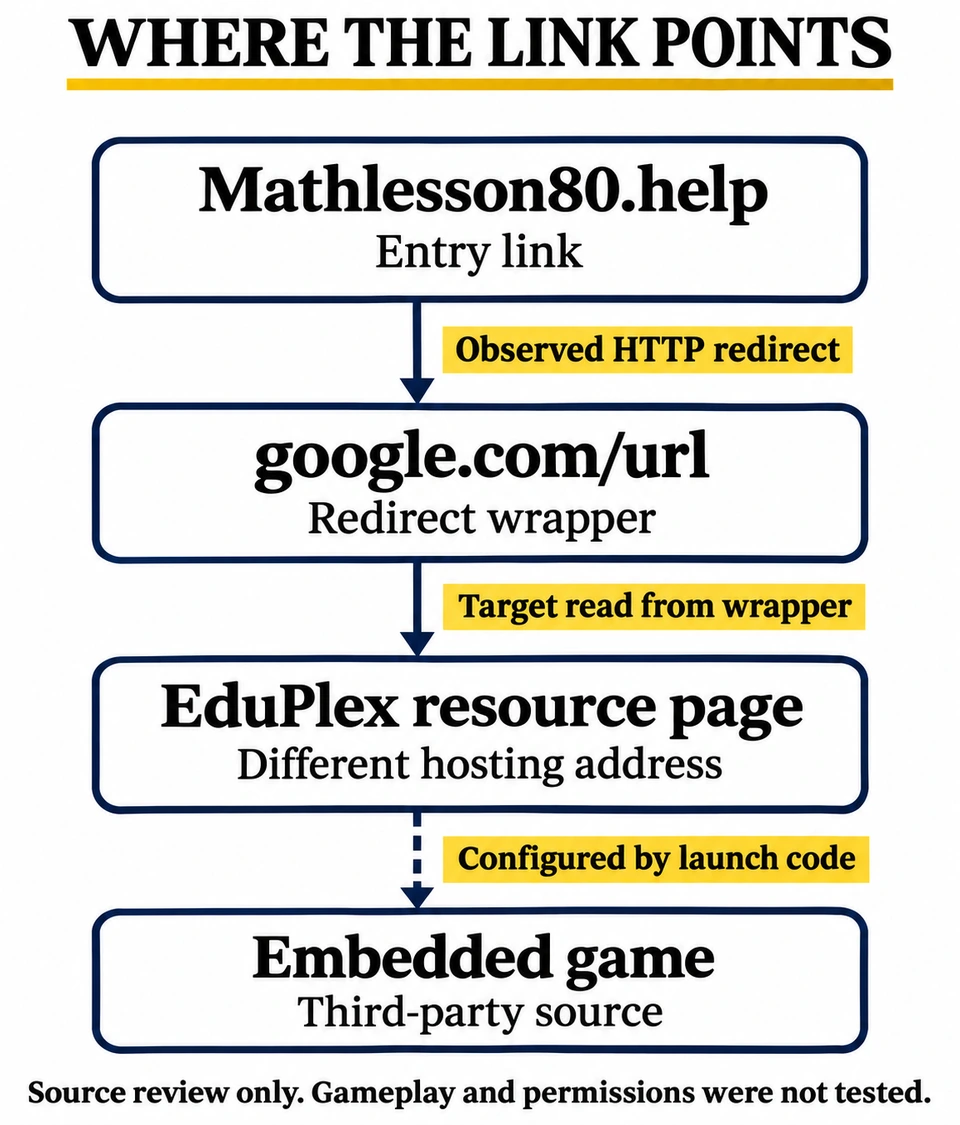
Our public HTTP check on November 16, 2026 found three distinct addresses or pages:
- The entry address:
mathlesson80.help, the domain someone might send you or put in a bookmark. - A Google URL wrapper: the request followed redirects to
www.google.com/url. That response contained a destination URL. A Google address in this intermediate step does not make the destination a Google product or an approved educational resource. - The destination page: we fetched that target separately on
espaciodca.fedace.org. It returned a page titled “Interactive Learning Resource Nexus,” using the name EduPlex.
This explains why the address can change even before a game is selected: the shared domain is an entry point, not the address of every component. The observed hostname does not establish who operates the game catalog or whether the organization associated with that host approved it.
What is behind the “learning modules”?
The page describes academic modules and reasoning resources. Its published assets/data.js file tells a more specific story: it stores encoded names and source addresses for 440 entries. We decoded those values as data using the reversible transformation in assets/app.js, without running the downloaded JavaScript.
The examples span a number puzzle, an action game, and a soccer game. All 440 configured source addresses in that snapshot used the same GitHub Pages host. The count describes catalog records; it does not mean we played, verified the availability of, or assessed the safety of 440 games.
Two details explain why this can be confusing to inspect. The code draws game titles onto canvas images rather than displaying them as ordinary text labels. The viewer also builds an on-page address label beginning with endpoint://, followed by a generated token, instead of showing the actual remote source address. That label belongs to the page; it is not the browser’s address bar.
The launch code creates an iframe—a separate webpage embedded inside the surrounding page—and assigns the chosen record’s source address to it. That arrangement can display a game while the browser’s main address bar continues to show the resource page. It is why checking only the top-level address does not identify every provider involved. [1]
Does the microphone setting mean it is recording?
No recording was established by this inspection. The viewer’s code sets an iframe allow attribute containing autoplay, fullscreen, gamepad, microphone, clipboard-write, accelerometer, and gyroscope. This is a feature-policy declaration: it specifies capabilities for the embedded page within the browser’s other restrictions. It is not a record of a visitor granting access or a feature being used. [1]
In particular, a microphone policy entry is not the same as accepting a microphone prompt. Chrome separately lets users allow or deny microphone access, and school or workplace administrators can control those settings. Likewise, the literal name clipboard-write in this source is not evidence that anyone’s clipboard was read. [2]
If a game or a page you did not expect asks for microphone access, decline it unless you understand and want the feature. Read the requesting address in the browser prompt. It may differ from the domain in the original link. There is no reason to grant a permission merely because a page calls itself educational.
What to do after a visit, prompt, or download
You only opened the link
Close the page if it is not what you expected. A redirect or an unfamiliar game catalog alone is not a diagnosis of malware. If you did not grant access, enter information, install anything, or see continuing symptoms, this observation does not justify treating the device as infected.
You allowed a browser permission
Review the permission for the address that requested it. In Chrome on a computer, open Settings → Privacy and security → Site settings → Microphone, then review allowed sites and remove the unwanted exception. On a managed school device, ask the administrator if the control is locked. [2]
For alerts that keep appearing, check Notifications in Site settings as well. Notifications and pop-up windows have separate controls; blocking pop-ups does not necessarily revoke an earlier notification grant. Our browser notification guide covers Chrome, Edge, Firefox, Safari, and Android. This is a response to a permission you actually granted, not a claim that our check reproduced a Mathlesson80 notification prompt. [3]
A file downloaded, but you have not opened it
Keep it unopened; delete it if you do not need it. Do not run an installer, add an extension, or change a security setting just to find out what a browser game requires. Verify an unexpected school download with the person who assigned the work through a known contact route.
You ran a file, installed something, or redirects keep returning
This is a different situation from a one-time page redirect. Note what you installed and whether the problem follows you across unrelated sites or returns after a browser restart. The adware symptoms guide helps distinguish website behavior, notification spam, and a persistent browser or app change.
On your own Windows PC, an unknown executed download or recurring unwanted browser behavior warrants a malware check. Download and install Gridinsoft Anti-Malware, update its database, run a Full Scan, review detections, apply the appropriate cleanup, and restart. Then check whether the original symptom returns. A scan can identify unwanted software and related components; a clean result is not proof that no exposure occurred. On school-managed equipment, report the incident to IT before installing tools or changing managed settings.
For parents and teachers: check the assignment, not the name
A learning-themed domain is not enough to identify a curriculum resource. Compare the exact link with the assignment in the school’s usual platform. If the result is unexpected, record the entry address, final address, and any permission wording, without sharing students’ personal information. Ask the teacher or IT team to verify the intended resource. A domain reputation check is an additional input; it does not establish that the games are appropriate for a class or approved by the school.
Inspection scope: We read public HTTP responses, HTML, and the catalog/viewer source on November 16, 2026. We did not launch games, click advertisements, grant permissions, submit information, or execute downloaded scripts. The page referenced advertising and other external scripts; their runtime behavior was not tested. The findings describe that snapshot, not every future destination or component.
References
- MDN Web Docs. “The iframe HTML element.” Accessed November 16, 2026. Inline frames and the allow attribute.
- Google Chrome Help. “Use your camera and microphone in Chrome.” Accessed November 16, 2026. Microphone permissions and managed settings.
- Google Chrome Help. “Block or allow pop-ups in Chrome.” Accessed November 16, 2026. Pop-ups, redirects, and notification controls.