
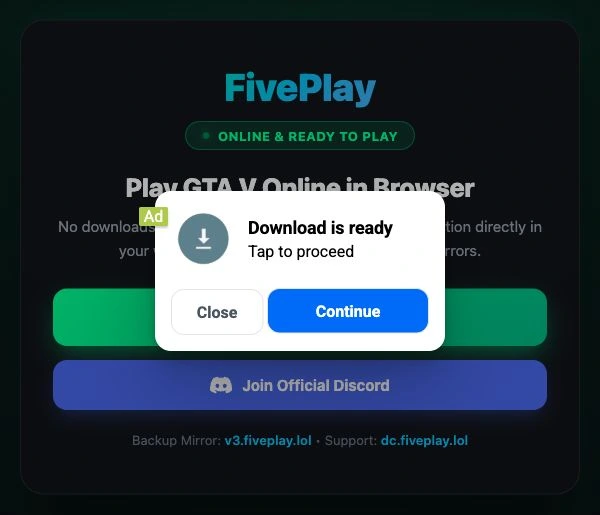
FivePlay.lol displayed an advertisement reading “Download is ready” over its GTA V landing page during our inspection. We had not selected a game or requested a file. The small “Ad” label mattered: the prompt belonged to advertising placed over the site, so its Continue button was a separate decision from starting the game.
If you arrived through gta.deloskiyt.pl, the connection is real: that address now serves a migration notice pointing to FivePlay. The public launcher files also contain a substantial browser-game interface. Understanding those files is more useful than assuming that browser gaming is impossible—or that a working game would make every surrounding request trustworthy.
We reviewed public HTML and JavaScript and captured one FivePlay landing-page advertising state on November 16, 2026. We did not launch the game, follow the advertisement, install software or certificates, or change system trust. This review explains the inspected source and that limited observation; it is not a gameplay benchmark or a blanket malware verdict.
Why GTA.Deloskiyt.pl leads to FivePlay
The old address serves a page announcing that its servers have moved. Its HTML contains two navigation mechanisms: a JavaScript redirect after 1.5 seconds and a separate two-second meta refresh to https://fiveplay.lol/. The FivePlay homepage links to v2.fiveplay.lol and a backup at v3.fiveplay.lol.
That establishes the migration advertised by the operator. The notice’s description of an “official domain” identifies its chosen destination; it does not establish Rockstar Games’ involvement. Our inspection did not establish the project’s licensing or authorization, and those questions cannot be settled by the domain name alone.
The launcher describes a local web port, not just a video stream
The homepage uses cloud-mirror language, but the fetched launcher identifies itself as $GrandV — Local Launcher and labels the interface Local Web Port. It offers Story and Sandbox modes, graphics settings, save profiles, and mod-import controls. The small v2 and v3 index files we fetched were identical: they selected game.html when a Story or Sandbox mode was supplied, and otherwise selected launcher.html. [1]
The game page contains code that creates a browser Worker for a loader, transfers a rendering canvas, and passes engine settings to that worker. A Worker is a way to run JavaScript work separately from the page’s main interface. The same page tracks received game-data bytes and loading progress. These are concrete parts of a browser-game loading scaffold, not merely a screenshot of a game.
They also explain why “no installation” need not mean “no download.” A browser can fetch code and game assets without a conventional installer, and that work still consumes network bandwidth, storage and device resources. The source structure is consistent with local browser processing; we did not execute the loader to verify its complete runtime, performance, game content or backend behavior.
A download advertisement is a different part of the page
The inspected HTML includes external script references to quge5.com and alwingulla.com. The main site’s sw.js file also imports an external service-worker script. That source evidence identifies third-party code associated with the page’s advertising setup. By itself, it does not establish a malicious payload or permission grant.
The captured overlay provides a more concrete recognition cue: a small Ad label, a download-ready claim, and a prominent Continue button appeared over the FivePlay landing page. We did not follow it, so its destination and any offered file remain untested. The claim in the advertisement is not evidence that a game file was ready or that a download had occurred.
If a new tab, overlay or redirect asks you to install an extension, enable notifications, pay, or enter an account password, stop and identify that destination independently. Do not use an advertisement’s instructions to troubleshoot the game. A video showing playable GTA elsewhere cannot authenticate the particular prompt in front of you.
The LAN certificate instructions have an activation condition
The launcher HTML contains instructions for trusting a root certificate from a local-network host. Reading that text in the source could suggest that every public-site visitor is offered a certificate. The accompanying code shows a narrower condition.
lan_certificate_ui.js first requests /__lan/certificate-info. Before enabling the relevant controls, it expects valid JSON containing the certificate route /__lan/certificate.cer and a 64-character SHA-256 fingerprint. Our direct request to that information endpoint returned HTTP 200 with the generic index HTML, not the required JSON. That captured public response did not satisfy the activation check.
A separate local-launcher.js file is restricted too: its local-server controls require the hostname localhost and a sufficiently long capability token in the URL fragment. Those conditions distinguish a locally launched server interface from an ordinary visit to the public hostname.
A root certificate is a system trust decision, not an ordinary game setting. Placing a certificate authority in a trusted-root store can make certificates issued through that authority trusted by software using the store. Microsoft documents that chain-of-trust relationship. A matching fingerprint identifies the certificate you are considering; it does not establish that its operator deserves that trust. [2]
Do not install an unfamiliar root certificate or bypass a certificate warning to make a game load. The supplied source instructions are not evidence that the public site installed one, that a certificate was downloaded, or that trust changed automatically. We did none of those things.
Changing mirrors can change where your saves live
The launcher offers separate Story and Sandbox saves, named save profiles, and save/settings export and import controls. Its local-server panel warns that changing a port opens a separate browser-storage context. We inspected those controls and references; we did not test saving or restoring a game.
Browsers generally separate website storage by origin: the protocol, hostname and port. Thus v2.fiveplay.lol and v3.fiveplay.lol do not automatically share the same browser-storage area just because their pages look alike. A missing save after a mirror switch need not mean that the old save was deleted. Check the original address and browser profile before clearing anything. [3]
The launcher’s game-cache control says it preserves saves and settings. That promise should not be confused with deleting all site data through the browser, which can remove locally stored progress. If you need to retain progress and the export function is available, keep a backup before deleting site data. Storage in a private-browsing session is also usually discarded when that session ends.
What to do depends on what you actually approved
- You only visited or saw the advertisement. Close the unwanted page or tab. Seeing a download claim is not the same as downloading or executing a file. Check your browser’s download list if you are unsure what happened; do not open an unfamiliar item to identify it.
- You allowed notifications or another site permission. In Chrome, open Settings → Privacy and security → Site settings and review the specific site’s permissions. Block unwanted notifications or reset that site’s permissions. If an ad opened another domain, review that domain as well. This permission change is separate from deleting site data and saves. [4]
- You installed an extension, ran an installer, or entered credentials on a different page. Identify the exact extension, file and destination. Stop using the unfamiliar software and scan the device if it ran; protect any account whose credentials you supplied. These are consequences of the particular action you took, not something established merely by visiting FivePlay.
- You manually trusted a certificate. Closing the tab or resetting browser permissions does not undo trust-store changes. Record the certificate you added and have a trusted administrator review and remove unintended trust. Do not delete built-in or workplace certificates indiscriminately.
For a current domain-level check, use the Gridinsoft report for FivePlay.lol alongside the exact address and request you are assessing. Separately, an offer of a leaked GTA 6 installer belongs to the GTA 6 leaked-build scam problem; it should not be confused with this GTA V launcher.
The useful distinction is between loading browser-game code, accepting an advertiser’s request, and changing trust on your device. FivePlay’s source and the observed advertisement make those separate decisions visible. Treat each one on its own evidence.
References
- FivePlay. “$GrandV — Local Launcher,” including its linked launcher scripts. Accessed November 16, 2026. Public launcher page.
- Microsoft. “Working with Certificates,” section on chain trust and certificate authorities. Microsoft Learn, accessed November 16, 2026. Certificate chain-trust documentation.
- MDN contributors. “Storage quotas and eviction criteria.” MDN Web Docs, accessed November 16, 2026. Browser storage origins and persistence.
- Google. “Change site settings permissions.” Google Chrome Help, accessed November 16, 2026. Reviewing a site’s browser permissions.