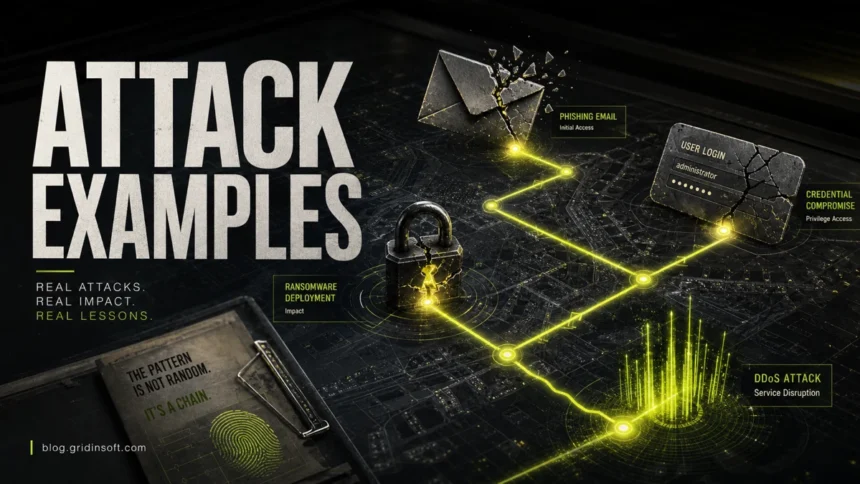
Cyber attack examples include phishing emails, stolen-password logins, ransomware encryption, DDoS floods, fake software updates, business email compromise, web application exploits, and compromised suppliers. The technical names matter less than the pattern: attackers try to steal data, take over accounts, disrupt services, install malware, or abuse trusted systems for money, access, espionage, or sabotage.
The most useful way to understand cyber attacks is not to memorize every technical name. It is to know what attackers are trying to achieve, how the attack usually starts, what warning signs appear, and which controls reduce the risk.
| Main keyword | Cyber attack examples |
| Common targets | People, email accounts, websites, cloud services, business networks, payment systems, and connected devices |
| Most common entry points | Phishing, stolen passwords, unpatched software, exposed remote access, malicious downloads, and compromised suppliers |
| Typical impact | Data theft, account takeover, ransomware, downtime, fraud, identity theft, reputation damage, or financial loss |
| Best first defense | Unique passwords, phishing-resistant MFA, updates, backups, least privilege, email filtering, endpoint protection, and a practical insider threat mitigation plan |
What Are the Most Common Cyber Attack Examples?
The most common cyber attacks in 2026 are phishing, credential theft, ransomware, malware infections, DDoS attacks, business email compromise, web application attacks, supply chain attacks, social engineering, and drive-by downloads. Many real incidents combine several of these. For example, a phishing email can steal a password, the password can open a VPN account, and that access can lead to ransomware.
For individuals, the biggest practical risks are phishing, fake support scams, stolen passwords, malware downloads, and account takeover. For businesses, the biggest risks are ransomware, email compromise, exposed remote access, web application flaws, supplier compromise, and DDoS disruption.
Why These Examples Matter in 2026
Recent public data points to the same situations victims recognize after something goes wrong: a vulnerable system was exposed, a login was stolen, a phone or email message tricked someone, a supplier was compromised, or ransomware followed earlier access. Verizon’s 2026 DBIR says vulnerability exploitation became the top breach entry point at 31% of breaches, mobile-centered social engineering had a 40% higher success rate than traditional email phishing, and third-party involvement appeared in 48% of breaches. The FBI’s 2025 IC3 report recorded 1,008,597 complaints and nearly $21 billion in cyber-enabled crime losses, with phishing/spoofing, extortion, and investment schemes among the most reported complaints.
That is why this guide is organized around examples, not only definitions. A reader usually searches after seeing a fake login page, a password alert, encrypted files, an offline website, a suspicious download, or an invoice change request. Each section below explains what the attack looks like, how it starts, and which first defense reduces the risk.
What Is a Cyber Attack?
A cyber attack is an attempt to compromise the confidentiality, integrity, or availability of a digital system. In plain English, attackers try to steal something, change something, or break access to something.
NIST describes an attack as an attempt to gain unauthorized access, destroy, expose, alter, disable, steal, or make unauthorized use of an asset. In practice, even a small suspicious login, malicious attachment, exposed admin panel, or fake support message can become a larger incident if it is not identified and contained.
Cyber Attack Types at a Glance
| Attack type | What attackers want | Common entry point | Best first defense |
| Phishing | Passwords, payment data, malware installs | Email, SMS, chat, fake login pages | Verify links, use MFA, report suspicious messages |
| Credential theft | Account access | Password reuse, breaches, fake forms | Password manager, unique passwords, passkeys/MFA |
| Ransomware | Payment through encryption or data theft | Phishing, RDP/VPN, stolen credentials | Offline backups, patching, MFA, endpoint protection |
| DDoS | Service outage | Botnets, reflection/amplification traffic | DDoS protection, rate limits, traffic filtering |
| Malware/Trojans | Persistence, spying, theft, loader access | Cracks, fake updates, attachments, malicious ads | Trusted downloads, antivirus, application control |
| Web application attacks | Database access, admin access, code execution | SQL injection, XSS, broken auth, vulnerable plugins | Patching, WAF, secure coding, least privilege |
| Supply chain attacks | Access through trusted software or vendors | Compromised update systems, packages, contractors | Vendor review, code signing, monitoring, segmentation |
If the incident starts with a threat to “boot” a game server, router, or website, check the IP stresser and DDoS booter guide before engaging with the attacker or testing anything back.
1. Phishing and Spear Phishing
Phishing uses fake messages to make people click links, enter passwords, open attachments, send money, or approve sign-ins. It can arrive by email, SMS, chat apps, social media, QR codes, or collaboration tools.
Example: a fake Microsoft 365 alert says your account will be blocked unless you sign in. The link opens a lookalike login page. Once the password is entered, attackers use it for email takeover, invoice fraud, or further phishing.
Prevention: type important URLs yourself, verify the sender domain, use password managers that refuse to autofill on fake domains, turn on phishing-resistant MFA where possible, and train users to report suspicious messages.
2. Credential Theft and Account Takeover
Credential attacks target passwords, session cookies, MFA prompts, API keys, recovery codes, and access tokens. Attackers may use breached password lists, phishing kits, infostealer logs, brute force, password spraying, or MFA fatigue.
Example: an employee reused a password from an old breach. Attackers try that password against cloud email, then create forwarding rules to watch invoices and reset other accounts.
Prevention: use unique passwords, passkeys or MFA, alert on unusual login locations, disable legacy authentication, rotate exposed secrets, and review active sessions and connected apps.
3. Ransomware and Data Extortion
Ransomware encrypts files, blocks systems, steals data, or combines all three to pressure victims into paying. Modern ransomware often includes double extortion: attackers steal sensitive files before encryption and threaten to leak them.
Example: attackers enter through exposed remote access, disable security tools, steal documents, encrypt servers, and demand payment for a decryptor and a promise not to leak data.
Prevention: follow CISA-style ransomware basics: patch internet-facing systems, protect remote access with MFA, maintain offline or immutable backups, segment networks, restrict admin rights, monitor for unusual tools, and test recovery.
4. DDoS and Denial-of-Service Attacks
A DoS or DDoS attack tries to make a website, server, API, or network unavailable. CISA groups DDoS techniques into traffic-volume attacks, protocol attacks, and application-layer attacks.
Example: a botnet floods a login endpoint or API with traffic until legitimate users cannot connect. Another campaign may use reflection/amplification to send large traffic bursts at a target.
Prevention: use DDoS mitigation, CDN or edge protection, rate limiting, caching, traffic filtering, autoscaling, and an incident contact path with the hosting provider before an attack starts.
5. Malware, Trojans, and Loaders
Malware is malicious software used to steal information, spy, open backdoors, download more payloads, mine cryptocurrency, or prepare ransomware. Trojans pretend to be harmless software but perform unwanted actions after installation.
Example: a fake game crack installs a loader. The loader downloads an infostealer, steals browser passwords, and sends the stolen data to a criminal marketplace.
Prevention: avoid cracks and fake updates, download software only from official sources, keep browsers and operating systems updated, block suspicious scripts, and use endpoint protection.
After uninstalling the suspicious app or deleting the visible threat, use Gridinsoft Anti-Malware to check hidden files, startup entries, scheduled tasks, bundled apps, browser changes, and other persistence points that can restore malware.
Download Anti-Malware6. Business Email Compromise
Business email compromise (BEC) is a fraud-focused cyber attack. Attackers impersonate executives, vendors, employees, or partners to redirect payments, change invoice details, or request sensitive data.
Example: attackers compromise a supplier mailbox and reply inside a real invoice thread with a new bank account. Because the message appears in an existing conversation, it looks more believable than a normal phishing email.
Prevention: verify payment changes out-of-band, use DMARC/SPF/DKIM, require approval workflows, train finance teams, and watch for mailbox forwarding rules and suspicious OAuth apps.
7. Web Application Attacks
Web application attacks target websites, admin panels, APIs, plugins, and databases. Common examples include SQL injection, cross-site scripting, broken authentication, insecure file upload, server-side request forgery, and vulnerable CMS plugins.
Example: an outdated WordPress plugin lets attackers upload a web shell. From there, they can deface the site, add SEO spam, steal database content, or redirect visitors to malware.
Prevention: update CMS/plugins, use least-privilege database accounts, validate input, protect admin areas, deploy a WAF, monitor file changes, and remove unused plugins and themes.
8. Drive-By Downloads and Malvertising
A drive-by download happens when visiting a compromised or malicious page triggers unwanted code, fake updates, push-notification spam, or exploit attempts. Malvertising uses ads or ad redirects to push users into fake downloads and scam pages.
Example: a fake “browser update required” page convinces a user to install a malicious file. The file then drops adware, a browser hijacker, or a password stealer.
Prevention: keep browsers updated, block unwanted notifications, avoid fake update prompts, use safe browsing filters, and remove unknown extensions.
9. Man-in-the-Middle and Session Hijacking
A man-in-the-middle attack intercepts or manipulates communication between two parties. Session hijacking steals or abuses an active login session instead of the password itself.
Example: an attacker on an unsafe network tricks a user into visiting a fake login flow or steals a session token from malware logs. The account can then be accessed without retyping the password.
Prevention: use HTTPS, avoid logging into sensitive accounts over untrusted networks, use VPN where appropriate, keep browsers updated, and sign out of sessions after suspected malware or phishing.
10. Supply Chain Attacks
Supply chain attacks compromise a trusted vendor, software update, package, contractor, library, or service provider. They are dangerous because the victim may trust the source by default.
Example: attackers compromise a software update system or a package repository account. Users install a “legitimate” update that contains malicious code.
Prevention: verify vendor security, use code signing, pin dependencies where practical, monitor software updates, restrict vendor access, and segment sensitive systems from third-party tools.
Cyber Attack Examples by Target
| Target | Likely attack | Warning sign |
| Home user | Phishing, fake support, malware download | Unexpected login alert, pop-up warning, unknown extension, password reset emails |
| Small business | BEC, ransomware, website compromise | Invoice change request, slow shared drives, website redirects, unknown admin login |
| Online store | Credential stuffing, payment skimming, plugin exploit | Fraudulent orders, injected scripts, strange admin accounts |
| Public website/API | DDoS, bot abuse, injection, scraping | Traffic spike, error rate increase, login attempts, abnormal API calls |
| Enterprise network | Ransomware, supply chain, stolen VPN credentials | New admin tools, mass file changes, unusual outbound transfers |
How to Prevent Cyber Attacks
No single tool stops every attack. Strong defense is layered and boring in the best way: reduce exposed entry points, detect suspicious behavior early, and make recovery possible.
- Use unique passwords and a password manager. Password reuse turns one breach into many account takeovers.
- Enable MFA or passkeys. Prioritize email, banking, cloud, VPN, admin panels, and business apps.
- Patch operating systems, browsers, CMS, plugins, routers, and VPN appliances. Unpatched internet-facing systems are high-value targets.
- Keep offline or immutable backups. Test restores before you need them.
- Limit admin rights. Users and services should have only the access they need.
- Filter email and web traffic. Block known phishing, malicious attachments, and unsafe downloads.
- Monitor logins and endpoints. Watch for impossible travel, unfamiliar devices, new forwarding rules, mass file changes, and unsigned executables.
- Segment critical systems. A compromised laptop should not automatically reach backups, domain controllers, or production databases.
- Train people with real examples. Most attacks start with a message, login prompt, fake call, or download.
- Prepare an incident response checklist. Know who can isolate systems, reset passwords, contact hosting providers, and report fraud.
What to Do During a Cyber Attack
If you suspect an active attack, do not start by deleting evidence. Act in a way that limits damage and preserves useful information.
- Disconnect affected devices from the network if malware or ransomware is suspected.
- Preserve screenshots, alerts, suspicious emails, file names, wallet addresses, IPs, and timestamps.
- Change passwords from a clean device, starting with email and administrator accounts.
- Revoke suspicious sessions, OAuth apps, API keys, and remote access tokens.
- Scan affected endpoints and check startup entries, scheduled tasks, browser extensions, and recently installed software.
- Contact your bank, hosting provider, insurer, or law enforcement when money, data, or public services are involved.
- Restore from known-good backups only after the entry point has been identified and closed.
For the people behind these techniques, compare this list with our types of hackers guide: the same attack can look different when it comes from a criminal, insider, hacktivist, or state-backed actor.
FAQ
What is the most common type of cyber attack?
Phishing is one of the most common entry points because it targets people, not only software. It often leads to credential theft, malware installation, invoice fraud, or ransomware.
What are examples of cyber attacks?
Examples include phishing emails, ransomware encryption, DDoS traffic floods, stolen password logins, fake software updates, web application exploits, supply chain compromises, and business email compromise.
What is the difference between a cyber attack and a data breach?
A cyber attack is the attempt or action against a system. A data breach is one possible result, where information is accessed, exposed, stolen, or disclosed without authorization.
Can small businesses be targeted?
Yes. Small businesses are common targets because they use email, payment systems, websites, cloud accounts, and remote access, but often have fewer security resources than large enterprises.
How do most ransomware attacks start?
Common starting points include phishing, stolen credentials, exposed RDP/VPN access, vulnerable internet-facing systems, malicious downloads, and compromised suppliers.
What is the best protection against cyber attacks?
The best protection is layered: unique passwords, MFA, patching, endpoint protection, backups, least privilege, email/web filtering, monitoring, and regular user training.
Bottom Line
Cyber attacks are not one thing. They are a chain of tactics: a message, a stolen password, an exposed service, a malicious file, a vulnerable plugin, or a trusted supplier abused for access. Learn the common attack types, reduce the easiest entry points, and prepare recovery before an incident happens.
References
- FBI Internet Crime Complaint Center. “2025 IC3 Annual Report.” Federal Bureau of Investigation, April 2026. Accessed June 7, 2026. https://www.ic3.gov/AnnualReport/Reports/2025_IC3Report.pdf
- Verizon. “Breach entry point, 2026 DBIR finds.” Verizon, May 19, 2026. Accessed June 7, 2026. https://www.verizon.com/about/news/breach-industry-wide-dbir-finds
- NIST Computer Security Resource Center. “Attack.” National Institute of Standards and Technology, accessed June 7, 2026. https://csrc.nist.gov/glossary/term/attack