

If a stranger on Discord asks whether you saw their message in Jurassic Front: Survival, you can end the conversation there. Players have described a mistaken-identity opener that turns into a personal invitation to play. The game has an App Store listing. That listing tells you which app exists. It cannot tell you who sent the message or why they want you to join their guild.
If you only received the DM or replied, you can report the message and block the sender. A reply alone gives you no reason to reset your phone or change your password. If you downloaded something, approved a login or made a payment, skip to the action that fits what happened.
How a wrong-person DM becomes a game invite
One recipient described two conversations in r/Scams. In their account, both strangers seemed to have mistaken them for someone else. Each stayed to chat, asked about strategy games and recommended the same game. Days later, one sent a voice message. That detail made the recipient take the invitation more seriously. [1]
One recipient’s account, paraphrased with identifying details omitted
Two people added me. Each seemed to think I was someone else. We made small talk, then both asked whether I liked strategy games. One later sent a voice message that sounded like a real person.
The revealing moment is what happens after you clear up the mistake. Someone who supposedly wanted a particular teammate now wants you to install a particular game. A convincing voice may make that request feel personal. It gives you no way to establish who controls the account or whether the person represents the game. You can decline without trying to prove they are a bot.
Check the game independently of the sender
Open the store app yourself and search for Jurassic Front: Survival. On Apple’s App Store, the listing has the numeric ID 6593664001 and offers in-app purchases. In a public reply to a player who reported Discord messages, the developer said it had not deployed Discord bots to privately invite players to download the game. That reply addresses one specific claim. The identity of the people in the reported conversations remains unknown. [2]
If you want to play, you can reach the listing yourself and decide what to install or buy. There is no need to send the stranger a screenshot of your account, follow a link to a “PC version,” or buy a pack to keep the conversation going. A request for a password, login approval or payment outside the store is a separate decision with its own consequences.
What to do after a Jurassic Front message
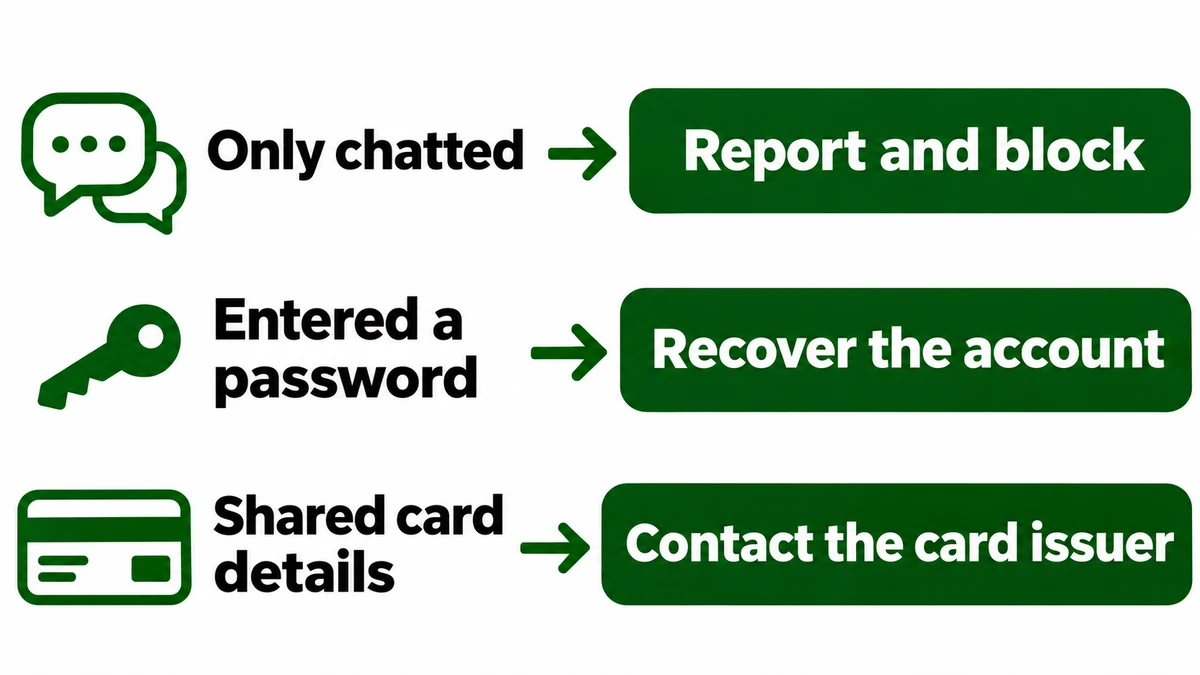
You replied or opened a page
End the conversation and close the page. Check Downloads if it offered a file. If you entered nothing, approved nothing and ran nothing, reporting and blocking the contact is a reasonable stopping point.
You installed the game from the store
Review the app and its permissions through your phone’s settings. Uninstall it if you no longer want it. The unwanted DM alone does not establish that the store app infected your device.
You downloaded a file from the chat
Leave an unopened installer closed and delete it. If you ran an unknown Windows installer, disconnect that PC and use a trusted device for important logins. Follow the recovery steps after running an unknown game file. This is a precaution for that file, not a finding about the store app.
You entered a password, shared a login code or approved an app
Open the affected service yourself on a trusted device. For Discord, reset the password, check User Settings → Authorized Apps, remove unfamiliar access and enable multifactor authentication. Change reused passwords too. If recovery details changed, use the account recovery checklist.
You bought a pack or sent money
Keep the receipt and the message asking for payment. For a purchase made through the store, use the order in your purchase history to request help. If you gave card details to a separate site or see an unfamiliar charge, contact the issuer using its app or the number on the card. For a transfer, contact the payment provider promptly with the transaction ID.
How to report the message in Discord
Report the message that contains the actual request. On desktop, right-click it. On mobile, press and hold it. Select Report Message, choose the reason that fits, and block the sender from their profile. If you lost access to Discord, use Discord’s compromised-account support route. A message report flags the sender’s conduct, while a recovery request gets the account problem to the right team. [3]
References
- r/Scams participant. Jurassic front discord messages. Reddit. First-person account, accessed November 18, 2026.
- Jurassic Front: Survival. App listing and developer response to a Discord invitation report. Apple App Store, accessed November 18, 2026.
- Discord Support. My Discord Account was Hacked or Compromised. Updated May 27, 2025. Accessed November 18, 2026.