Xeno Executor is not safe to judge by its name alone. Splunk Threat Research confirmed that one password-protected Xeno package from xenoexecutor[.]in installed the utility while also dropping Salat Stealer. A different Xeno Executor.exe hash analyzed by Gridinsoft showed no detection. That does not cancel the malicious finding; it proves the source, archive, and SHA-256 hash matter more than the filename.
If you ran a suspicious Xeno package, use Gridinsoft Anti-Malware to check the PC for threats installed alongside it. Review the detected files and apply cleanup before returning to sensitive activity. If suspicious processes are still running, disconnect the affected PC; use a clean device to secure exposed accounts. Scanning helps with device cleanup, but cannot undo stolen sessions or passwords.
Scan your Windows PC with Gridinsoft Anti-Malware for malware and unwanted components delivered with the installer. Review detections and apply cleanup. Secure exposed accounts separately from a clean device.
Free 6-day full trial for eligible new users, including cleanup. Email activation; no credit card required.
Download Gridinsoft Anti-Malware for WindowsThe safety decision
- Do not call every Xeno build malware: the confirmed evidence applies to specific packages and hashes.
- Do not call a Xeno download safe because one file is clean: a bundle can install a legitimate component and a separate malicious payload.
- Treat protection-disabling instructions as a stop sign: do not restore a quarantined file or add a broad folder exclusion just to make an executor run.
- Assume account exposure if the package ran: Salat Stealer can target browser data, cookies, credentials, wallets, and other local information.
What Splunk found in the Xeno bundle
In its July 2026 Salat Stealer investigation, Splunk analyzed a password-protected XENO.rar downloaded from xenoexecutor[.]in. Running the self-extracting Xeno.exe created two important branches: soa.exe installed the legitimate Xeno utility, while wios.exe contained the Salat Stealer payload [1].
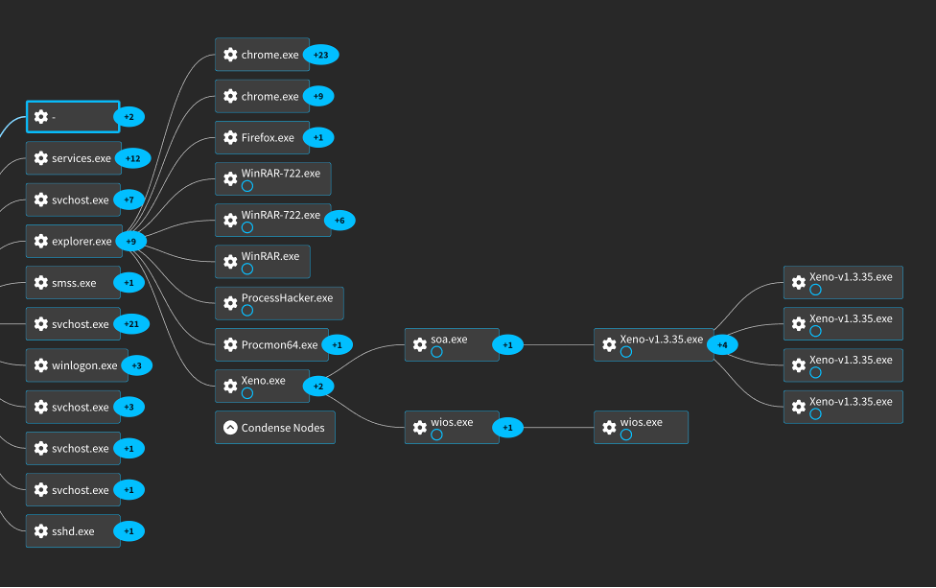
Xeno.exe dropping the utility installer and the Salat Stealer payload. Source: Splunk Threat Research Team.This is why a working interface is not proof of safety. A trojanized installer can launch the program the user expected and execute a stealer in the background. Splunk associated SHA-256 fec793499d9df0458b611a71dda23b41ba1c28038a79924ab606937e26e77115 with the observed XENO.rar bundle and documented separate hashes for the installed component and Salat payload.
Why one Xeno file can scan clean and another can be malicious
| Evidence | What it actually proves |
Splunk’s XENO.rar hash fec79349...77115 |
That specific package delivered the legitimate utility together with Salat Stealer. |
Gridinsoft’s clean Xeno Executor.exe hash fc418ec5...60585 |
That exact submitted file had no detected threat in its analysis. It does not validate another archive, mirror, version, or companion file. |
| The same filename on another website | Nothing by itself. Filenames and icons are easy to copy; compare the source, full archive contents, digital signature, and SHA-256. |
| A low antivirus detection count | A useful signal, not a guarantee. A fresh loader or companion payload may be missed, and the file may change after an update. |
You can inspect the specific clean Xeno Executor.exe report, but compare its complete SHA-256 with your file. Do not use a matching name or similar size as a shortcut.
Xeno warning signs that are not normal false positives
Code injection can trigger antivirus warnings, so a detection label alone sometimes needs review. The surrounding behavior is what separates a possible GameHack/PUA alert from a likely compromise. Stop and treat the PC as unsafe when you see any of these:
- the download comes from a mirror, ad redirect, Discord attachment, YouTube description, or password-protected archive;
- the page tells you to turn off real-time protection, restore every detection, or exclude an entire Downloads or executor folder;
- running
Xeno.execreates unexpected files such aswios.exeor launches hidden PowerShell, command-shell, or script activity; - a path such as
%APPDATA%\Microsoft\Windows\DefenderUpdates\docconv.exeappears without a legitimate software owner; - Defender exclusions, firewall rules, scheduled tasks, startup entries, or security settings change without a clear prompt;
- Roblox, Discord, Steam, email, browser, or wallet sessions show logins or activity you did not initiate.
Roblox itself warns that cheating and exploit downloads can be used to distribute keyloggers or other malware and says exploiting violates its rules [2]. A website calling itself “official” does not remove either the device risk or the account-ban risk.
What to do if you ran Xeno.exe
- Disconnect the affected PC from sensitive activity. Close the executor and Roblox, disconnect networking if suspicious processes are still running, and do not open email, banking, wallets, or password managers on that PC.
- Preserve the useful identifiers. Record the download URL, archive name, archive hash if available, Defender detection name, and paths for files such as
wios.exe,soa.exe, ordocconv.exe. Do not upload the archive to forums or share it with other users. - Scan the PC and clean detected threats. Install Gridinsoft Anti-Malware, update its database, and run a Full Scan. Eligible new users can activate the trial with the emailed code. Review the detected paths and proposed actions, then quarantine or remove confirmed threats. You do not need to manually locate every startup task before scanning.
- Remove the downloaded package. Delete the original archive and extracted Xeno folder. Empty the Recycle Bin only after saving the non-sensitive identifiers you need for comparison.
- Review Windows Security exclusions. Open Windows Security → Virus & threat protection → Manage settings → Exclusions. Remove unknown entries that point to the executor, Downloads, Temp, AppData, Startup, or a fake DefenderUpdates folder. Leave legitimate organization-managed exclusions alone.
- Restart and verify. Rescan if symptoms return. A clean scan cannot reverse credential theft: revoke sessions and change exposed passwords from a clean device using the account steps below.
Additional checks if symptoms remain
- If symptoms remain, check persistence. Review Startup Apps, Task Scheduler, and recently installed applications for items created around the time you ran Xeno. The PowExcScr Defender exclusion guide shows the deeper checks when an alert mentions PowerShell or
Add-MpPreference. - Use further scans if alerts persist. Update Defender, run a full scan, and use Microsoft Defender Offline if alerts return after reboot. Microsoft notes that recurring malware may be reinstalled by a hidden component and recommends an Offline scan for that case [3].
Secure accounts after the device is clean
If the suspicious package ran, treat credentials and sessions used on that Windows profile as potentially exposed. Clean or isolate the PC first, then use a different trusted device for recovery.
| Account or data | Recovery action |
| Primary email and Microsoft/Google account | Change the password first, revoke active sessions, review recovery methods, and remove unknown app access. |
| Roblox, Discord, Steam, Epic, and other gaming accounts | Change passwords, sign out other sessions, review linked accounts and purchases, and enable multi-factor authentication. |
| Browser-saved passwords and cookies | Rotate important passwords and invalidate sessions. A password change alone may not end every stolen cookie or token. |
| Crypto wallets and browser wallet extensions | Inspect approvals and activity from a clean device. If seed material or private keys may have been exposed, move assets to a newly created wallet. |
| Payment and shopping accounts | Review recent transactions and saved payment methods; contact the provider for unauthorized activity. |
Use the broader infostealer recovery checklist after a game or mod download for the full session and password order. If Roblox only reports an incompatible-software path and there are no malware signs, compare that path with the Roblox anti-cheat error guide before deleting drivers or normal security software.
How to tell whether cleanup worked
- Defender and Gridinsoft scans finish without detecting the original payload or new related files;
- removed exclusions, firewall rules, scheduled tasks, and startup items do not return after reboot;
wios.exe, unknowndocconv.exe, and the suspicious Xeno archive no longer exist;- Windows Security real-time protection and SmartScreen stay enabled;
- no new account logins, password-reset messages, wallet approvals, or unsolicited Discord/Roblox activity appear after session revocation.
If detections or exclusions return, do not keep repeating the same in-Windows cleanup. Use Defender Offline, scan from a trusted environment, or reinstall Windows from clean media when persistent compromise cannot be removed reliably.
FAQ
Is Xeno Executor a virus?
The name alone is not a verdict. Splunk confirmed one Xeno-labeled bundle that delivered Salat Stealer, while Gridinsoft analyzed a different Xeno Executor.exe hash with no detected threat. Judge the exact source, package contents, behavior, and SHA-256.
Can Xeno Executor be a false positive?
Injection behavior can trigger GameHack, HackTool, or PUA warnings. That does not make every alert malicious, but instructions to disable protection, hidden companion processes, unknown exclusions, or account theft signs are not ordinary false-positive evidence.
What is wios.exe?
In the package analyzed by Splunk, wios.exe contained the Salat Stealer payload. The same filename elsewhere is not proof by itself, but finding it after running the observed bundle is a serious indicator.
Should I change my Roblox password immediately?
Use a clean phone or computer to change it and revoke sessions. If the PC is still compromised, typing a new password there can expose the replacement credential too. Secure the primary email account first because it can reset other accounts.
Does deleting the Xeno folder remove Salat Stealer?
Not necessarily. A bundle may create companion files, exclusions, firewall rules, startup items, or scheduled tasks outside the original folder. Scan the whole system and verify that security settings and suspicious artifacts do not return after reboot.
References
- Splunk Threat Research Team and Teoderick Contreras. “Bundled to Steal: The Salat Stealer Campaign.” Splunk, July 6, 2026. https://www.splunk.com/en_us/blog/security/bundled-to-steal-salat-stealer-campaign.html.
- Roblox Support. “Cheating and Exploiting.” Roblox, accessed July 13, 2026. https://en.help.roblox.com/hc/en-us/articles/203312450-Cheating-and-Exploiting.
- Microsoft Support. “Troubleshoot problems with detecting and removing malware.” Microsoft, accessed July 13, 2026. https://support.microsoft.com/en-US/defender/troubleshoot-problems-with-detecting-and-removing-malware.