

I wouldn’t run a game from SteamRIP on the strength of the site’s reputation. SteamRIP offers unofficial, pre-installed PC games. A review can tell you that someone got a game to launch. It can’t tell you what else the program did, or whether you received the same files. If your antivirus flagged a download, leave it in quarantine and get a fresh copy through Steam or the game publisher. What you do next depends on whether you only visited the page, downloaded the archive, or actually ran something.
What did the SteamRIP safety check actually scan?
A player on Reddit asked whether to trust SteamRIP after scanning a game download and seeing a list of antivirus detections. There are two different checks you can make here. One looks up a web address. The other examines a particular file. Gridinsoft has public examples of both.
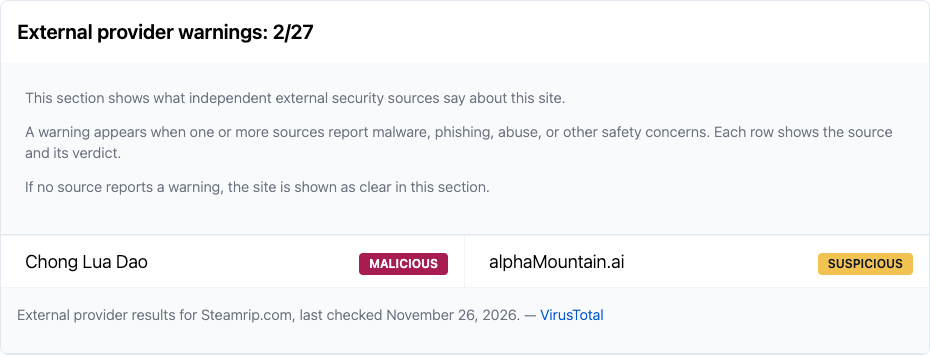
The website. On November 26, 2026, Gridinsoft’s report for steamrip.com showed a trust score of 79/100 and warnings from two of 27 external sources. The domain had been registered since 2021. Its history helps explain the score, but 79/100 does not mean a game has a 79% chance of being safe. If the download button opened another host, or the address contains an extra letter, that address needs its own check.
The file. A September 6, 2026 scan of an archive named Minecraft-W10-Fix-SteamRIP.com (1).rar recorded 26 detections across 56 engines. Some labels described a game modification tool. Others identified a possible Trojan. The report identifies the exact archive by its SHA-256 fingerprint. Someone could rename a different archive to match, and the name alone cannot establish where the scanned copy came from. We couldn’t connect this archive to the Reddit player’s download.
Could the antivirus warning be a false positive?
It could. A GameHack detection can refer to software that modifies how a game works. That label alone doesn’t tell you whether the package also contains a password stealer. Equally, an engine that reports no detection gives you no guarantee about the file. Counting votes or checking whether the game launches won’t settle the question.
Open your antivirus event details and read the affected item, time and action taken. Was the item the archive in Downloads, a DLL inside the extracted game folder, or an unexpected program the installer started? If you already have a file fingerprint, compare it with the SHA-256 in the report. A match ties the report to those exact bytes. A different hash means the report describes a different file. Leave quarantined files where they are. You don’t need to restore one to make this decision.
What to do after visiting, downloading or running a game
- You only visited the page. Close any unexpected tab. Check your browser’s downloads list for files you didn’t request and remove those without opening them. If you allowed notifications, revoke that site’s permission in the browser. A pop-up claiming your PC is infected is a web page, and clicking its “scan” button gives you no reliable diagnosis.
- You downloaded or extracted files but didn’t launch anything. In Windows Security, open Virus & threat protection → Protection history. If Defender says “Threat quarantined,” leave it contained or choose Remove. If it says “Threat blocked,” check the event details to see what was removed. Delete any remaining copy of the archive and extracted folder. If another antivirus handled the alert, check its quarantine history.
- You ran the game, a setup program or a separate “fix.” Stop using the package. Note roughly when it ran and keep the detection name and path. Re-enable protection if you turned it off, remove any exclusion you added for the game, update your security software and run a full scan. An alert for a new executable under a temporary or startup folder deserves attention even if you have since deleted the game.
After a program runs, quarantining the original download can leave a second file, a scheduled task or a browser change behind. If you ran the package or the alert returns with a new timestamp, use Gridinsoft Anti-Malware to scan the Windows PC and review any additional detections before signing back in.
What if you entered a Steam password?
If a download page asked you to sign in and you entered your Steam credentials, act even if you never opened a file. Use a trusted device to open the Steam app or type the Steam Support address yourself. Check Authorized Devices, sign out everywhere if you see unfamiliar activity, and change your Steam password. Secure the linked email account, especially if you reused the password. Enable Steam Guard and review recent security messages. These steps also apply if you ran a suspicious file and later noticed account activity you don’t recognize.
References
- Microsoft Support. Protection History in the Windows Security App. Accessed November 27, 2026.
- Valve. Account Security Recommendations. Steam Support. Accessed November 27, 2026.