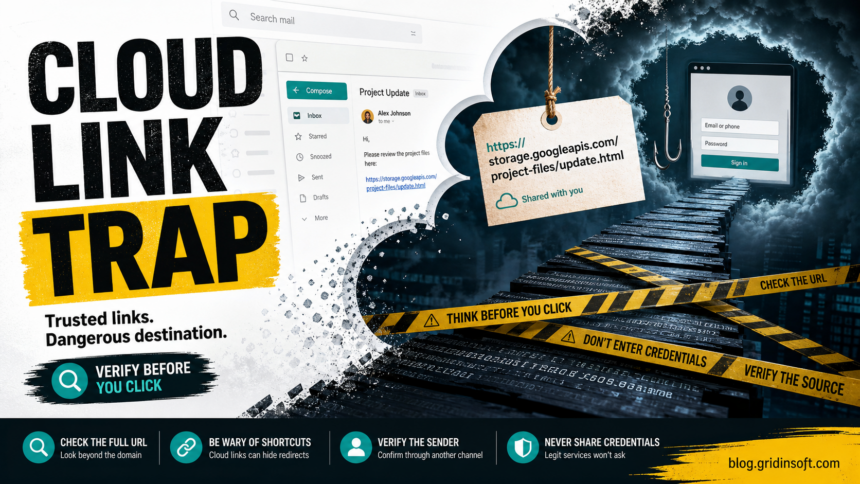
A storage.googleapis.com or Google Cloud link is not automatically a scam, but it is not automatically safe either. Attackers can abuse public cloud storage, shared documents, redirects, and hosted HTML files to make a phishing link look more trustworthy than a random new domain.
The important question is not “Is Google Cloud hacked?” In most cases, the answer is no. The real issue is that trusted infrastructure can host user-uploaded content, decoy documents, or redirect pages. A scammer can make the first link look familiar while the final goal is still credential theft, payment fraud, or malware delivery.
Why cloud links work in phishing
| What makes the link look safe | What can still be dangerous |
|---|---|
| The domain includes Google, cloud storage, or a familiar file-sharing brand. | The uploaded page, PDF, or redirect can be controlled by an attacker. |
| The email says a document, invoice, or shared file is waiting. | The link can lead to a fake Microsoft, Google, payroll, or banking login. |
| The URL uses HTTPS. | HTTPS protects the connection; it does not prove the page is honest. |
| The page asks you to sign in again. | The attacker may be collecting credentials, MFA codes, or session tokens. |
How to check a Google Cloud link
- Look at the full URL, not just the visible blue text in the email.
- Check who sent it and whether the message matches the normal workflow.
- Do not enter passwords from a link in an unexpected message. Open the service from a bookmark or typed address instead.
- Be extra cautious with PDFs, HTML attachments, QR codes, shortened links, and pages that immediately redirect.
- Use a reputation checker for unfamiliar domains and scan downloaded files before opening them.
Gridinsoft Website Reputation Checker can help evaluate suspicious domains in a phishing chain, while Gridinsoft Anti-Malware is useful if the cloud link led to a downloaded file, browser extension, remote-support app, or installer. A clean-looking cloud URL does not make a downloaded file safe.
If you entered credentials
- Change the affected password from a clean device.
- Sign out of all sessions where the account provider allows it.
- Remove unknown recovery emails, phone numbers, MFA devices, forwarding rules, and connected apps.
- Contact your workplace IT team if this was a business account.
- Watch for follow-up scams: fake support calls, invoice fraud, mailbox rules, and messages sent from your account.
When to report the link
Report phishing pages to the abused platform and to the service being impersonated. For Google-hosted phishing, use Google’s phishing reporting and Safe Browsing tools. If the message came through work email, report it through your organization’s mail-security workflow so similar messages can be blocked for other users.
Common Google Cloud phishing patterns
| Pattern | What to check |
|---|---|
| Shared document lure | Open Drive, SharePoint, or mail from a known bookmark instead of the email link. |
| HTML file hosted in cloud storage | Do not enter credentials into a page loaded from a storage bucket or raw hosted file. |
| QR code to a cloud-hosted page | Scan only if you expected it, then inspect the full URL before signing in. |
| Fake invoice or voicemail | Confirm with the sender through a separate channel before opening attachments. |
| Redirect chain | Check the final destination, not only the first familiar-looking domain. |
Safe decision flow
- Ask whether you expected the file or login request.
- Check the sender’s real email address, not just the display name.
- Hover or copy the link into a plain-text note to inspect the full destination.
- Open the service independently from a bookmark if you need the file.
- Report the message if the link asks for credentials, MFA codes, payment details, or a download.
Why cloud abuse hurts detection
Security filters may treat well-known cloud infrastructure differently from a newly registered scam domain. Attackers exploit that trust by hosting a decoy file in one place, redirecting through another, and collecting credentials on a final page that may disappear quickly. That is why user-facing checks and mail-security reporting both matter.
For organizations, the useful controls are attachment sandboxing, URL rewriting, login-risk detection, user reporting, and cloud-app monitoring. For home users, the safest habit is simpler: do not sign in from an unexpected link just because the first domain looks familiar.
FAQ
Is storage.googleapis.com safe?
The domain is legitimate Google infrastructure, but individual files or pages hosted through it can still be malicious or deceptive. Judge the full context, sender, and final destination.
Does a Google Cloud phishing link mean Google was breached?
Usually no. Most cases involve abuse of public hosting or storage features, not a breach of Google Cloud itself.
Can a cloud link install malware?
Yes, if it leads to a downloaded file, extension, installer, archive, or fake document viewer. Scan downloads before opening them.
Safe cloud link or phishing bait?
A legitimate cloud link usually has context you can verify without using the link itself: the sender is expected, the file name matches a real project, the account already has access through the normal service, and the page does not ask for unrelated credentials. A suspicious cloud link often arrives without context, hides behind a button, asks for a password on a strange hosted page, or redirects before showing the file.
If the page asks you to download an HTML file, enable macros, install a browser extension, run a viewer, or call support to unlock a document, treat it as malicious. Cloud storage is only the delivery surface; the dangerous part is the instruction that follows.
References
- Google Safe Browsing. “Report Phishing Page.” Google, accessed June 13, 2026. https://safebrowsing.google.com/safebrowsing/report_phish/
- Google Transparency Report. “Safe Browsing Site Status.” Google, accessed June 13, 2026. https://transparencyreport.google.com/safe-browsing/search