HOLLOWGRAPH is a newly documented Windows espionage implant that hides commands and stolen files inside a compromised Microsoft 365 calendar. Group-IB found events parked on May 13, 2050, where users are unlikely to notice them. The malware uses normal Microsoft Graph API traffic for tasking and file theft, while a separate DNS channel refreshes the Microsoft Entra application credentials it needs to keep access.
The discovery does not describe a Microsoft 365 vulnerability, and an unexpected calendar invitation alone is not evidence of HOLLOWGRAPH. Group-IB identified 12 infected systems, only about three of which were actively communicating during its observation window. The evidence points to a focused espionage operation involving Israeli entities, not a broad consumer campaign.
What Group-IB found
| Signal | Observed HOLLOWGRAPH behavior |
|---|---|
| Platform | .NET NativeAOT-compiled DLL loaded by a larger framework component |
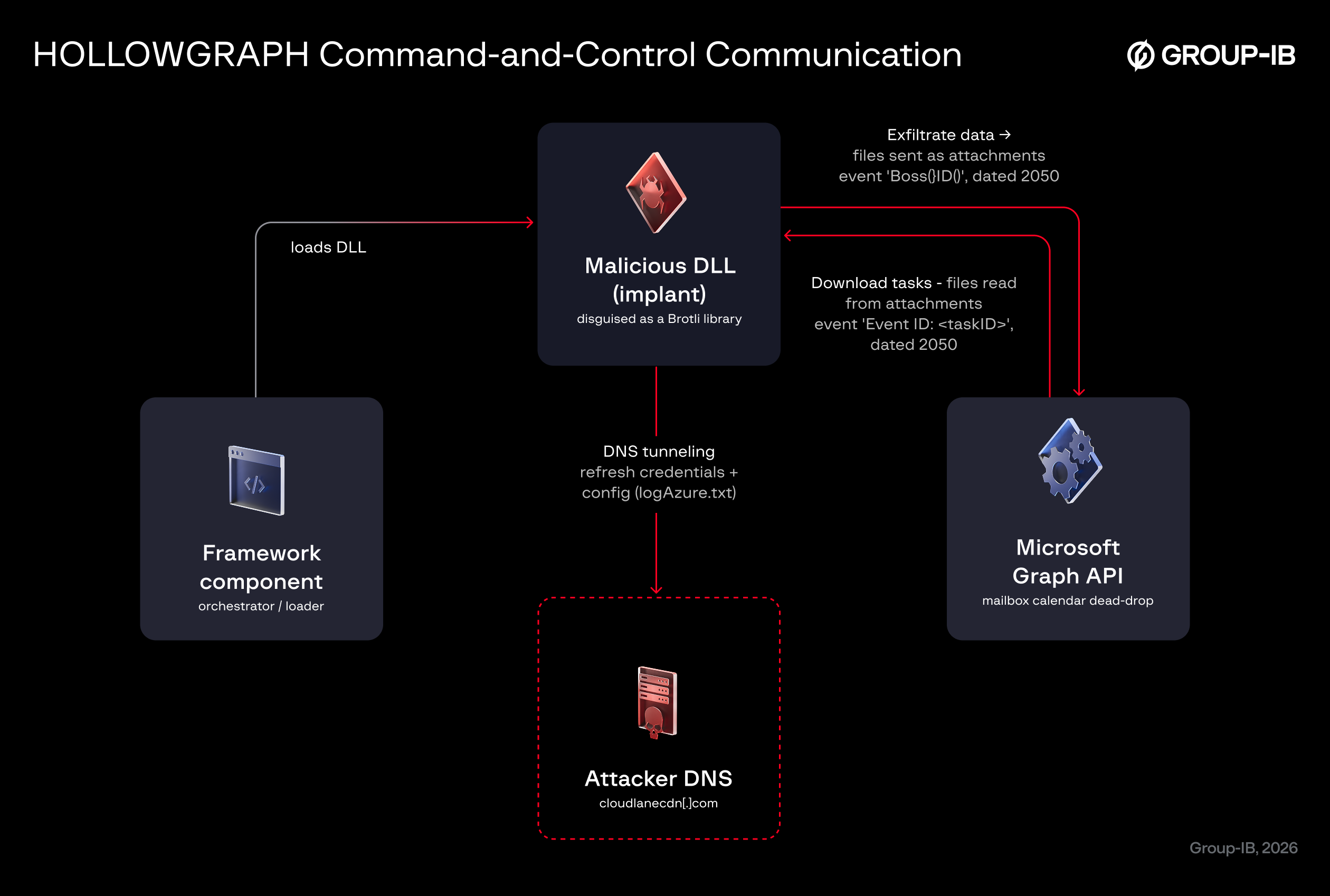
| Calendar marker | Events scheduled for 2050-05-13, including subjects such as Event ID: <taskID>, GUID-only subjects, or Boss...ID... |
| Attachments | Tasking and encrypted stolen data carried in calendar attachments such as File1.txt |
| Local file | logAzure.txt, which stores tenant, client, secret, mailbox, C2 domain, and key material |
| DNS indicator | cloudlanecdn[.]com queried through encoded IPv6 AAAA requests |
| Observed activity | June 3 through July 9, 2026; 12 identified systems, with roughly three active during analysis |
HOLLOWGRAPH supports only two core operations: get retrieves encrypted tasking from a calendar attachment, while send creates a far-future event and uploads encrypted output. The calendar channel uses separate RSA keys and AES-256-GCM for inbound and outbound data. The DNS credential-refresh channel is different: it reconstructs Microsoft Entra tenant ID, client ID, client secret, and mailbox values from AAAA responses and writes them back to logAzure.txt [1]. For a current Windows example with a DNS-only C2 path and scheduled-task persistence, see the TrickBot DNS tunneling indicators.
Who should investigate
The highest-priority audience is a Microsoft 365 or Entra administrator whose organization has links to the observed Israeli targeting, an endpoint alert involving the published hashes, traffic to cloudlanecdn[.]com, or an unexplained logAzure.txt file. Security teams should also investigate if a service principal suddenly creates calendar events or uploads attachments to a mailbox it does not normally touch.
Do not search every employee calendar and treat any event in 2050 as proof of compromise. The useful signal is the combination: a far-future event, application-driven Graph activity, the naming pattern or attachments, suspicious AAAA queries, and an endpoint artifact. Ordinary calendar spam usually arrives as a visible invitation or reminder; HOLLOWGRAPH uses an already compromised mailbox as a hidden dead drop.
Five checks for HOLLOWGRAPH
- Inspect the endpoint first. Search for
logAzure.txt, validate the file path and creation time, compare suspicious DLL hashes with Group-IB’s indicator list, and isolate the host before deleting evidence. - Search Microsoft 365 audit data. Look for application-driven calendar event creation, attachment uploads, subject changes, and access around May 13, 2050. Microsoft documents how to search the unified audit log and export results for investigation [2].
- Review Entra application credentials. Identify the client ID involved, check who added or changed its secret, review Graph application permissions, and confirm whether the app should have mailbox calendar access. Microsoft recommends controlled credential management and favors certificates or federated identities over long-lived client secrets [3].
- Check DNS telemetry. Hunt for
cloudlanecdn[.]com, repeated AAAA lookups, and long high-entropy subdomains. A sinkhole or block is useful containment, but it does not remove the implant or revoke stolen cloud credentials. - Contain both halves of the incident. Disable or restrict the suspicious application, revoke tokens where applicable, rotate the exposed client credential, isolate and examine affected Windows systems, and review mailbox access. Removing only the DLL leaves the cloud identity path unresolved.
If the investigation shows unauthorized application access, the response is closer to a cloud identity compromise than a simple malicious-calendar cleanup. Gridinsoft’s guide to revoking malicious OAuth application access explains the permission-review side, while the Storm-2949 investigation shows why Graph activity, identity changes, and cloud downloads must be correlated.
What not to assume
- No Microsoft patch fixes this by itself. The malware abuses legitimate Graph functionality with compromised application credentials.
- A calendar event is not the initial infection vector. Group-IB analyzed the covert channel, but did not establish how every endpoint first received the implant.
- Microsoft-owned traffic is not automatically safe. Trusted cloud infrastructure can carry malicious actions when the identity or application credential is compromised.
- Attribution remains limited. Group-IB links the malware to the Cavern framework with high confidence, but says the operator cannot yet be confidently assigned to a known actor.
References
- Javier Castillo, HOLLOWGRAPH: Turning Microsoft 365 Calendars into Covert Command-and-Control Channels, Group-IB, July 20, 2026. Primary research
- Microsoft, Search the audit log, Microsoft Learn, accessed July 20, 2026. Documentation
- Microsoft, Add and manage application credentials in Microsoft Entra ID, Microsoft Learn, accessed July 20, 2026. Documentation