
If you downloaded OBS Studio for Windows and then noticed the website looked wrong, leave the installer closed. Open your browser’s downloads with Ctrl + J and find the entry for OBS. If you only saved the file, you can check that installer online. If you opened it and setup started, check the Windows PC as well. A copy of OBS that opens and records normally can’t tell you what else a third-party installer ran.
I downloaded an OBS installer. How do I check it?
Look for the page where you clicked Download. The OBS Project’s Windows download starts at obsproject.com/download. If you can’t recall the site, check your browser history around the download time. A search ad, a familiar black OBS logo, or “OBS Studio” in the filename is easy to copy. On the OBS forum, a user described finding a lookalike through a Google ad [1].
Scan my downloaded installer with Gridinsoft Malware Check. Choose the file from Downloads in the scanner’s file picker. You can do this without launching setup. If your browser or antivirus already blocked or quarantined the file, leave it there and get a fresh copy directly from OBS.
If the scanner flags the file, keep it closed and remove the download. A clean result means the scanner found no threat in that copy. If you still can’t establish where it came from, discard it and use the official download. Saving an unopened installer alone usually calls for no further cleanup. Our guide to a suspicious download you didn’t open covers other cases, including browser warnings.
What a flagged OBS download looks like
Gridinsoft’s scanner recorded a Windows executable named Obs-studio.exe on May 24, 2026. Its verdict was Trojan.Win64.Downloader.sa. “Downloader” means the file was identified as capable of fetching other malicious software. The report identifies one submitted file. It doesn’t establish which website supplied it or what happened on the computer that submitted it.
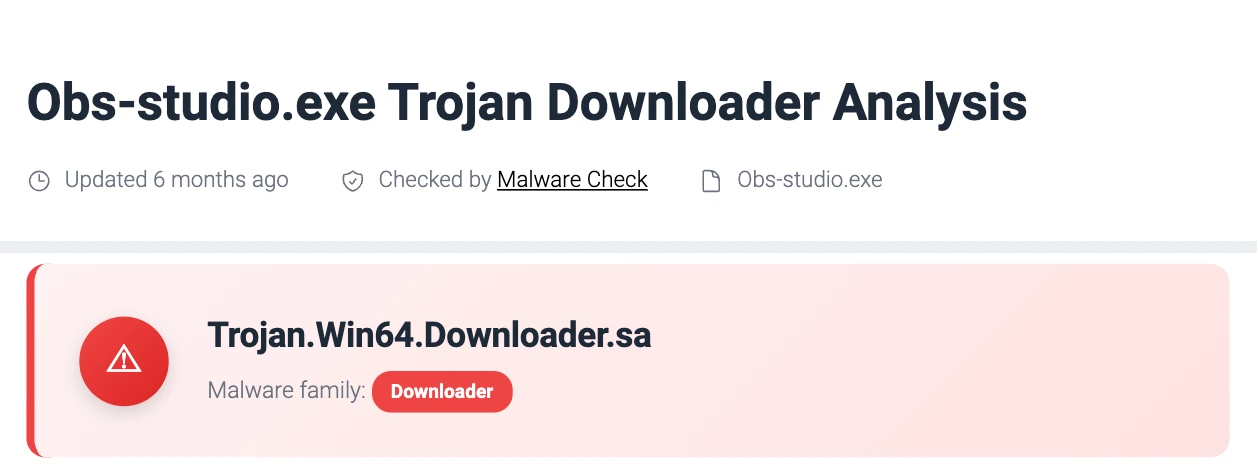
Compare the verdict when you open our example report. A matching filename alone can’t identify your copy. If yours was flagged and you already ran it, deleting the installer only removes the file you can see.
I ran the suspected fake OBS installer. What now?
Double-clicking the installer and seeing setup begin puts you in this group, even if setup failed or OBS never appeared. If all you did was open the Downloads folder, use the file check above. An interrupted setup can still have started another program.
- On the affected Windows PC, run a Full Scan. Download Gridinsoft Anti-Malware from the official product link below, open it, let its detection databases update, and choose Full Scan. This checks for other files the installer may have left behind. On a managed work computer, report the download to IT so they can check the device.
- Review the detections and apply the recommended cleanup. Keep the detection names and paths if you need help. Restart Windows, then check whether the same warning or unfamiliar program returns. Reinstalling genuine OBS by itself won’t remove a separate program installed alongside it.
- If you entered streaming-account credentials on the lookalike site, secure that account from a trusted device. Change the password and sign out other sessions. If you shared a stream key, reset it in your streaming service’s dashboard. A Windows scan can’t revoke a password, session or stream key.
Can I keep the OBS Studio installation I already had?
If your existing copy came from the OBS Project and you only saved a second, suspicious installer, remove that download. There’s no reason to delete your existing OBS scenes or recordings on those facts alone. If you ran the second installer, check Windows first, then get a fresh installer from the OBS Project if you need to repair the app.