Settra ransomware tried to erase the record of an intrusion, but one missing word defeated part of its cleanup. In a September attack investigated by Huntress, the malware targeted the wrong name for Windows Defender’s event log. The real log survived that deletion attempt—even as other logs and Windows recovery options came under attack.
Huntress’s September 17 report compares intrusions at a retail and consumer-services organization in July and a manufacturer in September. The useful discovery is not just another ransomware name: it shows why responders should look for surviving evidence rather than assume the attacker erased everything.
The wrong log name left a trail
The September executable attempted to clear a list of Windows logs, including Security, System, PowerShell and Task Scheduler. Its Defender entry was Microsoft-Windows-Defender/Operational. The actual channel is Microsoft-Windows-Windows-Defender/Operational: the attacker omitted the second “Windows.” Huntress reports that this mistake prevented that log from being cleared.
That distinction matters during an investigation. A request to delete a particular channel does not erase a differently named channel. Missing records in one place therefore do not establish that every local source is empty. The surviving log may help reconstruct activity; it does not, by itself, provide a complete history or prove that security software stopped the attack.
Remote access came before the ransom note
In July, Huntress detected MeshAgent, a legitimate remote-management tool, operating under the name mvtcs.exe. The next day, a ransomware executable ran from C:\Perflogs. Files received the .locked extension and a RESTORE_FILES.txt note appeared.
The September investigation began after the endpoint was already compromised. Researchers found MeshAgent again, this time under its normal name, alongside evidence involving gdrv.sys, a vulnerable driver. Bringing a vulnerable driver onto a compromised machine can give attackers a way to interfere with security tools. Huntress did not observe that driver technique in its July case.
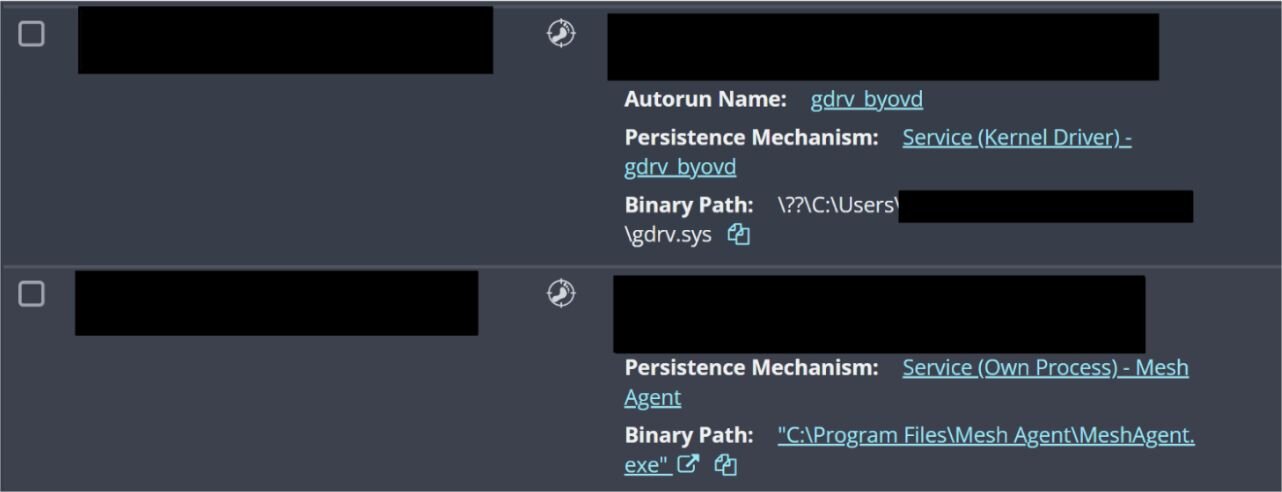
The image shows the relationship worth investigating: a kernel-driver service and a separate remote-management service on the affected endpoint. MeshAgent’s presence alone is not a Settra diagnosis; organizations also deploy it legitimately. An unexpected installation, its destination and surrounding activity are what turn the name into a useful lead.
In September, the encryptor ran from the compromised user’s Documents folder and produced .locked_wip files. Both incidents used executables named after the victim’s domain with _win64.exe appended. Huntress could not establish the initial access method in either case, so these observations should not be retold as confirmed VPN break-ins.
Microsoft’s separate Storm-2570 investigation traces repeated remote-access tools across four ransomware families. It adds context for investigating unauthorized MeshAgent deployments without assuming that shared software identifies the attacker.
Recovery sabotage needs an outcome check
The ransomware launched commands to disable Windows Recovery Environment and invoked DiskPart with a script that investigators could not recover. Huntress assessed the latter as an attempt to remove a recovery partition, while noting that it could not establish whether those recovery options had been in use beforehand.
In July, it also observed the Windows Cipher utility being used to overwrite free space, making deleted data harder to recover. That behavior was not observed in September. These differences are a reason to examine each affected host, not assume every Settra incident destroys the same recovery paths.
For an organization responding now, isolate affected endpoints from the network and preserve remaining logs and remote-management records before routine cleanup changes them. Keep encrypted files and ransom notes for analysis. If a suspicious executable needs identification, Gridinsoft’s file checker can provide an additional assessment; avoid uploading confidential material, and do not confuse a file verdict with decryption or a complete incident investigation.
The DeadLock investigation offers a separate example of why a responsive Windows desktop can coexist with encryption. Settra adds another lesson: check which evidence and recovery paths actually remain. An attacker’s command list describes its intentions; it does not guarantee every command succeeded.
References
- Huntress. Ready, Settra, Go: New Settra Ransomware Variant Deploys MeshAgent RMM. September 17, 2026.