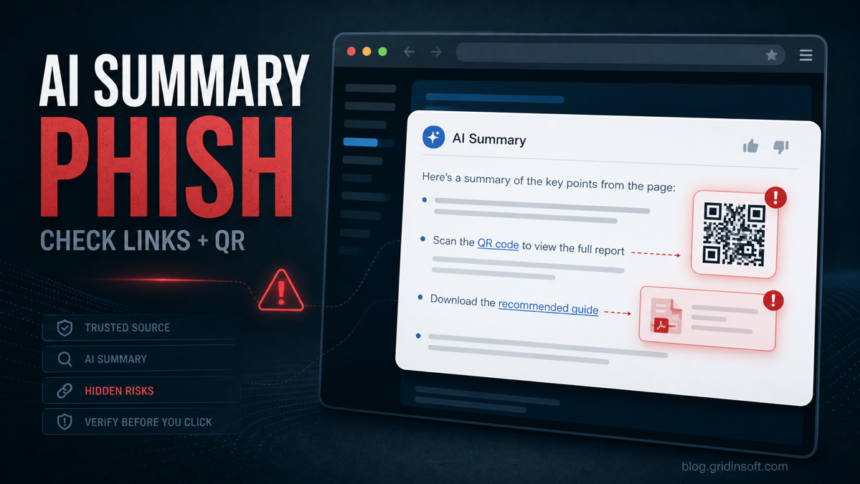
Permiso P0 Labs published ChatGPhish on May 29, 2026, showing how a normal web page can turn an AI-generated summary into a phishing surface. The issue is not that ChatGPT installs malware. The risk is that attacker-controlled page content can be summarized and then displayed as trusted-looking assistant output with live links, remote images, fake account alerts, or a QR code.
That distinction matters for anyone who uses AI summaries to triage websites, docs, repositories, or long articles. A link that appears inside a summary is not automatically an OpenAI link, a site-owner link, or a safe recommendation. It can be content that came from the page being summarized.
What ChatGPhish Changes
Classic phishing asks the victim to trust an email, a search result, or a fake download page. ChatGPhish moves the lure into a place many users now treat as safer: the assistant answer. Permiso’s proof of concept used page content that influenced the summary and produced a spoofed account-security message, a clickable phishing link, and a QR-code variant.
| Reader situation | Risk and safer response |
|---|---|
| You ask ChatGPT to summarize an unfamiliar page. | Treat links and images inside the answer as untrusted page content until you verify the real destination. |
| The summary shows an account alert, invoice, update notice, or login warning. | Open the service directly in a new tab instead of clicking the summary link. |
| The answer includes a QR code. | Do not scan it just because it appears in an AI response. QR codes move the check to a phone, where hover previews and desktop filters are weaker. |
| A download or document link appears in the summary. | Check the domain first. If you already downloaded a file, scan it before opening it. |
Who Should Pay Attention
This is most relevant to users who summarize pages before deciding whether to trust them: students, journalists, analysts, developers, support teams, and anyone who asks an AI assistant to process unknown websites. It also matters for businesses that allow browser-integrated AI tools, because users may treat the assistant’s response as a cleaned-up version of the page instead of an output that can still carry the page’s hostile instructions.
Home users should connect this to existing ChatGPT abuse patterns. Gridinsoft has already covered fake ChatGPT apps and older ChatGPT phishing scams. ChatGPhish is different: the attacker does not need to impersonate ChatGPT as a separate website or app. The lure can appear after a user asks for a summary.
What To Check Before Clicking
- Separate summary from source. If the assistant says a page contains an account warning or a download link, assume it came from the source page until proven otherwise.
- Use direct navigation for accounts. Type the service domain yourself or use a saved bookmark. Do not sign in through a link surfaced by a summary.
- Inspect QR codes separately. If your phone shows a shortener, cloud-storage host, random bucket, or unrelated domain, close it.
- Check domains before entering credentials. Use Gridinsoft Website Reputation Checker for unfamiliar URLs before you sign in.
- Scan after downloads. If a summary link led to an installer, PDF, archive, or script, check the file with Gridinsoft Online Virus Scanner, then run a second-opinion cleanup with Gridinsoft Anti-Malware before opening it.
What Not To Assume
Do not assume a summary link is safe because it appears in a clean AI interface. Do not assume a QR code is safer than a URL. Do not assume a page-summary feature removes malicious instructions from the original page. The safer mental model is simple: an AI summary can explain a page, but it can also repeat or render unsafe elements from that page.
FAQ
Is ChatGPhish malware?
No. It is a phishing and UI-trust risk demonstrated through AI page summarization, Markdown links, remote images, and QR codes. The danger starts when a user clicks, scans, signs in, or downloads something from the rendered response.
Does this mean ChatGPT itself is a phishing site?
No. The concern is that untrusted page content can appear inside a trusted assistant response. Users still need to verify links, QR codes, and account warnings before acting on them.
Should I stop using AI summaries?
No. Use them for reading and triage, but do not treat embedded links, QR codes, or security alerts inside the summary as automatically trustworthy.
References
- Permiso P0 Labs, Andi Ahmeti. “ChatGPhish: The Page Is the Payload.” Permiso, published May 29, 2026, accessed May 31, 2026. https://permiso.io/blog/chatgpt-markdown-rendering-vulnerability