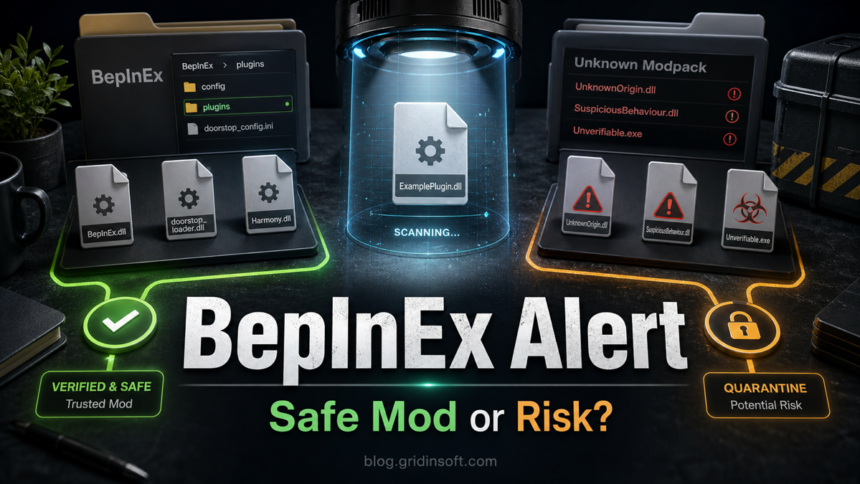
BepInEx is not malware by default. It is an open-source Unity, XNA, and .NET game modding framework, and the official GitHub project describes it as a plugin/modding framework for supported games. The risk starts when the alert comes from a third-party modpack, a repacked installer, a random Discord upload, or a BepInEx-looking DLL in a folder you cannot explain.
That is why the useful answer is not simply “allow it” or “delete it.” Check where the files came from, whether the archive matches an official release or a trusted game-mod package, what exactly your antivirus flagged, and whether anything added startup tasks, browser changes, or unrelated executables. If the source is unclear, keep the files quarantined until you verify them.
What Is BepInEx?
BepInEx is a mod loader and plugin framework used by many Unity-based games. Its normal files can include items such as BepInEx.dll, BepInEx.Preloader.dll, winhttp.dll, a BepInEx folder, a plugins folder, and configuration files inside the game directory. [1]
Check the component as well as the framework name: the BepInEx core loads third-party plugins, and a modpack can bundle both with additional software. Verifying the core does not verify every plugin. The official build code also copies .doorstop_version into Unity distributions alongside Doorstop components; that filename is not automatically an unrelated payload. Compare the exact component with the package for your game and version. [3]
Those files can look unusual to security software because a mod loader changes how a game starts and loads plugin code. That behavior is expected for a modding framework, but it is also the kind of behavior malware can imitate. The file name alone is not enough to prove safety.
When BepInEx Is Usually Safe
- You downloaded it from the official BepInEx GitHub releases page or from a trusted mod manager/package that names the exact BepInEx version.
- The location matches your intentional installation: the game directory or the profile directory used by your mod manager. Check the manager’s configured profile rather than judging
%APPDATA%or%TEMP%alone. - The core files and each plugin match the documented package. Investigate extra executables or scripts that its publisher cannot explain; the presence of a launcher alone does not decide whether a package is malicious.
- The alert has been checked against the exact file, version, and source. A small number of detections or a generic label can justify asking for a false-positive review, but neither is a safety verdict.
- Disabling the mod or profile stops a fresh alert and the game returns to its unmodded state. This helps locate the trigger; it does not establish that everything in the package was safe.
A public BepInEx GitHub discussion from November 2024 shows the exact kind of false-positive question users ask: a release archive was reported as flagged by Gridinsoft in a multi-scanner check, with files such as winhttp.dll and .doorstop_version mentioned in the report. The thread was later closed as fine by the reporter, but it is still a good reminder to verify source and context instead of treating every mod-loader alert the same way. This was the reporter’s conclusion, not a current vendor verdict for another download. [2]
For example, a July 2025 public BepInEx issue includes a Gale launch log loading the BepInEx preloader from an AppData\Roaming game-profile directory. That is a reported mod-manager layout, not certification of that user’s files. On your PC, match the alert path to the manager’s selected game/profile and the package you installed. An unrelated Startup entry launching another executable needs a separate investigation. [4]
When To Treat It As Risky
Treat a BepInEx alert as suspicious when it is tied to a bundle rather than the official framework. The biggest red flags are not the BepInEx name itself; they are the delivery path and the extra behavior around it.
- The download came from a crack site, fake “FPS booster,” cheat loader, Discord DM, shortened link, reuploaded ZIP, or unknown modpack.
- The archive asks you to run an installer as administrator when manual extraction would normally be enough.
- The package includes unrelated files such as
setup.exe,update.exe,browser.exe, password-protected archives, PowerShell scripts, or random DLLs outside the expected plugin set. - The alert repeats after you remove the game mod folder or after reboot.
- Startup entries, scheduled tasks, browser extensions, Defender exclusions, or unknown installed apps appear on the same day.
- The alert or accompanying behavior points to credential theft, a loader, or another unexpected function. Keep the file blocked while you investigate; a named family label also needs file-specific verification.
How To Check A BepInEx Malware Alert
- Keep the detected file quarantined first. Do not restore or whitelist it while you are still unsure about the source.
- Identify the exact source. Write down the game, modpack name, download URL, archive name, version, and whether it came from GitHub, Thunderstore, Nexus, a mod manager, Discord, or a random mirror.
- Compare the file set. Normal BepInEx packages should look like a mod framework and plugin folder, not a general Windows installer with unrelated executables.
- Check the path against the installation. Open the selected profile folder from your mod manager or compare the manual installation with the game folder. AppData can hold a legitimate profile, while a familiar game folder can still contain an untrusted plugin.
- Review the exact detected object. Record whether the alert names the archive, a core DLL, a plugin, or a bundled program, together with its version and hash if available. Ask the security vendor and package maintainer to assess that exact file. Scanner counts and generic-versus-named labels cannot settle the decision by themselves.
- Disable the mod or profile as a test. Keep quarantined files quarantined. Close the game and manager, disable the affected profile or remove the known mod files, and verify game files through the platform. Check whether a new alert occurs, rather than mistaking an old protection-history entry for fresh activity.
- Look for persistence. Check Startup apps, Task Scheduler, installed apps, and browser extensions if the alert returns after removing the mod files.
For broader false-positive logic, compare this case with the Gridinsoft guide to Malware.AI false-positive checks. The same principle applies: a detection name matters, but source, behavior, folder, and repeat symptoms decide the risk.
Should You Allow It In Your Antivirus?
Keep the detected file quarantined while its identity or source is unresolved. A familiar BepInEx filename, a popular modpack, or an isolated alert is not enough to recommend an exclusion. Use the publisher’s documented download and ask the security vendor to review the exact detected file before considering restoration.
- Downloaded but not run: leave the archive or component blocked, remove the untrusted download, and obtain the package from its documented source. A blocked download alone does not establish that an account or the whole PC was compromised.
- Verified source with an isolated alert: compare the version and affected component, update security definitions, and seek a file-specific false-positive assessment. Pause that mod while the decision is unresolved; do not disable protection to test it.
- Executed an unverified package: close the game and mod manager, keep detected files quarantined, and follow the system checks below if the package is suspicious or activity continues outside the game. Account symptoms require the linked recovery steps as well.
If The Warning Came From An Unknown Modpack
If you ran a package from a crack, cheat, random mirror, or private upload and cannot verify it, handle it as possible system exposure. Remove the known mod files, restore the original game through Steam/Epic/GOG or the publisher launcher, and use a separate trusted device for important account recovery while you check the affected PC.
A shady modpack can use BepInEx as camouflage while adding a separate loader, stealer, browser extension, or scheduled task. Quarantining the visible file may leave another component that recreates it. If an unverified package ran or unexplained activity persists, run a full Gridinsoft Anti-Malware scan to check for hidden files, startup entries, scheduled tasks, bundled apps, browser changes, and persistence that may remain after you delete the visible mod folder.
A false positive is possible, but restore only after checking that the system has no companion detections, startup entries, scheduled tasks, or hidden files tied to the same source.
Scan before allowing this mod fileIf you already ran a suspicious game mod and then saw account warnings, Discord/Steam activity, browser password prompts, or unexpected sign-ins, use the post-game-mod infostealer recovery checklist. For cheat loaders specifically, the ExLoader safety and cleanup guide explains why mod/cheat ecosystems are higher risk than ordinary cosmetic mods.
How To Remove BepInEx From A Game Safely
- Close the game and any mod manager.
- Back up only your save files and configuration you recognize.
- For a manual installation, remove the
BepInExfolder, BepInEx DLLs, Doorstop files, and mod plugin files you added to the game directory. For a manager installation, disable the affected profile and use its documented uninstall procedure; do not delete the manager’s entire AppData folder. - Use the game platform’s “verify files” or “repair” feature to restore the clean game files.
- Restart the PC and confirm the alert no longer appears.
- If fresh alerts continue after disabling the game/profile, check startup entries, scheduled tasks, and installed apps before reinstalling mods. Use the Windows security audit after malware to check remaining changes; a clean scan does not reverse account theft.
Do not delete random system DLLs because a forum comment mentions winhttp.dll. In a BepInEx setup, that file is usually part of the game-folder hooking method. A same-named file in a Windows system folder or unknown startup path is a different investigation.
BepInEx changes a game, while Windhawk can inject customization mods into broader Windows processes. If an alert involves that desktop customizer, use the Windhawk safety and mod-check guide to verify the official installer, inspect target processes, and roll back an unstable mod without weakening antivirus protection.
FAQ
Is BepInEx a virus?
No, BepInEx itself is a legitimate open-source modding framework. It becomes risky when a third-party modpack, cracked installer, cheat bundle, or random mirror includes modified or unrelated files under the BepInEx name.
Why does antivirus detect BepInEx?
Mod loaders can trigger heuristic detections because they load plugin code into a game process and may include DLLs used to alter startup behavior. That can be a false positive for official files, but the same behavior also means source verification matters.
Is winhttp.dll from BepInEx safe?
A winhttp.dll file in the game directory can be part of a normal BepInEx/Doorstop setup. Mod managers can also load it from a profile directory. Compare the exact file and location with your installation; neither a familiar filename nor AppData alone settles safety. Investigate an unrelated startup launch separately.
Can a BepInEx mod steal accounts?
BepInEx is only the framework. A malicious plugin or bundled executable can still steal data if you run it. Be extra cautious with mods from private links, cracks, cheat packs, and archives that ask for administrator permissions.
Should I whitelist BepInEx?
Do not whitelist it solely because the name or package is familiar. Keep the file blocked while you verify the source, exact component, and security vendor’s assessment. A low scanner count does not justify turning off protection or excluding a folder.
References
- BepInEx project. “BepInEx/BepInEx.” GitHub, accessed September 13, 2026. https://github.com/BepInEx/BepInEx
- BepInEx project discussion. “BepInEx is being flagged to contain malware by Gridinsoft when scanned in VirusTotal.” GitHub, November 2024, accessed September 13, 2026. https://github.com/BepInEx/BepInEx/discussions/1014
- BepInEx project. “Distribution build code (Program.cs).” GitHub, accessed September 13, 2026. Distribution build code
- BepInEx issue #1127. “Re-entering the window crashes peak.” GitHub, July 10, 2025, accessed September 13, 2026. Reported Gale profile launch