

If Abinuliks Service keeps coming back after you end it in Task Manager, stopping the process has not removed the program that starts it. If you found Abinuliks Application or Ahtangurics Application on your Windows PC and didn’t install it intentionally, check for the unwanted app and its startup components together.
Gridinsoft Anti-Malware can remove detected components of these unwanted applications. Update its detection database, run a Full Scan, review the findings and apply removal or quarantine. Restart Windows and check whether the same service returns.
Which name are you seeing?
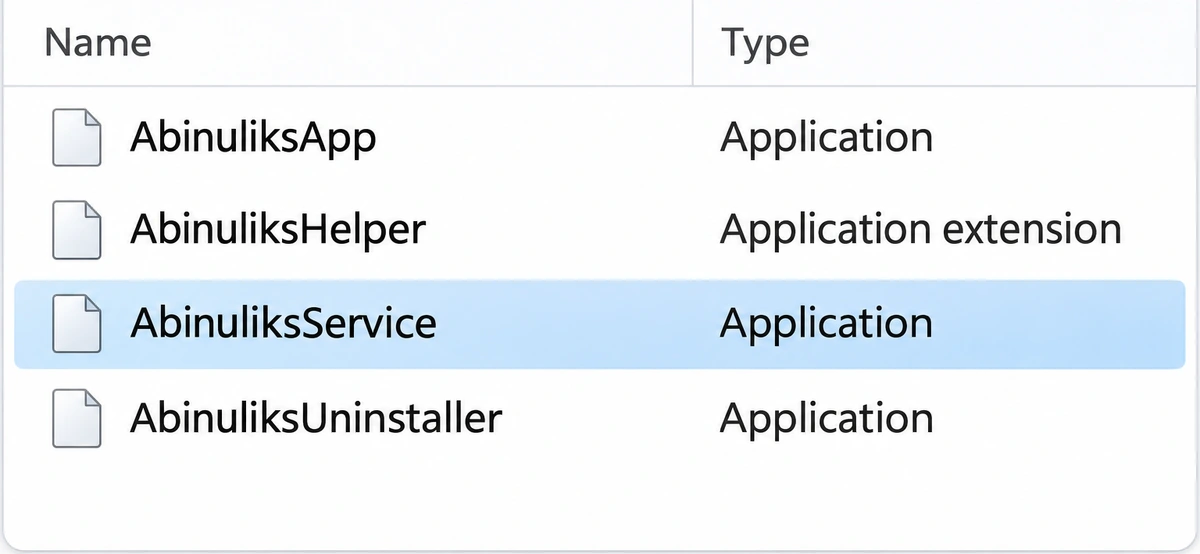
Abinuliks: In a November 13 report on r/techsupport, a Windows user found AbinuliksApp, AbinuliksService, AbinuliksHelper and AbinuliksUninstaller together under Program Files (x86). The app showed no window when opened. The useful clue was what happened next: ending the process stopped it only briefly. The user reported no detection from their scanner. They did not provide a verified sample analysis establishing what the program did.
If your app says Ahtangurics: Use the spelling on your PC. In Task Manager, right-click the running process and choose Open file location. Right-click the file and open Properties → Details to compare its original filename and product name with the installed app. You can do this without running the file. A similar name, heart icon or returning service does not establish that a file mines cryptocurrency.
If your screen actually says Almoristics Application or AlsulicsApplication, use the guide for that spelling; don’t borrow a filename or service name from it to delete something on your PC.
Match the process to its installed app
- Record the file location. Press Ctrl + Shift + Esc to open Task Manager. From the process’s file location, open the file’s Properties. Note the filename, product name and publisher or digital signer if shown. A heart icon, an unfamiliar publisher or a folder under Program Files is not a verdict.
- Check the installation record. In Windows 11, open Settings → Apps → Installed apps and search for the spelling you saw. On Windows 10, use Apps & features. Compare the publisher and install date with software you recognize. A file’s last-modified date is not necessarily the date it was installed.
- Use the match to decide. If the path and publisher belong to an app you deliberately installed, verify the component with that publisher or your IT team before removing it. If the app is unwanted and the entry matches, use its Uninstall option in Settings. If it fails, asks you to turn off protection, or has no entry, leave the folder in place and scan. There is no need to launch an unknown uninstaller from File Explorer.
Remove an unwanted app and check what returns
Ending a task stops the current process. It does not uninstall the app or remove a service configured to start it. That is why a process coming back after End task and a process coming back after uninstall and restart are different findings. A service, scheduled task or bundled component can remain even when the visible app disappears.
After restart: Return to Installed apps and Task Manager. Look for the same executable at the path you recorded. An old folder with an unused file is different from a running process. If the app is gone, the process stays gone and no new alert appears, there is no reason to keep deleting files with similar names.
If the same executable runs again: Open Microsoft Sysinternals Autoruns and use Find to search for its filename. Check the Services and Scheduled Tasks tabs for an entry pointing to that exact path. Record the entry name, image path and scan result for support. If the paths differ, or the only match is a signed system component, leave the entry alone. On a managed PC, pass these details to IT before changing a service.
FAQ
Does a blank VirusTotal result mean Abinuliks is safe?
The person reporting Abinuliks described an “empty” result, but did not supply a report that identifies the file. A missing report and a completed scan with zero detections are different. Neither explains why the process returned. Keep the full local path and the result of an updated scan so you can compare the same file after restart.
What if CPU use is high even after Abinuliks is gone?
In Task Manager, sort processes by CPU while the slowdown is happening. Note which process is consuming resources under the same workload. If a different service is responsible, investigate that service rather than deleting more Abinuliks files. The Windows service miner guide covers sustained CPU use and how to trace the service responsible.
References
- r/techsupport. Abinuliks service (virus?). Reddit, November 13, 2026. Accessed November 13, 2026.
- Mark Russinovich. Autoruns for Windows. Microsoft Sysinternals, June 17, 2026. Accessed November 13, 2026.