If your WhatsApp or Telegram messages suddenly stay on one check mark, the profile photo disappears, and calls no longer connect, you may have been blocked. One sign is not enough: privacy settings, a dead phone, a deleted account, or a bad connection can look almost the same. The practical way to check is to compare several signals without trying to bypass the other person’s boundary.
Fast Check: Blocked or Something Else?
| What you see | What it usually means |
|---|---|
| One check mark for hours or days | The message is not reaching the contact, but the reason can be a block, no connection, deleted app, or a switched-off phone. |
| Profile photo and last-seen status vanish only for you | Stronger block signal, especially if mutual contacts still see normal profile details. |
| You cannot add the contact to a small test group | One of the stronger signs, but group privacy settings can cause the same result. |
| Messenger calls never connect | Possible block signal when it appears together with the message and profile signs. |
| The person also disappeared after asking for money, links, codes, or crypto | Treat it as a possible scam, not only a relationship or privacy issue. |
How User Blocking Works in Messaging Apps
Blocking a user in a messaging app usually prevents the blocked person from sending delivered messages, seeing some profile information, making successful app calls, or adding the blocker to group chats. The exact behavior differs between apps, but the goal is the same: the person who blocked you should not have to reveal or explain the block.
That privacy design is why there is no single perfect test. A missing profile picture can be a block, but it can also be a privacy setting. One check mark can be a block, but it can also mean the phone is offline. A failed group invite can be a block, but it can also be a group-permission rule.
Use the checks below as a pattern. If only one thing looks odd, wait. If several signs appear at the same time and mutual contacts see the account normally, a block becomes much more likely.
WhatsApp: Signs Someone Blocked You
WhatsApp is the query people search most often because check marks, last-seen visibility, and profile photos are easy to notice. The signs below are useful only when they appear together.
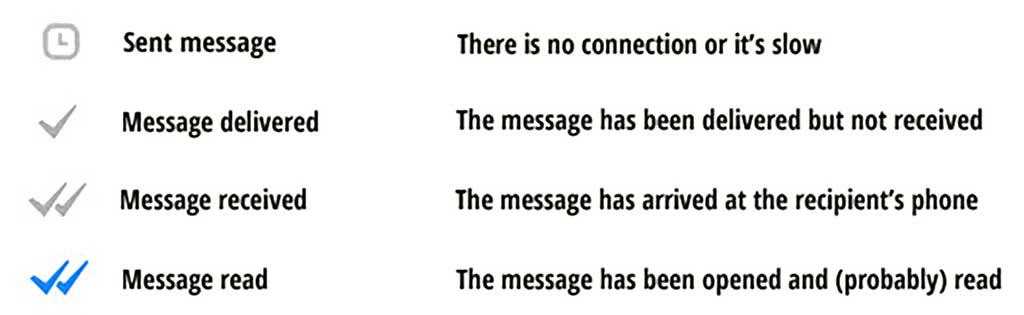
1. Your WhatsApp message stays on one gray check mark
A single gray check mark means the message was sent from your side but was not delivered to the other person’s WhatsApp. If that status remains for a long time, it can mean you were blocked.
It can also mean the recipient has no internet access, their phone is off, they removed WhatsApp, or the account is inactive. Do not treat one check mark alone as proof.
2. The profile photo, last seen, or online status disappears
If a contact’s photo, last seen, and online status all disappear for you, that is a stronger clue. It is especially suspicious if another mutual contact can still see normal details.
There is an important caveat: WhatsApp privacy settings can hide profile details from everyone, from non-contacts, or from selected people. If you hide your own last seen, WhatsApp can also limit what you see from others.
3. You cannot add the person to a group
Being unable to add someone to a group is one of the stronger WhatsApp block signs. Still, use it carefully. Adding a person to a random group just to test them can feel invasive, and group privacy settings can block invitations even when the person did not block you.
4. WhatsApp calls do not connect
If voice or video calls never connect and your messages also remain undelivered, the block signal becomes stronger. If the person is offline, travelling, using another number, or has network problems, calls can fail for ordinary reasons too.
Telegram: Signs Someone Blocked You
Telegram search intent is slightly different. People often search for “last seen a long time ago” or “how to tell if blocked on Telegram” because Telegram uses approximate presence labels.
1. Telegram shows “last seen a long time ago”
If a contact was active recently and suddenly shows “last seen a long time ago,” that can be a block sign. Telegram also uses approximate last-seen labels for privacy, so this status is not proof on its own.
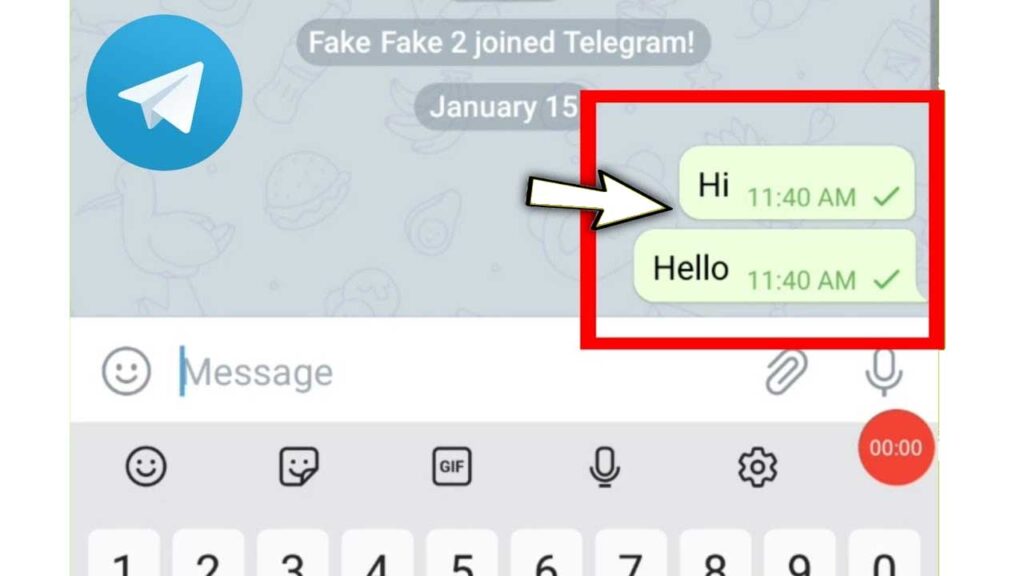
2. Your Telegram message has one check mark and never becomes read
Telegram check marks work differently from WhatsApp. One check mark means the message has been sent and delivered to Telegram’s cloud; two check marks mean the recipient opened the conversation and read the message. If the message never becomes read and other signs also changed, blocking is possible.
3. The avatar disappears and calls fail
A blank avatar, failed calls, and a sudden last-seen change together are much stronger than any one of those signs alone. If the person deleted their account, changed privacy rules, or stopped using Telegram, the symptoms can still look similar.
What Not to Do If You Think You Were Blocked
Do not create new accounts, use another phone number, pressure mutual contacts, or try to bypass the block. Besides being disrespectful, this can make a normal misunderstanding worse and may violate platform rules or local laws.
If the relationship is personal, wait before reacting. If you need to resolve something important, use one respectful offline or alternative channel if that is appropriate. If there is no response, stop there.
When Being Blocked May Be a Scam Warning
Sometimes a sudden block is not just social friction. Scammers often cut contact after they get money, gift cards, crypto, login codes, screenshots, or remote access. If the person moved the conversation to WhatsApp or Telegram, pushed urgency, and then disappeared, treat the situation as a security incident.
- If you paid money or shared financial details, read our guide on what to do if you were scammed.
- If the conversation involved WhatsApp links, fake support, or investment promises, compare it with our WhatsApp scams guide.
- If a Telegram bot, captcha, archive, or strange file was involved, scan the link or file before opening anything else. You can use the Gridinsoft Online Virus Scanner or check a suspicious domain with the Website Reputation Checker.
Checklist of Signs You Have Been Blocked
- Your messages stay on one check mark for a long time.
- The contact’s photo, last seen, or online status vanished only for you.
- Messenger calls do not connect.
- You cannot add the contact to a group, and there is no obvious privacy-setting reason.
- Mutual contacts still see the account normally while you do not.
- The person also stopped replying on other channels.
- The block happened after money, links, codes, files, or account access were discussed.
FAQ
How do I know if someone blocked me on WhatsApp?
Look for several signs together: one gray check mark for a long time, no profile photo or last seen, failed calls, and inability to add the person to a group. One sign alone can be caused by privacy settings or connection problems.
How do I know if someone blocked me on Telegram?
A sudden “last seen a long time ago” status, disappearing avatar, unread messages, and failed calls together can indicate a block. Telegram privacy settings and inactive accounts can create similar signs.
If I am unblocked, will my old messages be delivered?
Do not rely on old blocked-period messages being delivered normally. If the other person unblocks you and communication is appropriate, send a new, respectful message instead of assuming the earlier ones went through.
Can I check a block without bothering the person?
Yes. Check message status, profile visibility, and whether mutual contacts see the profile differently. Avoid creating test groups or new accounts unless there is a legitimate reason.
References
- WhatsApp Help Center. “How to block and report contacts.” WhatsApp, accessed June 7, 2026. https://faq.whatsapp.com/1142481766359885
- Telegram. “Telegram FAQ: Last seen and online statuses.” Telegram, accessed June 7, 2026. https://telegram.org/faq#q-what-does-39last-seen-recently-39-mean