The Trump Gold Card Selection Program Nomination email is a scam when it arrives unexpectedly and asks you to pay $3,500, make at least a $25,500 “donation,” or send a passport copy to secure a place. The real Trump Gold Card program does not select recipients through an unsolicited nomination committee. Its official process begins when an applicant goes to trumpcard.gov, submits an application, and pays the currently listed $15,000 DHS processing fee; the $1 million contribution comes only after vetting. Do not reply or use the email’s button. Open the official site manually and verify any case from there.
A real official program and a fake message can use the same names, photos, and immigration terms. The useful test is not whether the program exists. It is whether you initiated an application through the official portal and whether the amount, stage, domain, and payment instructions match that application.
Trump Gold Card email: real process vs fake nomination
- Start: The official route begins with your own application at
trumpcard.gov. A surprise “selection” or “nomination” from a committee is not the published application route. - Fee: The official site currently lists a nonrefundable $15,000 DHS processing fee. The scam message asks for $3,500.
- Gift: The official individual contribution is currently $1 million after vetting. The scam asks for a minimum $25,500 “donation” before any verified application exists.
- Stage: The official flow is application, payment settlement, USCIS follow-up, vetting, and then the contribution. The fake email invents a nomination and a short deadline.
- ID files: Official documents belong in the authenticated application process. A passport copy sent by reply email to an unverified sender creates an identity-theft risk.
The message may use the name of Commerce Secretary Howard Lutnick, refer to EB-1 or EB-2 processing, or imitate government language. Those details are easy to copy and do not authenticate the sender. A display name is not proof of a government mailbox, and a signature image is not proof that the named person sent the message.
What the fake nomination email looks like
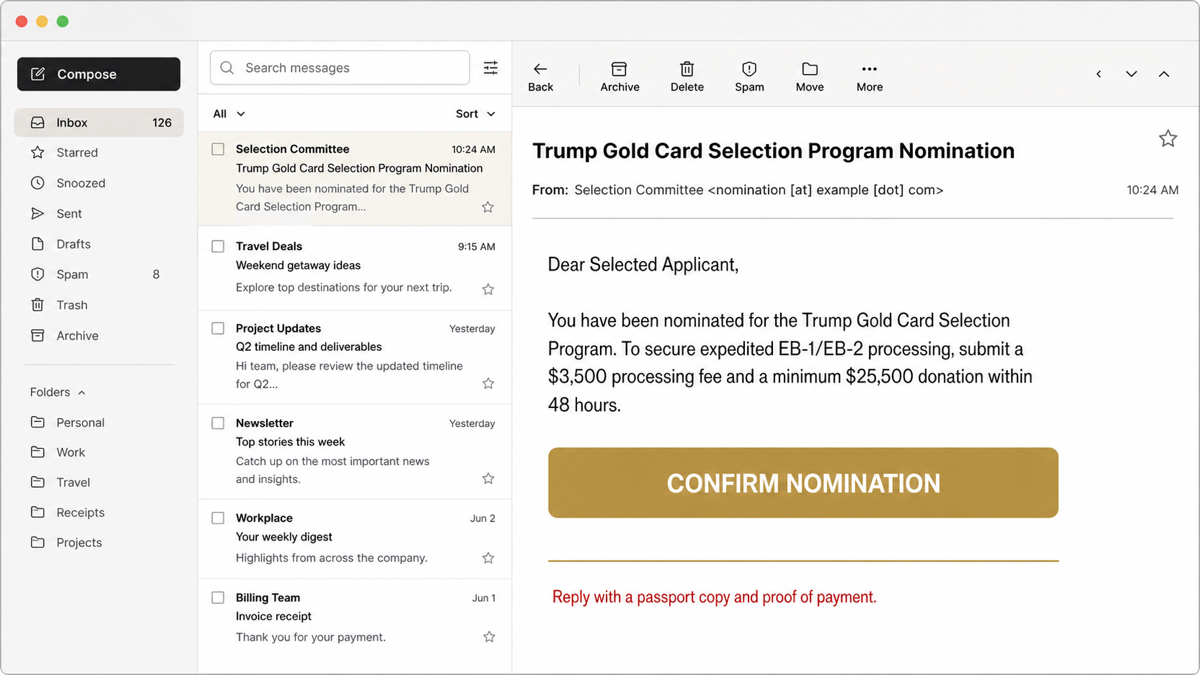
Example:
Subject: Trump Gold Card Selection Program Nomination
From: Selection Committee <nomination [at] example [dot] com>
Dear Selected Applicant,
You have been nominated for the Trump Gold Card Selection Program. To secure expedited EB-1/EB-2 processing, submit a $3,500 processing fee and a minimum $25,500 donation within 48 hours.
CONFIRM NOMINATION
Reply with a passport copy and proof of payment.
The sender shown above is intentionally non-live, but the decision clues match the lure: an unexpected nomination, invented committee authority, figures that conflict with the official program, a 48-hour deadline, and a request for identity documents. The broader online scam red-flag checklist explains why surprise benefits, urgency, private payment instructions, and hidden sender identity often appear together.
How to verify a Gold Card message safely
- Do not use the message’s button, phone number, QR code, or reply address. A polished template can still route to a private mailbox or payment account.
- Open
trumpcard.govyourself. Type the address or use a saved official bookmark. Do not reach it through an ad or forwarded link. - Ask whether you actually applied. If you never submitted an application, there should be no application-specific fee, case, or nomination to confirm.
- Match the stage and figures. Compare the message with the current official process and your authenticated application record. Do not let an urgent deadline replace that check.
- Check the full sender and reply-to. A government-looking display name can hide an unrelated address. Forwarded mail and spoofing can also make the visible From line misleading.
- Verify through a separately found official channel. If you have a real application, sign in through the official route or use contact details you obtained there, not details inside the suspicious message.
If the message is still unclear, copy its text or headers into the Gridinsoft Email Scam Checker. Remove passport numbers, account details, and other private data before sharing the text for review.
What to do if you paid or shared banking details
- Contact the payment provider immediately. Tell the bank, card issuer, wire company, payment app, or exchange that the transaction was fraudulent and ask whether it can be stopped or reversed.
- Secure online banking. Change exposed banking and email passwords from a known-clean device, enable multi-factor authentication, review payees and transfers, and check whether mailbox forwarding rules were added.
- Save evidence. Keep the original email, full headers, payment receipt, account destination, phone numbers, and conversation. Do not keep following the scammer’s instructions to collect more proof.
- Report the impersonation. In the United States, use FTC ReportFraud. If money moved through a bank or card, also follow that institution’s fraud process.
- Expect a second approach. Anyone who now promises recovery for another upfront fee may be running a recovery scam. Our fake FBI funds-recovery email guide shows how the same authority tactic is used to target victims again.
Acting quickly can improve the chance of stopping a card charge or transfer, but no article can promise recovery. Do not pay another “tax,” “clearance,” “legalization,” or “release” fee to unlock the first payment.
What to do if you sent a passport or identity documents
A passport scan, signature, address, date of birth, bank statement, or proof-of-funds file can support identity theft, account recovery abuse, and more convincing follow-up scams. Treat the exposure as a separate incident even if no money has moved.
- Contact the authority that issued the passport or identity document and ask what exposure or replacement steps apply.
- Use
IdentityTheft.govfor a personalized U.S. identity-theft recovery plan when Social Security or other sensitive identity data was shared. - Monitor bank, credit, email, and immigration-related accounts for unfamiliar applications, password resets, new payees, or address changes.
- Tell a real immigration attorney or authorized representative through a known channel if the exposed file belonged to an active case.
- Follow the broader controls in our identity-theft response guide.
What if you clicked the button or downloaded a file?
If you only opened the email and did not use the link, reply, pay, or download anything, delete or report the message and continue monitoring. If you clicked but entered nothing, close the page, do not revisit it, and use the post-phishing-link checks for browser downloads, permissions, and account sessions.
If the page collected a password, change that password and every reused password from a clean device. Sign out other sessions and enable multi-factor authentication. If you downloaded or ran a file, disconnect the device from sensitive work until it is checked. A Gridinsoft Anti-Malware scan can look for the downloaded payload, startup entries, scheduled tasks, browser changes, and related persistence; it cannot reverse a payment or invalidate a stolen passport copy.
How to avoid official-program impersonation scams
- Start applications from a government site you opened yourself, not from an unsolicited invitation.
- Keep application receipts and case references so later messages can be matched to a real action.
- Do not send passports or financial statements by ordinary reply email unless the authenticated official process explicitly requires that channel.
- Pause when a message combines authority, secrecy, a short deadline, and a payment method chosen by the sender.
- Verify current fees at the official source; scam templates often preserve real names while substituting smaller, more believable amounts.
FAQ
Is the Trump Gold Card program itself fake?
No. A real official program and application site exist. This article addresses an impersonation email that claims an unsolicited nomination and uses figures and a workflow that do not match the current official process.
Does an email from Howard Lutnick prove the nomination is real?
No. A sender can copy a real official’s name, signature, or photo. Verify the domain, reply-to, application record, stage, and payment instructions through the official site opened separately.
Will the government select me without an application?
The published Gold Card route begins with an applicant submitting an online application and processing fee. An unexpected committee nomination is not the process described by the official site.
Can I get a scam payment back?
Possibly, but speed matters and recovery is not guaranteed. Contact the card issuer, bank, wire company, payment app, or exchange immediately, report the fraud, and ask whether the transaction can be stopped or reversed.
References
- Trump Gold Card Program. “The Trump Gold Card.” Official program site, accessed July 16, 2026. https://trumpcard.gov/
- Federal Trade Commission. “How To Avoid a Government Impersonation Scam.” FTC Consumer Advice, November 2023, accessed July 16, 2026. https://consumer.ftc.gov/articles/how-avoid-government-impersonation-scam
- Federal Trade Commission. “What To Know Before You Wire Money.” FTC Consumer Advice, updated December 2023, accessed July 16, 2026. https://consumer.ftc.gov/articles/what-know-you-wire-money