Cisco Talos has disclosed Starland RAT, a Windows backdoor delivered through trojanized installers that imitate Zoom, WebEx, MobaXterm, DBeaver, and FACEIT. The malware can steal browser credentials and cryptocurrency wallet data, capture screenshots, run commands, and install additional payloads. If one of these installers came from an unexpected page or command and was executed, disconnect the PC and treat stored passwords, sessions, and wallet files as exposed until the system is checked.
Talos published the research on July 16, 2026, and tracks the financially motivated, Russian-speaking actor as UAT-11795. The campaign has operated since at least June 2025, with most observed activity in the United States and smaller signals in Germany, Romania, and Venezuela.
Which installers were used as Starland RAT lures?
The researchers observed malicious copies bearing names associated with several legitimate Windows applications:
| Observed lure | What it imitates |
|---|---|
MobaXterm_v26.1.exe |
MobaXterm remote administration and terminal software |
WebEx_Client.exe and a Zoom installer |
Video conferencing and collaboration apps |
dbeaver-ce-windows-x86_64.exe |
DBeaver Community database client |
FaceitInstaller_x64.exe |
FACEIT gaming platform |
These filenames alone do not prove infection. Talos did not report a compromise of the official vendors or their download services. The researchers could not confirm the initial delivery vector and assess that a ClickFix-style instruction may have led victims to run an HTA downloader and then a trojanized installer. The practical distinction is the source and execution path: a package fetched by an unexpected command or an unofficial site is not equivalent to a package obtained directly from a verified vendor portal.
This is also why a familiar meeting-app name should not override basic source checks. Similar lures appear in fake job-interview and developer-tool attacks, where the meeting or coding prompt is only the reason given for running an untrusted file.
How the fake installer reaches Starland RAT
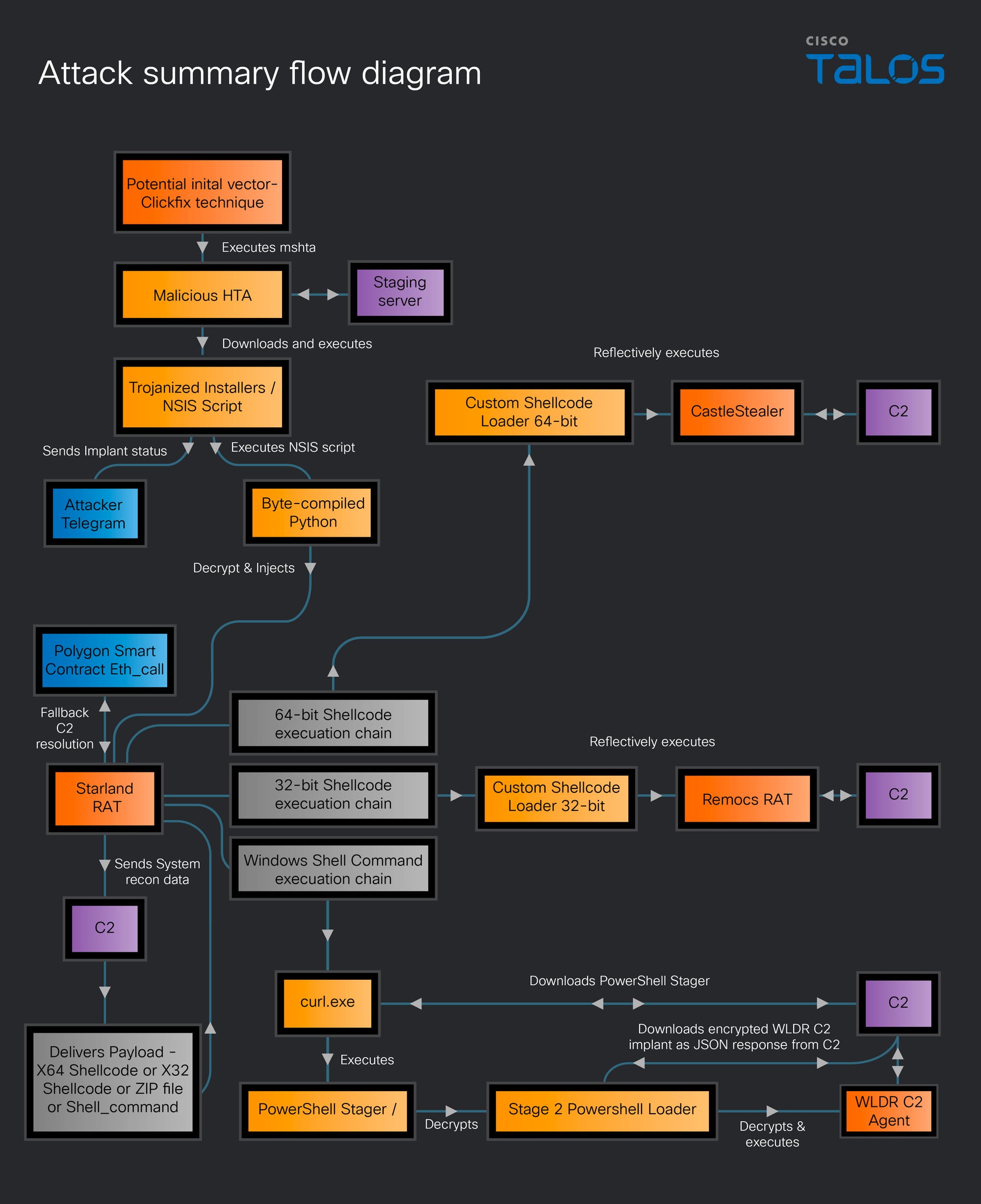
In the chain analyzed by Talos, a weaponized HTA file runs through mshta.exe and retrieves a modified NSIS installer. The installer contains pythonw.exe and a byte-compiled Python loader disguised as LICENSE.txt. That loader decrypts and runs Starland RAT in memory.
Starland can then execute shell commands or load 32-bit and 64-bit shellcode. Talos observed the 64-bit branch delivering CastleStealer, while the 32-bit branch delivered Remcos RAT. A separate command path installed the PowerShell-based WLDR agent, which operates in memory and accepts encrypted tasks from its command-and-control server.
Starland RAT persistence and data theft checks
Deleting the visible installer is not enough after execution. The campaign uses several independent persistence paths, and Starland can download other malware that leaves its own files and settings.
| Artifact or behavior | Why it matters |
|---|---|
HKCU\Software\Microsoft\Windows\CurrentVersion\Run value MyApp |
The observed VBScript points this value to mshta.exe and the remote HTA at logon. |
Scheduled task named PythonLauncher- plus three random characters |
Starland creates an at-logon task and may request elevated execution. |
| Unknown Startup-folder shortcut | The observed shortcut launches pythonw.exe with LICENSE.txt as its argument. |
Unexpected PowerShell, mshta.exe, or child processes after the installer |
They may belong to the downloader, WLDR chain, or a secondary payload. |
| New browser, wallet, Discord, Telegram, or Steam session alerts | Starland and CastleStealer target credentials, sessions, and wallet data. |
Do not delete a registry value or scheduled task merely because its name looks unfamiliar. Record the command, path, creation time, and parent process first. A legitimate task can have a generic name; the suspicious combination is an unexpected installer followed by the artifacts and behavior above.
What to do if a suspicious installer was downloaded or run
- If the file was only downloaded, do not open it. Keep it quarantined or delete it, clear the browser download, and obtain the application again from the vendor’s official site. A download sitting on disk is not the same as the observed execution chain.
- If the installer or a copied command ran, disconnect the PC. Disable Wi-Fi or unplug Ethernet before using the affected machine for email, banking, messaging, or wallet access.
- Preserve the timeline. Note the download URL, filename, command, installer start time, protection alerts, and any new tasks, shortcuts, Run values, or processes. Organizations should preserve logs and involve their incident-response team because the malware also performs Active Directory reconnaissance.
- Check the persistence locations. Review Task Scheduler, Startup apps and the user Startup folder, the Run value shown above, recent downloads, and unusual
mshta.exe,pythonw.exe, PowerShell, Remcos, or unknown child-process activity. - Run a full malware scan. Removing the installer does not remove an HTA Run entry, scheduled task, Startup shortcut, CastleStealer, Remcos, or WLDR component. Use Gridinsoft Anti-Malware to check for the original payload, persistence, and downloaded components, then reboot and scan again if alerts or suspicious processes return.
- Secure accounts from a clean device. Revoke active sessions first, then change browser-saved passwords and important email, financial, Discord, Telegram, Steam, and work credentials. The broader infostealer recovery checklist explains why password changes made on the infected PC can be captured again.
- Treat locally stored wallet material as exposed. If a wallet extension, wallet file, private key, or recovery phrase was accessible on the PC, follow the wallet vendor’s clean-device recovery process and move assets to newly generated keys where appropriate. A malware scan cannot recover stolen secrets or reverse a completed transfer.
Fake VPN and media-player downloads can exploit the same trust gap. The MarkiRAT removal guide covers Pis2ray and YEPlayer lures, the svehost.exe lookalike, and BITS persistence after execution.
A malicious installer can also come from a compromised vendor server rather than a lookalike site. The exploited TrueConf Server flaw response explains why a valid publisher signature still matters when the download URL appeared legitimate.
If the attacker gained administrative access, security tools were disabled, secondary payloads were confirmed, or remote access returns after cleanup, a clean Windows reinstall from trusted media is safer than relying on manual deletion alone.
If the page or email made you download an invoice, coupon, tracking app, browser extension, or support tool, scan the PC before opening it again or logging into sensitive accounts.
Scan for Starland RAT leftoversReferences
- Cisco Talos. “UAT-11795 deploys novel Starland RAT and bespoke WLDR C2 implant in financially motivated campaign.” Cisco Talos Intelligence Blog, July 16, 2026. Primary research and indicators.