A manufacturing company’s Windows computers displayed ransom messages after a restart, but investigators found no encrypted files on those workstations. In a September 21 report, Kaspersky’s Global Emergency Response Team describes how PAYLOAD attackers turned the company’s own Group Policy into an extortion channel. The incident occurred in April at an unnamed organization in the Middle East. [1]
The instruction came from inside the domain
The reported entry point was a compromised account used through FortiGate SSL VPN. Investigators could not establish how its credentials were stolen or reconstruct the intervening privilege escalation. By April 13, the attacker could create policy and link it at the domain root. [1]
Group Policy lets administrators distribute settings to managed Windows computers and users. A Group Policy Object, or GPO, contains those instructions; its links and filtering determine where they apply. That is why the location of the unauthorized change matters: a centrally distributed setting can affect many computers without a user downloading an unfamiliar application. [2]
In this case, a GPO called PAYLOAD distributed README-payload.txt, changed desktop and lock-screen images, imposed a ransom logon notice and disabled the local Administrator account. A separate win Firewall Off policy switched off Windows Firewall profiles. [1]
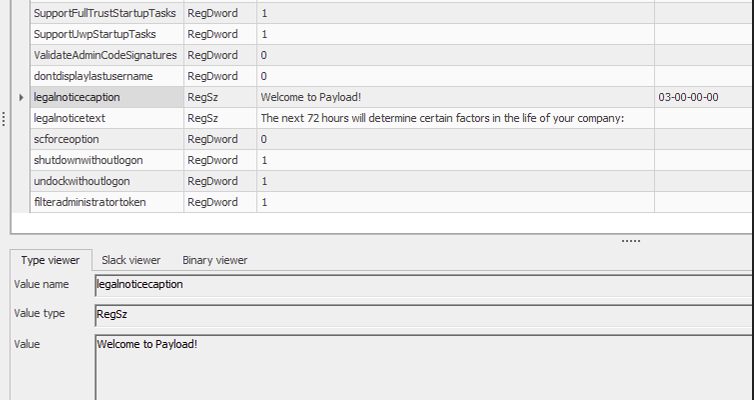
The policy report above is useful because it shows the configured logon notice. The suspicious instruction was carried by the same administrative machinery that normally applies company settings. Finding and deleting a ransom note on one desktop would address the visible result while leaving its source available to that computer.
Why the ransom screen appeared a day later
The investigators dated policy staging and caching to April 13, then visible disruption to April 14 as computers restarted. Their workstation review found no resident malicious binaries or ordinary endpoint persistence. [1]
This timing needs a careful reading. Group Policy does not universally wait for a reboot: Microsoft documents startup, sign-in and background processing, with behavior depending on the policy extension. The one-day interval is the finding from this incident, not a guaranteed warning period on every Windows network. [2]
For responders, that separates two timestamps worth investigating: when an unauthorized policy was written and when a user first saw its effect. Starting the timeline at the ransom screen alone risks missing the earlier change that explains it.
Unencrypted files did not mean an intact network
Kaspersky also reports stolen data and a PAYLOAD sample targeting Linux/ESXi elsewhere in the incident. The finding about unencrypted Windows workstations therefore should not become a claim that the entire environment was malware-free. [1]
The company’s account of the case emphasizes operational disruption and control of central network rules. A file that still opens does not answer whether its contents were copied or whether an attacker can change the computer’s settings. [3] The separate The Gentlemen backup investigation illustrates another reason to examine identity material alongside file recovery.
For an employee seeing an unexpected ransom wallpaper or login notice on a managed PC, the useful next step is to contact the organization’s incident-response team through a known channel. Avoid treating it as a cosmetic wallpaper problem. Administrators need to investigate the domain policy source, privileged access and affected systems together; scanning or rebuilding one workstation cannot establish that the central configuration is trustworthy.
This case makes the recovery question more precise: who is still authorized to tell the computers what to do? Restoring that trust matters even when there is no Windows file decryption to perform.
References
- Ahmad Zaidi Said and Elsayed Elrefaei. Group Policy hijacked: PAYLOAD ransomware weaponizes Active Directory GPO. Securelist, September 21, 2026.
- Microsoft. Group Policy processing for Windows. Microsoft Learn, accessed September 21, 2026.
- Kaspersky. PAYLOAD incident: corporate devices hijacked without file encryption. September 21, 2026.